CHARGING SYSTEM(w/ Stop And Start System) FREEZE FRAME DATA
-
DESCRIPTION
The ECM records vehicle and driving condition information as freeze frame data the moment a DTC is stored. When troubleshooting, freeze frame data can be helpful in determining whether the vehicle was moving or stationary, whether the engine was warmed up or not, whether the air fuel ratio was lean or rich, as well as other data recorded at the time of a malfunction.
Tech Tips
-
If it is impossible to reproduce the symptoms even though a DTC is stored, confirm the freeze frame data.
-
Freeze frame data is available in long and short forms.
-
-
PENDING FREEZE FRAME DATA
Tech Tips
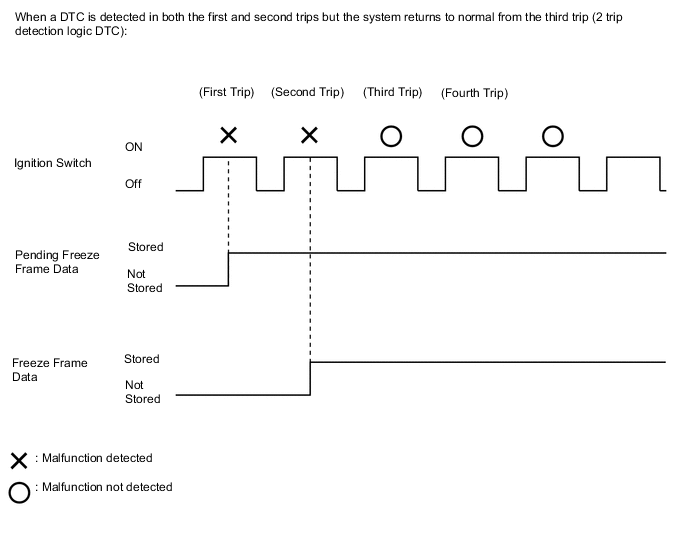
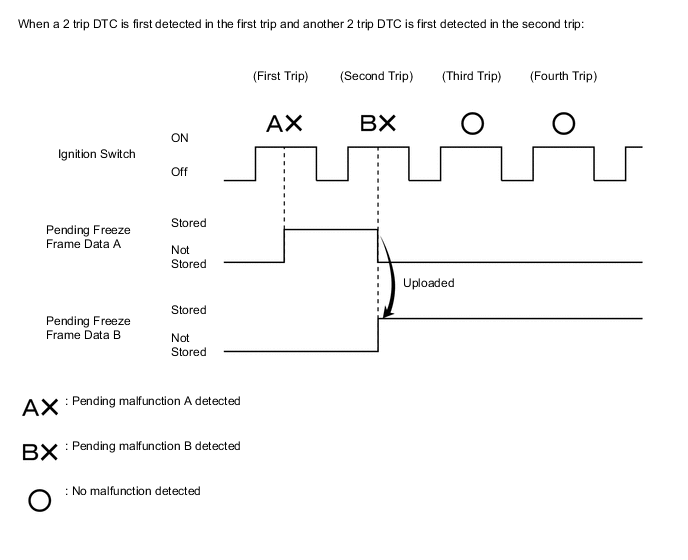
Pending freeze frame data is stored when a 2 trip DTC is first detected during the first trip.
-
Connect the GTS to the DLC3.
-
Turn the ignition switch ON.
-
Turn the GTS on.
-
Enter the following menus: Powertrain / Engine / Trouble Codes.
-
Select a DTC in order to display its pending freeze frame data.
Tech Tips
-
Pending freeze frame data is cleared when any of the following occurs:
-
Using the GTS, the DTCs are cleared.
-
The cable is disconnected from the negative (-) battery terminal.
-
40 trips with the engine fully warmed up have been performed after the condition returns to normal. (Pending freeze frame data will not be cleared only by the system returning to normal.)
-
With previous pending freeze frame data stored, if pending freeze frame data is newly stored when a 2 trip DTC is detected in the first trip, the old freeze frame data will be replaced with the new data of the newly detected DTC in the next trip.
-
-
-
LIST OF FREEZE FRAME DATA
-
According to the display on the GTS, read the freeze frame data.
Powertrain > Engine and ECT Tester Display Battery Voltage Battery Sensor Voltage Battery Current Battery Temperature Alternator Output Duty Alt Vol - Non Active Test Alt Vol - Active Test
-