| DTC Code | DTC Name |
|---|---|
| Does not Play even after Bluetooth Audio Mode is Selected |
CAUTION / NOTICE / HINT
Even if the portable player can play audio content, it may not be able to play via the in-vehicle device. This does not necessarily indicate a malfunction of the in-vehicle device.
PROCEDURE
- Click here
CHECK OPERATION
-
Check if the portable player operates normally.
OK The portable player operates normally.
- OKClick here
- NG
MALFUNCTION IN PORTABLE PLAYER
-
- Click here
CHECK AUDIO SETTINGS
-
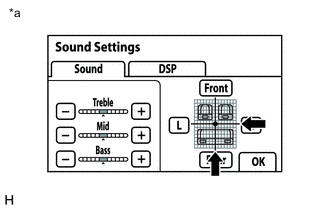
Display the "Sound Settings" screen.
-
Set volume, fader and balance to the initial values and check that sound is normal.
OK Audio system returns to normal. Tip:Sound quality adjustment measures vary according to the type of amplifier.
Table 1. Text in Illustration *a Example
- OKClick here
- NG
PROCEED TO NEXT SUSPECTED AREA SHOWN IN PROBLEM SYMPTOMS TABLE (Click here)
-
- Click here
CHECK USING ANOTHER "Bluetooth" AUDIO COMPATIBLE VEHICLE OF SAME MODEL
-
Check if the "Bluetooth" audio player plays normally on another "Bluetooth" audio compatible vehicle of the same model.
OK "Bluetooth" audio player plays normally.
- OK
PROCEED TO NEXT SUSPECTED AREA SHOWN IN PROBLEM SYMPTOMS TABLE (Click here)
- NG
MALFUNCTION IN PORTABLE PLAYER
-