AUDIO AND VISUAL SYSTEM(for Radio and Display Type) Voice is not Recognized
PROCEDURE
-
CHECK CONDITION
-
Check if the system voice recognition level is low when recognizing a particular voice.
Result Result Proceed to System voice recognition level is low with any voice. A System voice recognition level is low only for a particular voice. B Tech Tips
System voice recognition level varies depending on voice and pronunciation. This is not a malfunction.
B 
END
A 
-
-
CHECK MICROPHONE AND VOICE RECOGNITION (OPERATION CHECK)
-
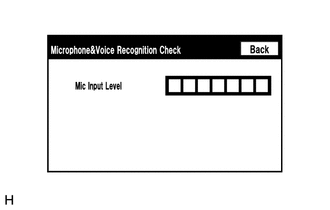
Enter the "Microphone & Voice Recognition Check" screen. Refer to Check Mic & Voice Recognition in Operation Check Click here.
-
When voice is input into the microphone, check that the microphone input level meter changes according to the input voice.
OK Check result is normal.
OK
REPLACE RADIO AND DISPLAY ASSEMBLY Click here
NG
PROCEED TO NEXT SUSPECTED AREA SHOWN IN PROBLEM SYMPTOMS TABLE Click here
-