AUDIO AND VISUAL SYSTEM(for Radio and Display Type) Voice Guidance does not Function
PROCEDURE
-
CHECK VOICE GUIDANCE SETTING
-
Display the "Voice Settings" screen.
-
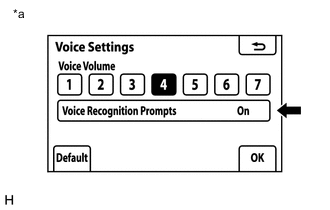
Text in Illustration *a Example Check that "Off" is not selected.
OK "Off" is not selected.
NG 
TURN VOICE RECOGNITION PROMPTS "On"
OK 
-
-
CHECK AUDIO FUNCTION
-
Check that sound can be heard from a front speaker.
OK Sound can be heard.
OK
REPLACE RADIO AND DISPLAY ASSEMBLY Click here
NG
PROCEED TO NEXT SUSPECTED AREA SHOWN IN PROBLEM SYMPTOMS TABLE Click here
-