NAME PLATE INSTALLATION
PROCEDURE
-
INSTALL FRONT FENDER EMBLEM (for GRMN)
-
Clean the attachment surface.
-
Using an infrared light, heat the double-sided tape remaining on the front fender sub-assembly.
Heating Temperature Item Temperature Back Door Panel 40 to 60°C (104 to 140°F) CAUTION:
Do not burn yourself on the hot body panel or with the infrared light.
Note
Do not heat the front fender sub-assembly excessively.
-
Using a piece of cloth, rub the double-sided tape off the front fender sub-assembly while it is hot from the infrared light.
Note
Installing the front fender emblem while any double-sided tape remains on the front fender sub-assembly may cause adhesion failure. Therefore, completely remove the double-sided tape.
-
Using a non-residue solvent, clean the attachment surface.
-
-
for LH Side:
-
Install the front fender emblem as shown in the illustration.
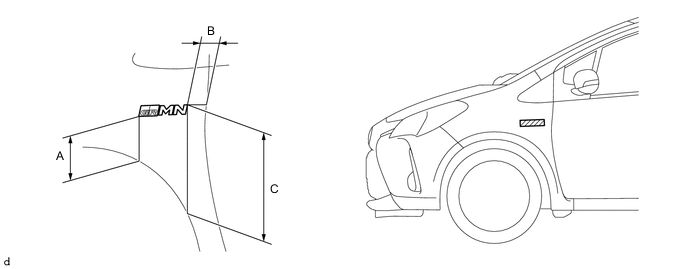
Installation Position: Area Measurement Area Measurement A 127.5 mm (5.020 in.) B 51.9 mm (2.043 in.) C 305.1 mm (12.012 in.) - -
-
-
for RH Side:
-
Install the front fender emblem as shown in the illustration.
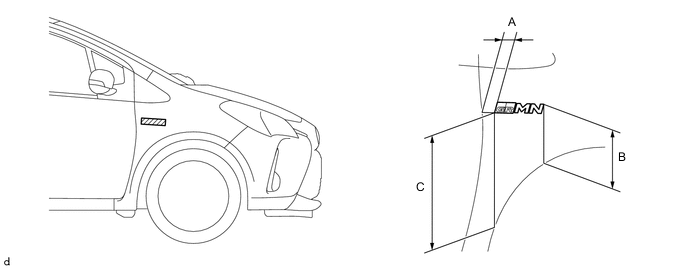
Installation Position: Area Measurement Area Measurement A 36.0 mm (1.417 in.) B 159.1 mm (6.264 in.) C 308.4 mm (12.142 in.) - - Note
Install the front fender emblem in an environment where the ambient temperature is over 20°C (68°F). If it is below 20°C (68°F), using an infrared light, heat the front fender sub-assembly and the front fender emblem to 20 to 30°C (68 to 86°F) and install the front fender emblem.
-
-
-
INSTALL NO. 1 BACK DOOR EMBLEM (for GRMN)
-
Clean the attachment surface.
-
Using an infrared light, heat the double-sided tape remaining on the back door panel.
Heating Temperature Item Temperature Back Door Panel 40 to 60°C (104 to 140°F) CAUTION:
Do not burn yourself on the hot body panel or with the infrared light.
Note
Do not heat the back door panel excessively.
-
Using a piece of cloth, rub the double-sided tape off the back door panel while it is hot from the infrared light.
Note
Installing the No. 1 back door emblem while any double-sided tape remains on the back door panel may cause adhesion failure. Therefore, completely remove the double-sided tape.
-
Using a non-residue solvent, clean the attachment surface.
-
-
Install the No. 1 back door emblem as shown in the illustration.
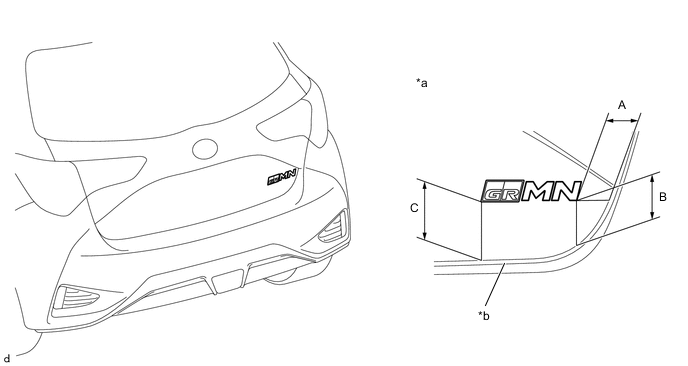
*a Reference Values *b Edge of Back Door Panel Installation Position: Area Measurement Area Measurement A 40.9 mm (1.610 in.) B 55.7 mm (2.193 in.) C 74.3 mm (2.925 in.) - - Note
Install the No. 1 back door emblem in an environment where the ambient temperature is over 20°C (68°F). If it is below 20°C (68°F), using an infrared light, heat the back door panel and the No. 1 back door emblem to 20 to 30°C (68 to 86°F) and install the No. 1 back door emblem.
-
-
INSTALL BACK DOOR ORNAMENT (for GRMN)
-
Install the back door ornament to the symbol emblem.
-
-
INSTALL SYMBOL EMBLEM
-
Engage the guide and 3 claws to install the symbol emblem.
-
-
INSTALL NO. 2 LUGGAGE COMPARTMENT DOOR NAME PLATE
-
Clean the attachment surface.
-
Using an infrared light, heat the double-sided tape remaining on the back door panel.
Heating Temperature Item Temperature Back Door Panel 40 to 60°C (104 to 140°F) CAUTION:
Do not burn yourself on the hot body panel or with the infrared light.
Note
Do not heat the back door panel excessively.
-
Using a piece of cloth, rub the double-sided tape off the back door panel while it is hot from the infrared light.
Note
Installing the No. 2 luggage compartment door name plate while any double-sided tape remains on the back door panel may cause adhesion failure. Therefore, completely remove the double-sided tape.
-
Using a non-residue solvent, clean the attachment surface.
-
-
Install the No. 2 luggage compartment door name plate as shown in the illustration.
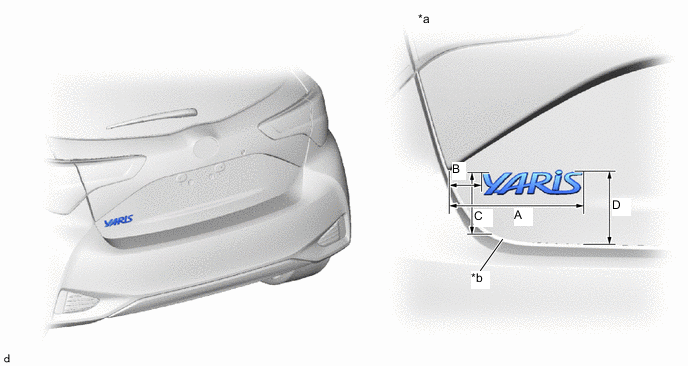
*a Reference Values *b Edge of Back Door Panel Installation Position Area Measurement Area Measurement A 180.9 mm (7.122 in.) B 43.0 mm (1.692 in.) C 69.8 mm (2.748 in.) D 95.1 mm (3.744 in.) Note
Install the No. 2 luggage compartment door name plate in an environment where the ambient temperature is over 20°C (68°F). If it is below 20°C (68°F), using an infrared light, heat the back door panel and the No. 2 luggage compartment door name plate to 20 to 30°C (68 to 86°F) and install the No. 2 luggage compartment door name plate.
-