SFI SYSTEM, Diagnostic DTC:P0571
| DTC Code | DTC Name |
|---|---|
| P0571 | Brake Switch "A" Circuit |
DESCRIPTION
| DTC No. | Detection Item | DTC Detection Condition | Trouble Area | MIL | Memory |
|---|---|---|---|---|---|
| P0571 | Brake Switch "A" Circuit | DTC Detection Condition
Enable Criteria (1)
Enable Criteria (2)
Malfunction Criteria (1)
Malfunction Criteria (2)
Malfunction Criteria (3)
Diagnostic Mask
Monitor
Potential failure modes |
|
Comes on | DTC stored |
WIRING DIAGRAM
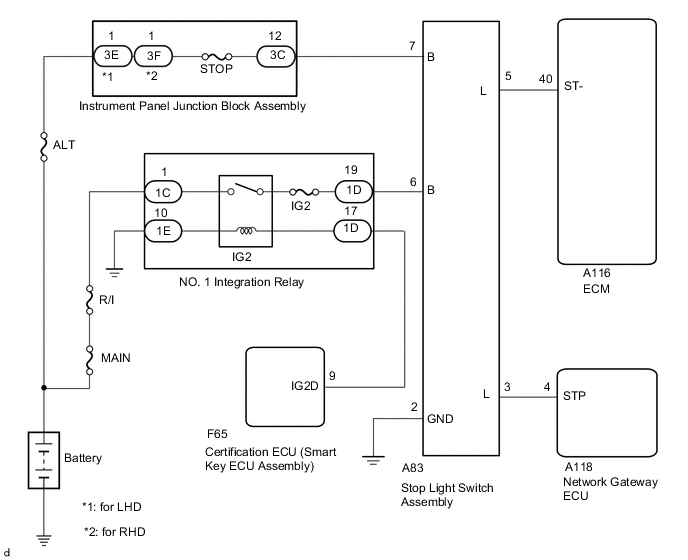
CAUTION / NOTICE / HINT
Tech Tips
-
Read freeze frame data using the GTS. Freeze frame data records the engine condition when malfunctions are detected. When troubleshooting, freeze frame data can help determine if the vehicle was moving or stationary, if the engine was warmed up or not, if the air fuel ratio was lean or rich, and other data from the time the malfunction occurred.
-
STP signal conditions can be checked using the GTS.
-
Connect the GTS to the DLC3.
-
Turn the power switch on (IG).
-
Turn the GTS on.
-
Enter the following menus: Powertrain / Engine / Data List / All Data / Stop Light Switch and ST1.
-
Check the STP signal when the brake pedal is depressed and released.
| Brake Pedal Operation | Stop Light Switch | ST1 |
|---|---|---|
| Depressed | ON | ON |
| Released | OFF | OFF |
PROCEDURE
-
READ VALUE USING GTS (STOP LIGHT SWITCH AND ST1)
-
Connect the GTS to the DLC3.
-
Turn the engine switch on (IG).
-
Turn the GTS on.
-
Enter the following menus: Powertrain / Engine / Data List / Stop Light Switch and ST1.
-
Read the value displayed on the GTS.
Standard Condition Specified Condition Brake pedal depressed ON Brake pedal released OFF Result Proceed to OK NG
OK 
CHECK FOR INTERMITTENT PROBLEMS Click here
NG 
-
-
CHECK STOP LAMP SWITCH ASSEMBLY INSTALLATION
-
Check the stop light switch assembly installation.
Standard Stop light switch assembly is installed correctly. Result Proceed to OK NG
NG
SECURELY REINSTALL STOP LAMP SWITCH ASSEMBLY Click here
OK
-
-
CHECK TERMINAL VOLTAGE (POWER SOURCE OF STOP LIGHT SWITCH ASSEMBLY)
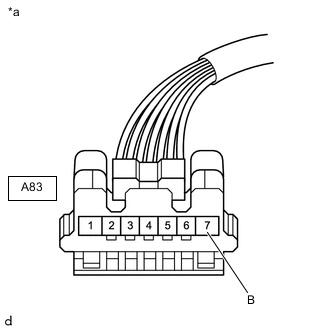
*a Front view of wire harness connector
(to Stop Light Switch Assembly)
-
Disconnect the stop light switch assembly connector.
-
Measure the voltage according to the value(s) in the table below.
Standard Voltage Tester Connection Condition Specified Condition A83-7 (B) - Body ground Always 11 to 14 V Result Proceed to OK NG
NG
REPAIR OR REPLACE HARNESS OR CONNECTOR (STOP LIGHT SWITCH ASSEMBLY - BATTERY)
OK
-
-
CHECK TERMINAL VOLTAGE (POWER SOURCE OF STOP LIGHT SWITCH ASSEMBLY)
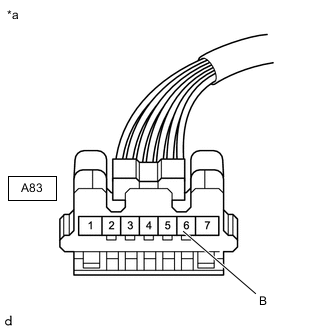
*a Front view of wire harness connector
(to Stop Light Switch Assembly)
-
Disconnect the stop light switch assembly connector.
-
Turn the engine switch on (IG).
-
Measure the voltage according to the value(s) in the table below.
Standard Voltage Tester Connection Switch Condition Specified Condition A83-6 (B) - Body ground Engine switch on (IG) 11 to 14 V Result Proceed to OK NG
NG 
CHECK TERMINAL VOLTAGE (POWER SOURCE OF INSTRUMENT PANEL JUNCTION BLOCK ASSEMVBLY) Click here
OK
-
-
INSPECT STOP LAMP SWITCH ASSEMBLY
-
Inspect the stop light switch assembly.
Result Proceed to OK NG
NG
REPLACE STOP LIGHT SWITCH ASSEMBLY Click here
OK
-
-
CHECK HARNESS AND CONNECTOR (STOP LIGHT SWITCH ASSEMBLY - BODY GROUND)
-
Disconnect the A83 stop light switch assembly connector.
-
Measure the resistance according to the value(s) in the table below.
Standard Resistance Tester Connection Condition Specified Condition A83-2 (GND) - Body ground Always Below 1 Ω Result Proceed to OK NG
NG
REPAIR OR REPLACE HARNESS OR CONNECTOR
OK
-
-
CHECK TERMINAL VOLTAGE (ST- VOLTAGE)
-
Disconnect the ECM connector.
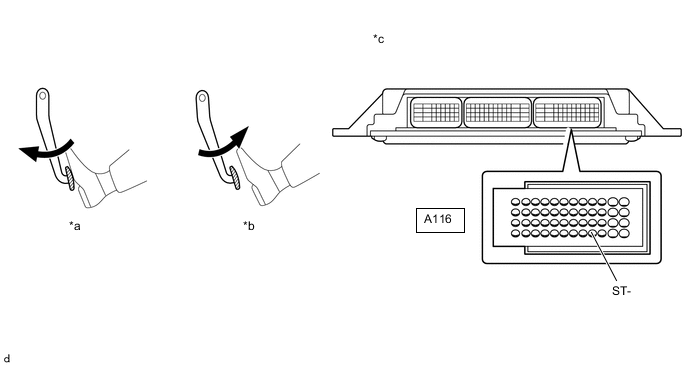
*a Brake Pedal Depressed *b Brake Pedal Released *c Front view of wire harness connector
(to ECM)
- - -
Turn the engine switch on (IG).
-
Measure the voltage according to the value(s) in the table below.
Standard Voltage Tester Connection Brake Pedal Operation Specified Condition A116-40 (ST1-) - Body ground Released 7.5 to 14 V Depressed Below 1.5 V Result Proceed to OK NG
NG
CHECK HARNESS AND CONNECTOR (STOP LIGHT SWITCH ASSEMBLY - ECM) Click here
OK
-
-
CHECK TERMINAL VOLTAGE (STP VOLTAGE)
-
Disconnect the network gateway ECU connector.
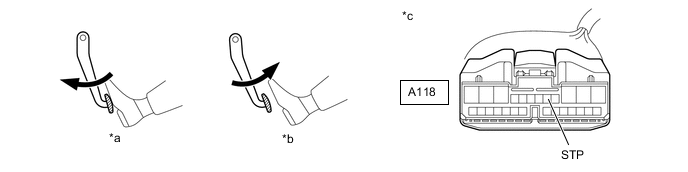
*a Brake Pedal Depressed *b Brake Pedal Released *c Front view of wire harness connector
(to ECM)
- - -
Turn the engine switch on (IG).
-
Measure the voltage according to the value(s) in the table below.
Standard Voltage Tester Connection Brake Pedal Operation Specified Condition A118-9 (STP) - Body ground Released Below 1.5 V Depressed 7.5 to 14 V Result Proceed to OK NG
NG
CHECK HARNESS AND CONNECTOR (STOP LIGHT SWITCH ASSEMBLY - NETWORK GATEWAY ECU) Click here
OK
-
-
CHECK WHETHER DTC OUTPUT RECURS
-
Connect the GTS to the DLC3.
-
Turn the engine switch on (IG).
-
Turn the GTS on.
-
Clear the DTCs.
-
Turn the engine switch off and wait for at least 30 seconds.
-
Turn the engine switch on (IG).
-
Turn the GTS on.
-
Start the engine.
-
Enter the following menus: Powertrain / Engine / Utility / All Readiness.
-
Input the DTC: P0571.
-
Check the DTC judgment result.
Result Result Proceed to NORMAL
(DTCs are not output)
A ABNORMAL
(DTC P0571 is output)
B
A
CHECK FOR INTERMITTENT PROBLEMS Click here
B
REPLACE ECM Click here
-
-
CHECK HARNESS AND CONNECTOR (STOP LIGHT SWITCH ASSEMBLY - NETWORK GATEWAY ECU)
-
Disconnect the A83 stop light switch assembly connector.
-
Disconnect the A118 network gateway ECU connector.
-
Measure the resistance according to the value(s) in the table below.
Standard Resistance Tester Connection Condition Specified Condition A83-3 (L) - A118-4 (STP) Always Below 1 Ω A83-3 (L) or A118-4 (STP) - Body ground and other terminals Always 10 kΩ or higher Result Proceed to OK NG
OK
REPLACE NETWORK GATEWAY ECU Click here
NG
REPAIR OR REPLACE HARNESS OR CONNECTOR
-
-
CHECK HARNESS AND CONNECTOR (STOP LIGHT SWITCH ASSEMBLY - ECM)
-
Disconnect the A83 stop light switch assembly connector.
-
Disconnect the A116 ECM connector.
-
Measure the resistance according to the value(s) in the table below.
Standard Resistance Tester Connection Condition Specified Condition A83-5 (L) - A116-40 (ST-) Always Below 1 Ω A83-5 (L) or A116-40 (ST-) - Body ground and other terminals Always 10 kΩ or higher Result Proceed to OK NG
OK
REPLACE ECM Click here
NG
REPAIR OR REPLACE HARNESS OR CONNECTOR
-
-
CHECK TERMINAL VOLTAGE (POWER SOURCE OF INSTRUMENT PANEL JUNCTION BLOCK ASSEMVBLY)
-
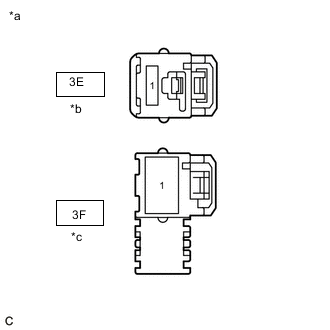
*a Front view of wire harness connector
(to Instrument Panel Junction Block Assembly)
*b for LHD *c for RHD - - Disconnect the Instrument Panel Junction Block Assembly connector.
-
Measure the voltage according to the value(s) in the table below.
Standard Voltage for LHD Tester Connection Condition Specified Condition 3E-1 - Body ground Always 11 to 14 V for RHD Tester Connection Condition Specified Condition 3F-1 - Body ground Always 11 to 14 V Result Result OK NG
OK
CHECK FOR INTERMITTENT PROBLEMS Click here
NG
REPAIR OR REPLACE HARNESS OR CONNECTOR
-