SFI SYSTEM, Diagnostic DTC:P0327, P0328
| DTC Code | DTC Name |
|---|---|
| P0327 | Knock Sensor 1 Circuit Low Input (Bank 1 or Single Sensor) |
| P0328 | Knock Sensor 1 Circuit High Input (Bank 1 or Single Sensor) |
DESCRIPTION
A flat type knock sensor (non-resonant type) has a structure that can detect vibration between approximately 5 kHz and 15 kHz.
The knock sensor is fitted onto the engine block to detect engine knocking.
The knock sensor contains a piezoelectric element which generates a voltage when it becomes deformed.
The voltage is generated when the engine block vibrates due to knocking. The occurrence of engine knocking can be suppressed by delaying the ignition timing.
| DTC No. | Detection Item | DTC Detection Condition | Trouble Area | MIL | Memory |
|---|---|---|---|---|---|
| P0327 | Knock Sensor 1 Circuit Low Input (Bank 1 or Single Sensor) | Output voltage of knock sensor is less than 0.5 V for 1 second or more (1 trip detection logic). |
|
Comes on | DTC stored |
| P0328 | Knock Sensor 1 Circuit High Input (Bank 1 or Single Sensor) | Output voltage of knock sensor is higher than 4.5 V for 1 second or more (1 trip detection logic). |
|
Comes on | DTC stored |
Tech Tips
When DTC P0327 or P0328 is stored, the ECM enters fail-safe mode. During fail-safe mode, the ignition timing is delayed to its maximum retardation. Fail-safe mode continues until the ignition switch is turned off.
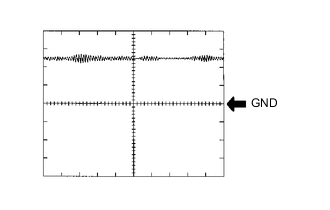
Reference: Inspection using an oscilloscope
Tech Tips
The correct waveform is as shown.
| ECM Terminal Name | Between KNK1 and EKNK |
| Tester Range | 1 V/DIV., 1 ms./DIV. |
| Condition | Engine speed maintained at 4000 rpm after warming up engine |
MONITOR DESCRIPTION
If the output voltage transmitted by the knock sensor remains low or high for 1 second or more, the ECM interprets this as a malfunction in the sensor circuit, and stores the DTC.
MONITOR STRATEGY
| Frequency of Operation | Continuous |
CONFIRMATION DRIVING PATTERN
-
Connect the GTS to the DLC3.
-
Turn the ignition switch to ON.
-
Turn the GTS on.
-
Clear the DTCs (even if no DTCs are stored, perform the clear DTC procedure).
-
Turn the ignition switch off and wait for at least 30 seconds.
-
Turn the ignition switch to ON.
-
Turn the GTS on.
-
Start the engine and wait 5 minutes.
-
Enter the following menus: Powertrain / Engine and ECT / Trouble Codes.
-
Read the pending DTCs.
Tech Tips
-
If a pending DTC is output, the system is malfunctioning.
-
If a pending DTC is not output, perform the following procedure.
-
-
Enter the following menus: Powertrain / Engine and ECT / Utility / All Readiness.
-
Input the DTC: P0327 or P0328.
-
Check the DTC judgment result.
GTS Display Description NORMAL
-
DTC judgment completed
-
System normal
ABNORMAL
-
DTC judgment completed
-
System abnormal
INCOMPLETE
-
DTC judgment not completed
-
Perform driving pattern after confirming DTC enabling conditions
N/A
-
Unable to perform DTC judgment
-
Number of DTCs which do not fulfill DTC preconditions has reached ECU memory limit
Tech Tips
-
If the judgment result shows NORMAL, the system is normal.
-
If the judgment result shows ABNORMAL, the system has a malfunction.
-
If the judgment result shows INCOMPLETE or N/A, idle the engine for 5 minutes and check the DTC judgment result again.
-
WIRING DIAGRAM
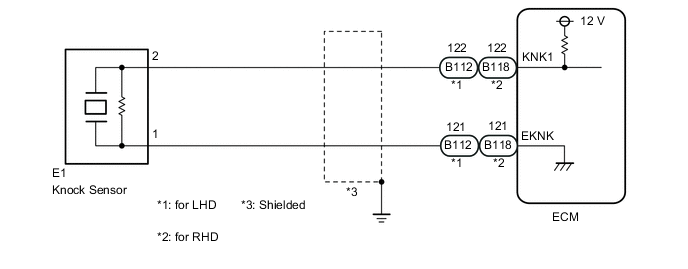
CAUTION / NOTICE / HINT
Tech Tips
Read freeze frame data using the GTS. The ECM records vehicle and driving condition information as freeze frame data the moment a DTC is stored. When troubleshooting, freeze frame data can help determine if the vehicle was moving or stationary, if the engine was warmed up or not, if the air fuel ratio was lean or rich, and other data from the time the malfunction occurred.
PROCEDURE
-
READ VALUE USING GTS (KNOCK FEEDBACK VALUE)
-
Connect the GTS to the DLC3.
-
Start the engine.
-
Turn the GTS on.
-
Warm up the engine.
-
Enter the following menus: Powertrain / Engine and ECT / Data List / Knock Feedback Value.
-
Read the values displayed on the GTS while driving the vehicle.
OK The value changes. Tech Tips
Malfunction does not occur Knock Feedback Value changes Malfunctions occur Knock Feedback Value does not change The Knock Feedback Value change can be confirmed by running the engine with a high load, for example, by activating the air conditioning system and racing the engine.
Result Proceed to OK NG
OK 
CHECK FOR INTERMITTENT PROBLEMS Click here
NG 
-
-
CHECK TERMINAL VOLTAGE (POWER SOURCE OF KNOCK SENSOR)
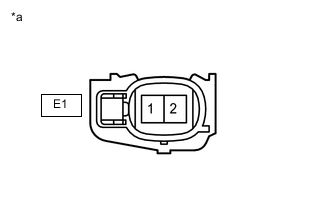
*a Front view of wire harness connector
(to Knock Sensor)
-
Disconnect the knock sensor connector.
-
Turn the ignition switch to ON.
-
Measure the voltage according to the value(s) in the table below.
Standard Voltage Tester Connection Switch Condition Specified Condition E1-2 - E1-1 Ignition switch ON 4.5 to 5.5 V Result Proceed to OK NG
NG 
CHECK HARNESS AND CONNECTOR (ECM - KNOCK SENSOR) Click here
OK
-
-
INSPECT KNOCK SENSOR
-
Inspect the knock sensor.
Result Proceed to OK NG
OK
REPLACE ECM Click here
NG
REPLACE KNOCK SENSOR Click here
-
-
CHECK HARNESS AND CONNECTOR (ECM - KNOCK SENSOR)
-
Disconnect the B112 ECM connector.*1
-
Disconnect the B118 ECM connector.*2
-
Disconnect the E1 knock sensor connector.
-
Measure the resistance according to the value(s) in the table below.
*1: for LHD
*2: for RHD
Standard Resistance for LHD Tester Connection Condition Specified Condition B112-122 (KNK1) - E1-2 Always Below 1 Ω B112-121 (EKNK) - E1-1 Always Below 1 Ω B112-122 (KNK1) or E1-2 - Body ground and other terminals Always 10 kΩ or higher B112-121 (EKNK) or E1-1 - Body ground and other terminals Always 10 kΩ or higher for RHD Tester Connection Condition Specified Condition B118-122 (KNK1) - E1-2 Always Below 1 Ω B118-121 (EKNK) - E1-1 Always Below 1 Ω B118-122 (KNK1) or E1-2 - Body ground and other terminals Always 10 kΩ or higher B118-121 (EKNK) or E1-1 - Body ground and other terminals Always 10 kΩ or higher Result Proceed to OK NG
OK
REPLACE ECM Click here
NG
REPAIR OR REPLACE HARNESS OR CONNECTOR
-