ECD SYSTEM(w/ DPF), Diagnostic DTC:U1103
| DTC Code | DTC Name |
|---|---|
| U1103 | Lost Communication with Stop and Start Control Module |
DESCRIPTION
The ECM and engine stop and start ECU communicate with each other via CAN communication. The engine stop and start ECU also communicate with other computers through the ECM. If there is a problem with this communication, the ECM illuminates the MIL and stores this DTC.
| DTC Detection Drive Pattern | DTC Detection Condition | Trouble Area |
|---|---|---|
| Ignition switch ON | No communication between ECM and engine stop and start ECU (1 trip detection logic) |
|
WIRING DIAGRAM
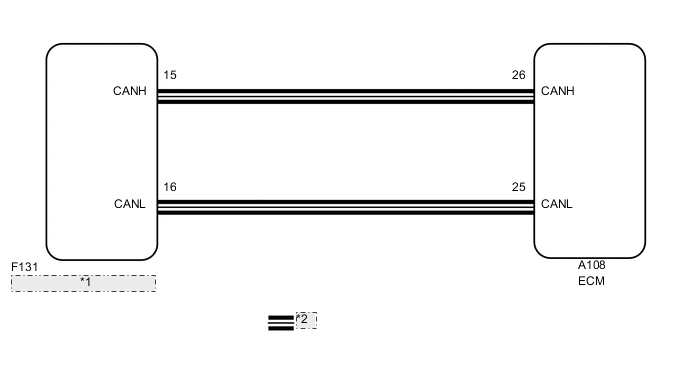
| *1 | Engine Stop and Start ECU |
| *2 | CAN Communication Line |
CAUTION / NOTICE / HINT
Tech Tips
-
When DTCs indicating a CAN communication system malfunction are output, repair the CAN communication system first.
-
If the CAN communication malfunctions, there is no data output from the ECM. In this case, some of the freeze frame data are not correct and not identical with the ECM data, however the ECM data are correct.
-
Read freeze frame data using the GTS. Freeze frame data records the engine condition when malfunctions are detected. When troubleshooting, freeze frame data can help determine if the vehicle was moving or stationary, if the engine was warmed up or not, if the air fuel ratio was lean or rich, and other data from the time the malfunction occurred.
PROCEDURE
-
CHECK FOR ANY OTHER DTCS OUTPUT (IN ADDITION TO DTC U1103)
-
Connect the GTS to the DLC3.
-
Turn the ignition switch to ON.
-
Turn the GTS on.
-
Enter the following menus: System Select / Health Check.
-
Read the DTCs.
Result Result Proceed to DTC U1103 and other DTCs are output A DTC U1103 is output (w/ Toyota Safety Sense) B DTC U1103 is output (w/o Toyota Safety Sense) C Tech Tips
If any DTCs other than U1103 are output, troubleshoot those DTCs first.
A 
GO TO DTC CHART Click here
B
GO TO CAN COMMUNICATION SYSTEM Click here
C
GO TO CAN COMMUNICATION SYSTEM Click here
-