ECD SYSTEM(w/ DPF), Diagnostic DTC:P1605
| DTC Code | DTC Name |
|---|---|
| P1605 | Rough Idling |
DESCRIPTION
This DTC is stored when the speed of a specific cylinder becomes low and the idle speed becomes unstable. This DTC is also stored if the vehicle runs out of fuel. Be sure to check whether there is enough fuel in the fuel tank before inspection.
| DTC Detection Drive Pattern | DTC Detection Condition | Trouble Area |
|---|---|---|
| - | When the accelerator pedal is fully closed and the engine is idling, the speed of a specific cylinder is low for 2 to 10 seconds. (1 trip detection logic) |
|
| DTC No. | Data List |
|---|---|
| P1605 |
|
CAUTION / NOTICE / HINT
-
In order to keep idling stable, glow system operation, fuel system operation and compression sufficient to maintain the target idling speed are necessary.
-
Glow system
-
The following malfunctions may be present in the glow system.
-
Engine coolant temperature sensor malfunction.
-
Glow plug assembly malfunction.
-
Glow plug controller malfunction.
-
-
-
Fuel system
-
The following malfunctions may be present in the fuel system.
-
Fuel leakage.
-
Problem with injector assemblies.
-
Problem with supply pump assembly.
-
Air in fuel pipe.
-
-
-
Engine assembly
-
The following malfunctions may be present in the engine assembly.
-
Insufficient compression.
-
Tech Tips
-
In contrast to normal malfunction diagnosis for components, circuits and systems, DTC P1605 is used to determine the malfunctioning area from the problem symptoms and freeze frame data when the user mentions problems such as rough idling.
As the DTC can be stored as a result of certain user actions, even if the DTC is output, if the customer makes no mention of problems, clear the DTC without performing any troubleshooting and return the vehicle to the customer.
-
If any other DTCs are output, perform troubleshooting for those DTCs first.
-
Read freeze frame data using the GTS. Freeze frame data records the engine condition when malfunctions are detected. When troubleshooting, freeze frame data can help determine if the vehicle was moving or stationary, if the engine was warmed up or not, and other data from the time the malfunction occurred.
-
When confirming the freeze frame data, be sure to check all 5 sets of freeze frame data.
-
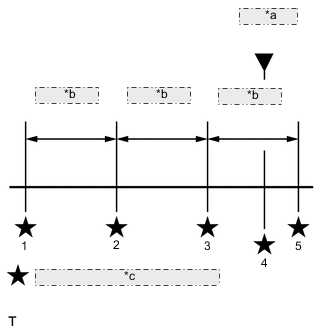
*a DTC stored *b 0.5 seconds *c Freeze frame data recorded point The fourth set of freeze frame data is the data recorded when the DTC is stored.
-
PROCEDURE
-
READ OUTPUT DTC (RECORD STORED DTC AND FREEZE FRAME DATA (PROCEDURE 1))
-
Connect the GTS to the DLC3.
-
Turn the ignition switch to ON.
-
Turn the GTS on.
-
Enter the following menus: Powertrain / Engine and ECT / Trouble Codes.
-
Record the stored DTC and Freeze Frame Data.
Tech Tips
This freeze frame data shows the actual engine conditions when engine starting trouble occurred.
NEXT 
-
-
CHECK ANY OTHER DTCS OUTPUT (IN ADDITION TO DTC P1605)
-
Connect the GTS to the DLC3.
-
Turn the ignition switch to ON.
-
Turn the GTS on.
-
Enter the following menus: Powertrain / Engine and ECT / Trouble Codes.
-
Read the DTCs.
Result Result Proceed to DTC P1605 is output A DTC P1605 and other DTCs are output B Tech Tips
If any DTCs other than P1605 are output, troubleshoot those DTCs first.
B 
GO TO DTC CHART Click here
A
-
-
DETERMINE CAUSE OF PROBLEM (CHECK FREEZE FRAME DATA)
-
Determine the cause of the problem based on the freeze frame data recorded in Procedure 1.
Rough Idle #1 to #4 Judgment of Data List Value Problem Cause Diagnosis Note Any of Rough Idle #1 to #4 in the freeze frame data is ON Injector assembly This shows that the idle speed of this cylinder is lower than the other cylinders. Injection Feedback Val #1 to #4 Data List Judgment of Data List Values Faulty Component Diagnosis Note Injection Feedback Val #1 (to #4)
-
When idling after the engine is warmed up, the fuel quantity of each injector assembly is corrected to make each cylinder engine speed equal.
-
Cylinders more than 2.0 mm3/st may have a fault.
Tech Tips
Read the value after one minute of idling after warm up (engine coolant temperature above 75°C (167°F)). This value is only calculated when idling.
-
Injector assembly clogging
-
Injector assembly deterioration
-
Decrease in cylinder compression
-
incorrectly set (forgot to input code after replacement or mistake made during setting of code after replacing ECM with one from another vehicle)
-
With injector assembly faults, other than difficulty starting, there is a possibility of rough idling, lack of power, black smoke, white smoke and knocking.
-
When idling after warm up, the injection amount for each cylinder is corrected to optimize the difference between the engine speed of each cylinder. Example: For cylinders that are slowing the engine speed compared to other cylinders, the injection volume is increased.
-
"Injection Feedback Val" more than 2.0 mm3/st: Injector assembly breakdown is causing injection volume deviation, or insufficient compression is causing poor combustion.
-
NEXT
GO TO ROUGH IDLING OR EXCESSIVE ENGINE VIBRATIONS Click here
-