PARKING BRAKE SYSTEM ADJUSTMENT
PROCEDURE
-
INSPECT PARKING BRAKE LEVER TRAVEL
-
Slowly pull the parking brake lever to the fully applied position, counting the number of clicks.
Parking brake lever travel at 200 N (20 kgf, 45 lbf) Rear Brake type Number of clicks for TMC Made Drum 8 to 11 for TMMF Made Drum 5 to 7 Disc 4 to 6
-
-
ADJUST PARKING BRAKE LEVER TRAVEL (for Rear Drum Brake)
-
for TMC Made
-
Remove the rear console box. Click here
-
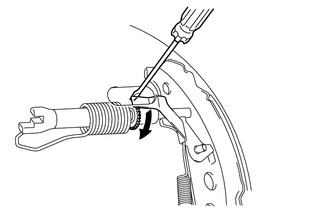
Remove the hole plug, and turn the adjuster to expand the shoe until the drum locks.
Text in Illustration 
Expand -
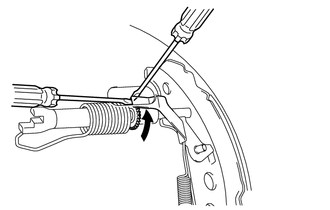
Hold the automatic adjust lever away from the adjuster, and contract the brake shoe by turning the adjust bolt using another screwdriver until the drum can rotate smoothly.
Text in Illustration Contract Standard 8 to 11 notches -
Check that there is no brake drag against the shoe.
-
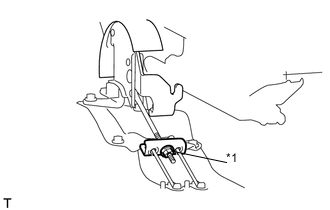
Text in Illustration *1 Lock nut Turn the lock nut until the parking brake lever travel is corrected to within the specified range.
Parking brake lever travel at 200 N (20 kgf, 45 lbf) 8 to 11 clicks -
Operate the parking brake lever 3 to 4 times, and check the parking brake lever travel.
-
Install the rear console box. Click here
-
-
for TMMF Made
-
Remove the rear console box. Click here
-
Press the brake pedal 30 times (not the parking brake). The clearance between the brake shoes and drum will be adjusted automatically.
-
Check that there is no brake drag against the shoe.
-
Remove the rear brake drum.
-
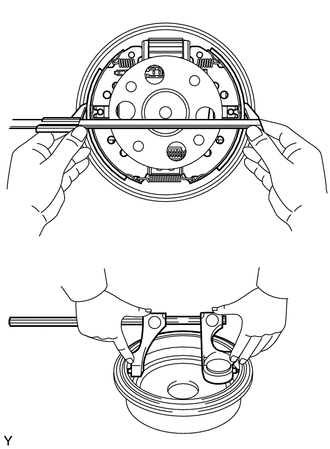
Measure the brake drum inner diameter and the diameter of the brake shoes. Check that the difference between the diameters is equal to the specified shoe clearance.
Shoe clearance 0.6 mm (0.024 in.) -
Install the rear brake drum.
-
Text in Illustration *1 Lock nut Turn the lock nut until the parking brake lever travel is corrected to within the specified range.
Parking brake lever travel at 200 N (20 kgf, 45 lbf) 5 to 7 clicks -
Operate the parking brake lever 3 to 4 times, and check the parking brake lever travel.
-
Install the rear console box. Click here
-
-
-
ADJUST PARKING BRAKE LEVER TRAVEL (for Rear Disc Brake)
-
Remove the rear console box. Click here
-
Text in Illustration *1 Lock nut Turn the lock nut until the parking brake lever travel is corrected to within the specified range.
Parking brake lever travel at 200 N (20 kgf, 45 lbf) 4 to 6 clicks -
Operate the parking brake lever 3 to 4 times, and check the parking brake lever travel.
-
Check whether the parking brake drags or not.
-
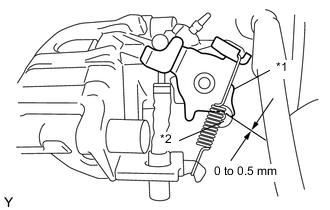
Text in Illustration *1 Operation Lever *2 Stopper Release the parking brake lever and check that the clearance measurement between the rear disc brake cylinder operation lever and the stopper is within the specified range.
Clearance 0 to 0.5 mm (0 to 0.02 in.) -
Install the rear console box. Click here
-
-
INSPECT BRAKE WARNING LIGHT
-
When operating the parking brake lever, check that the brake warning light illuminates.
OK Brake warning light always illuminates at the first click.
-