VEHICLE STABILITY CONTROL SYSTEM(for TMC Made) CALIBRATION
-
DESCRIPTION
-
After replacing the VSC relevant components or performing "Front wheel alignment adjustment", clear and read the sensor calibration data.
-
Follow the chart to perform calibration.
Replacing Part/Operation Necessary Operation Skid control ECU (brake actuator assembly) Yaw rate and deceleration sensor zero point calibration Yaw rate sensor (Airbag sensor assembly)
-
AT/CVT learned values initialization.
-
Yaw rate and deceleration sensor zero point calibration
-
CVT oil pressure calibration.
-
-
OBTAIN ZERO POINT OF YAW RATE AND DECELERATION SENSOR (When Using Intelligent Tester)
Note
-
Stored system information cannot be overwritten unless it is cleared. Clear the stored information and then store new system information.
-
While obtaining the zero points, keep the vehicle stationary and do not vibrate, tilt, move, or shake it. (Do not start the engine.)
-
Be sure to perform this procedure on a level surface (with an inclination of less than 1 degree).
-
Clear the zero point calibration data.
-
Turn the ignition switch off.
-
Check that the steering wheel is in the straight-ahead position.
-
Check that the shift lever is in neutral and apply the parking brake.
-
Connect the intelligent tester to the DLC3.
-
Turn the ignition switch to ON.
-
Turn the tester on.
-
Select the skid control ECU (brake actuator assembly) to clear the zero point calibration data using the intelligent tester.
Enter the following menus: Chassis / ABS/VSC/TRC / Utility / Reset Memory.
-
Check that the Slip indicator light comes on.
-
Turn the ignition switch off.
Note
If the ignition switch is turned to ON for more than 15 seconds with the shift lever in P after the zero points of the yaw rate and deceleration sensor has been cleared, only the zero point of the yaw rate sensor will be stored. If the vehicle is driven under these conditions, the skid control ECU (brake actuator assembly) will store the zero point calibration for the deceleration sensor as not being completed. The skid control ECU (brake actuator assembly) will then also indicate this as a malfunction of the VSC system using the warning lights.
-
-
Perform zero point calibration of the yaw rate and deceleration sensor.
-
Turn the ignition switch off.
-
Check that the steering wheel is in the straight-ahead position.
-
Check that the shift lever is in neutral and apply the parking brake.
Note
DTCs C1210 (zero point calibration of yaw rate sensor undone) and C1336 (zero point calibration of deceleration sensor undone) will be recorded if the shift lever is not in P Click here.
-
Connect the intelligent tester to the DLC3.
-
Turn the ignition switch to ON.
-
Turn the tester on.
-
Switch the skid control ECU (brake actuator assembly) to Test Mode using the intelligent tester.
Enter the following menus: Chassis / ABS/VSC/TRC / Utility / Test Mode.
-
After the Test Mode has been entered, keep the vehicle stationary on a level surface for 5 seconds or more.
-
Check that the Slip indicator light comes on for several seconds and then blinks in Test Mode.
Tech Tips
-
If the Slip indicator light does not blink, perform zero point calibration again.
-
The zero point calibration is performed only once after the system enters the Test Mode.
-
Calibration cannot be performed again until the stored data is cleared.
-
-
Turn the ignition switch off and disconnect the intelligent tester.
-
-
-
OBTAIN ZERO POINT OF YAW RATE AND DECELERATION SENSOR (When not Using Intelligent Tester)
Note
-
Stored system information cannot be overwritten unless it is cleared. Clear the stored information and then store new system information.
-
While obtaining the zero points, keep the vehicle stationary and do not vibrate, tilt, move, or shake it. (Do not start the engine.)
-
Be sure to perform this procedure on a level surface (with an inclination of less than 1 degree).
-
Clear the zero point calibration data.
-
Turn the ignition switch off.
-
Check that the steering wheel is in the straight-ahead position.
-
Check that the shift lever is in neutral and apply the parking brake.
-
Turn the ignition switch to ON.
-
The warning light and indicator light come on for 3 seconds to indicate that the initial check is completed.
-
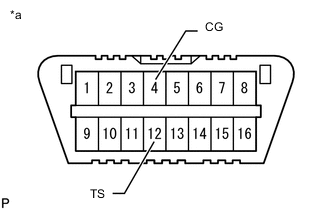
Text in Illustration *a Front view of DLC3 Using SST, connect and disconnect terminals 12 (TS) and 4 (CG) of the DLC3 4 times or more within 8 seconds.
- SST
- 09843-18040
-
Check that the Slip indicator light comes on.
Note
If the ignition switch is turned to ON for more than 15 seconds with the shift lever in P after the zero points of the yaw rate and deceleration sensor has been cleared, only the zero point of the yaw rate sensor will be stored. If the vehicle is driven under these conditions, the skid control ECU (brake actuator assembly) will store the zero point calibration for the deceleration sensor as not being completed. The skid control ECU (brake actuator assembly) will then also indicate this as a malfunction of the VSC system using the warning lights.
-
-
Perform zero point calibration of the yaw rate and deceleration sensor.
-
Turn the ignition switch off.
-
Check that the steering wheel is in the straight-ahead position.
-
Check that the shift lever is in neutral and apply the parking brake.
Note
DTCs 36 (zero point calibration of yaw rate sensor undone) and 39 (zero point calibration of deceleration sensor undone) will be recorded if the shift lever is not in P Click here.
-
Text in Illustration *a Front view of DLC3 Using SST, connect terminals 12 (TS) and 4 (CG) of the DLC3.
- SST
- 09843-18040
-
Turn the ignition switch to ON.
-
After Test Mode has been entered, keep the vehicle stationary on a level surface for 5 seconds or more.
-
Check that the Slip indicator light comes on for several seconds and then blinks in Test Mode.
Tech Tips
-
If the Slip indicator light does not blink, perform zero point calibration again.
-
The zero point calibration is performed only once after the system enters the Test Mode.
-
Calibration cannot be performed again until the stored data is cleared.
-
-
Turn the ignition switch off and disconnect SST from the DLC3.
-
-