CAUTION / NOTICE / HINT
-
Handle components indoors as much as possible to prevent foreign matter from entering and adhering to headlight assembly components.
-
Do not reuse parts which have reduced fastening ability due to thread damage.
-
When installing components, make sure that the wire harness is not pinched or pulled.
-
Do not use solvent to clean components. Only clean them with a dry cloth.
-
Use the same procedure for the RH and LH sides.
-
The procedure listed below is for the LH side.
PROCEDURE
- Click here
INSTALL HEADLIGHT LEVELING MOTOR LH
Note:
-
Prevention of static electricity is required during this procedure.
-
Use static electricity countermeasures SST (desktop antistatic mat set) and observe all precautions to prevent damage to the system by electrostatic discharge (ESD).
-
Perform work using clean rubber gloves.
-
Do not touch the headlight LED unit assembly LH with bare hands.
-
Do not allow metallic surfaces to become dirty, as such surfaces become damaged even if they are only lightly wipe with a soft cloth.
-
If there are fingerprints on the inner surface of the lens, lightly wiped with a soft cloth.
-
Do not use solvent to clean components. Only clean them with a dry cloth.
09890-47010 09891-04010 09891-04020 09891-04030 09891-04040
-
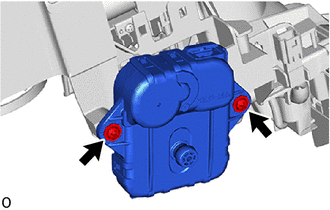
Install the headlight leveling motor LH with the 2 screws.
-
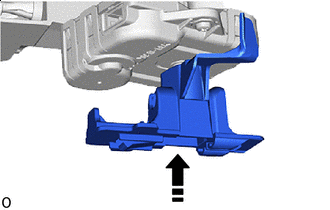

Install in this Direction Install the spherical step.
Tip:It may be slightly difficult to install.
-
- Click here
INSTALL HEADLIGHT UNIT LH
Note:
-
Prevention of static electricity is required during this procedure.
-
Use static electricity countermeasures SST (desktop antistatic mat set) and observe all precautions to prevent damage to the system by electrostatic discharge (ESD).
-
Perform work using clean rubber gloves.
-
Do not touch the headlight LED unit assembly LH with bare hands.
-
Do not allow metallic surfaces to become dirty, as such surfaces become damaged even if they are only lightly wipe] with a soft cloth.
-
If there are fingerprints on the inner surface of the lens, lightly wiped with a soft cloth.
-
Do not use solvent to clean components. Only clean them with a dry cloth.
09890-47010 09891-04020 09891-04010 09891-04030 09891-04040
-
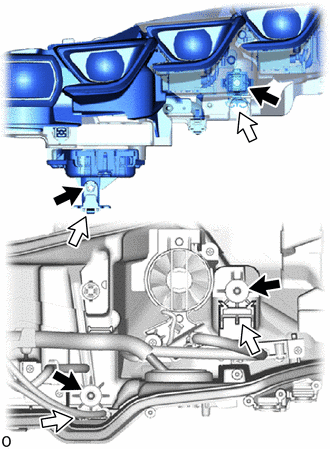
Set the headlight unit LH onto the left and right rails and aiming screws for beam axis vertical and horizontal adjustments.
Tip:Set it into place by aligning the arrows shown in the illustration: black with black, and white with white.
-
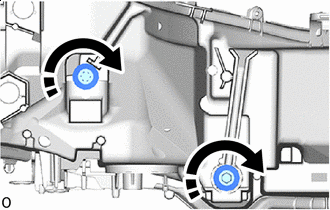
Clockwise Hold the headlight unit LH with one hand to prevent it from tipping over and tighten the aiming screws for beam axis horizontal and vertical adjustments clockwise with the number of turns that were recorded.
-
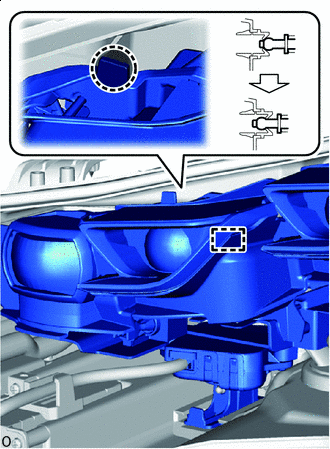

Push Here Push the part shown in the illustration to connect the pivot collar.
-
Clockwise Tighten the aiming screws for beam axis horizontal and vertical adjustments by rotating them clockwise 10 times each.
-
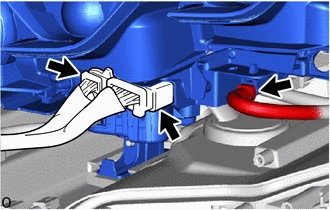
Connect the 3 connectors.
-
- Click here
INSTALL HEADLIGHT CORNERING LED UNIT LH (w/ Cornering Light)
Note:
-
Prevention of static electricity is required during this procedure.
-
Use static electricity countermeasures SST (desktop antistatic mat set) and observe all precautions to prevent damage to the system by electrostatic discharge (ESD).
-
Perform work using clean rubber gloves.
-
Do not touch the headlight cornering LED unit LH and headlight LED unit assembly LH with bare hands.
-
Do not allow metallic surfaces to become dirty, as such surfaces become damaged even if they are only lightly wipe with a soft cloth.
-
If there are fingerprints on the inner surface of the lens, lightly wiped with a soft cloth.
-
Do not use solvent to clean components. Only clean them with a dry cloth.
09890-47010 09891-04020 09891-04010 09891-04030 09891-04040
-
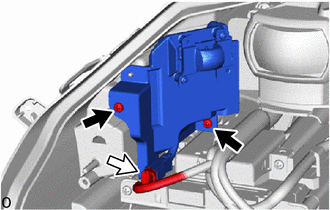
Install the headlight cornering LED unit LH with the 2 screws.
-
Connect the connector.
-
- Click here
INSTALL LIGHT CONTROL LED ECU LH
- Click here
INSTALL NO. 1 HEADLIGHT CLEARANCE LED UNIT LH
Note:
-
Prevention of static electricity is required during this procedure.
-
Use static electricity countermeasures SST (desktop antistatic mat set) and observe all precautions to prevent damage to the system by electrostatic discharge (ESD).
-
Perform work using clean rubber gloves.
-
Do not touch the No. 1 headlight clearance LED unit LH with bare hands.
-
Do not allow metallic surfaces to become dirty, as such surfaces become damaged even if they are only lightly wipe with a soft cloth.
-
If there are fingerprints on the inner surface of the lens, lightly wipe with a soft cloth.
-
Do not use solvent to clean components. Only clean them with a dry cloth.
09890-47010 09891-04020 09891-04010 09891-04030 09891-04040
-
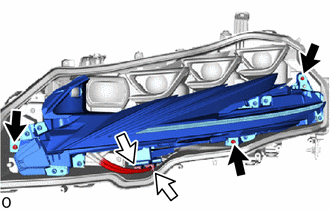
Install the No. 1 headlight clearance LED unit LH with the 3 screws.
-
Connect the 2 connectors.
-
- Click here
INSTALL HEADLIGHT LENS GASKET
Note:
-
The headlight lens gasket must not be reused.
-
Perform work using clean rubber gloves.
-
Do not touch the inner surface of the lens and metallic surfaces as much as possible, or they may become dirty.
-
Do not allow metallic surfaces to become dirty, as such surfaces become damaged even if they are only lightly wiped with a soft cloth.
-
If there are fingerprints on the inner surface of the lens, lightly wipe with a soft cloth.
-
Do not use solvent to clean components. Only clean them with a dry cloth.
-
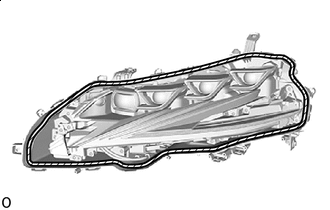

Area to Clean Clean the headlight lens gasket installation groove.
-
Prepare 2 screwdrivers, fold a piece of peeling paper over the tip of each screwdriver and fix the pieces of peeling paper in place with tape.
Tip:Use the peeling paper that is supplied with the headlight lens gasket.
-
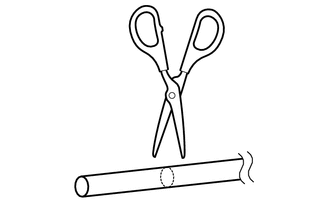
Using scissors, cut the headlight lens gasket at a 90°.
-
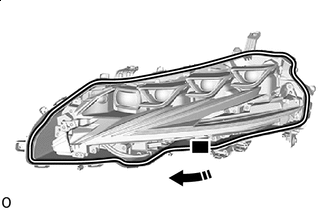

Starting Point Clockwise Starting from the position shown in the illustration, set the headlight lens gasket into the straight groove clockwise until it meets the corner groove.
Note:Lightly set the gasket in place without pulling.
-
Fold the peeling paper over the tip of a screwdriver and fix it in place with tape.
Note:Use the peeling paper that is supplied with the seal.
-
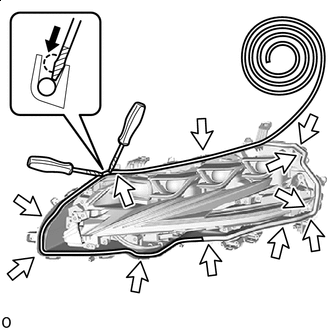

Corner Groove 
Headlight Lens Gasket Peeling Paper Set the headlight lens gasket into the corner groove and using 2 screwdrivers with their tips wrapped with peeling paper, push the gasket into the bottom of the groove.
Note:
-
Lightly set the gasket in place without pulling.
-
If the headlight lens gasket is set while pulled, the gasket will be pushed up at the corner groove.
-
-
Repeat the following order while working in a circle back to the starting point.
-
Set headlight lens gasket into straight groove.
-
Push into bottom of groove.
-
Set into corner groove.
-
Push into bottom of groove.
-
-
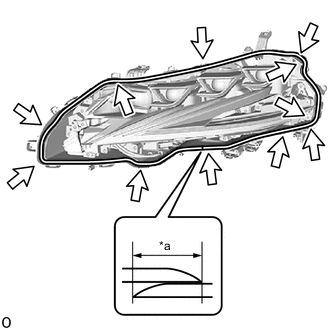
*a 20 mm (0.7874 in.) Corner Groove Using scissors, cut the headlight lens gasket at a 45° angle at the starting point so that the gasket overlaps itself 20 mm (0.7874 in.) and set the gasket in place.
-
Check the installation condition of the headlight lens gasket.
OK Gasket not pushed up or protruding. No gap where gasket overlaps. Note:Check the corners carefully since the gasket can easily become pushed up in those areas.
-
- Click here
INSTALL HEADLIGHT LENS LH
Note:
-
Perform work using clean rubber gloves.
-
Do not touch the inner surface of the lens and metallic surfaces as much as possible, or they may become dirty.
-
Do not allow metallic surfaces to become dirty, as such surfaces become damaged even if they are only lightly wiped with a soft cloth.
-
Do not use solvent to clean components. Only clean them with a dry cloth.
-
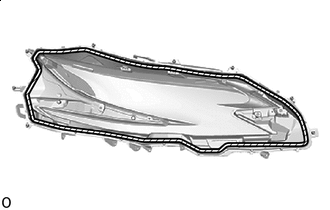
Area to Clean Clean the headlight lens gasket contact surface.
-
Set the headlight lens LH in place.
Note: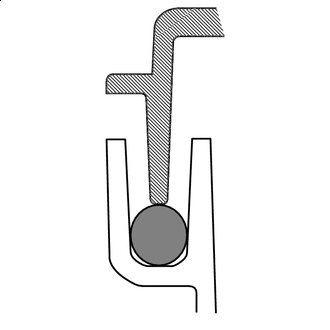
Headlight Lens Gasket 
Headlight Housing Headlight Lens LH Set the headlight lens LH in the middle of the headlight lens gasket as shown in the illustration.
-
Check that the entire circumference of the headlight lens LH is positioned above the middle of the headlight lens gasket.
-
Install headlight lens LH:
Tip: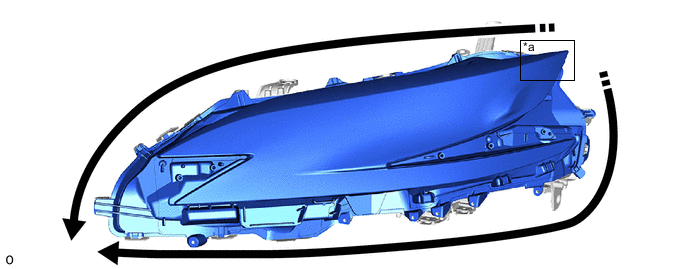
*a Installation Starting Point - - Install in this Direction - - Install the headlight lens LH to the headlight housing from the starting point of installation toward the inside of the vehicle as shown in the illustration.
-
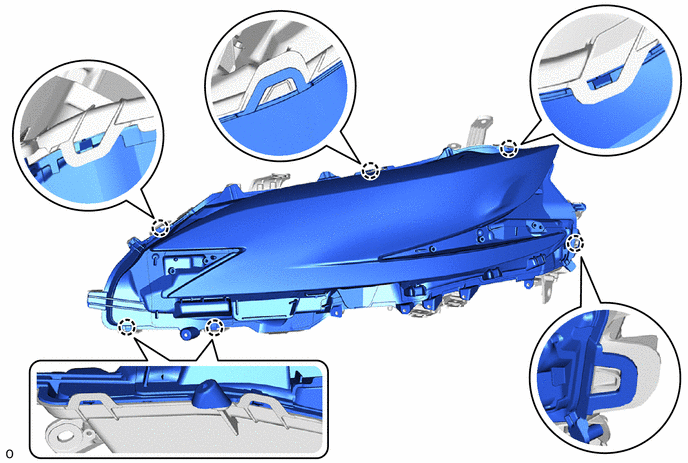
Attach the claw to install the headlight lens LH.
-
Using a T20H "TORX" driver, install the 6 TORX screws.
-
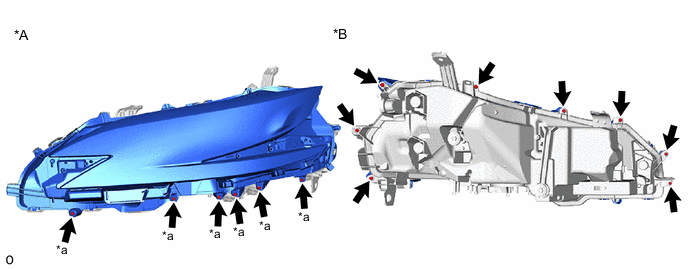
*A Headlight Assembly LH Surface *B Headlight Assembly LH Backside *a "TORX" Screw - - Install the 8 screws.
-
Check the condition of the headlight lens gasket.
OK Gasket contacts headlight lens LH and does not protrude out.
-
- Click here
INSTALL NO. 2 HEADLIGHT FITTING RIM LH
-
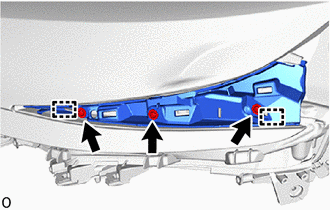
Align the 2 guides and set the No. 2 headlight fitting rim LH into place.
-
Install the 3 screws.
-
- Click here
INSTALL NO. 1 HEADLIGHT FITTING RIM LH
-
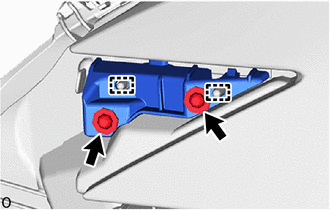
Align the 2 guides and set the No. 1 headlight fitting rim LH into place.
-
Install the 2 screws.
-
- Click here
INSTALL HEADLIGHT GASKET
- Click here
INSTALL HEADLIGHT ECU SUB-ASSEMBLY LH
- Click here
INSTALL FRONT SIDE RADAR SENSOR BRACKET LH (w/ Front Side Radar)
- Click here
INSTALL FRONT SIDE RADAR SENSOR (w/ Front Side Radar)
- Click here
INSTALL RADIATOR GRILLE PROTECTOR
-
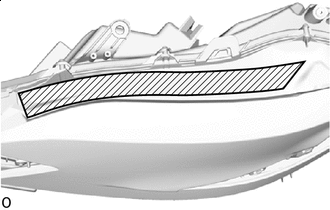
Area to Clean Clean the application area shown in the illustration.
Note:Remove any remaining double-sided tape, and then clean and degrease the area.
-
Remove approximately 3 cm of peeling tape from a new radiator grille protector.
-
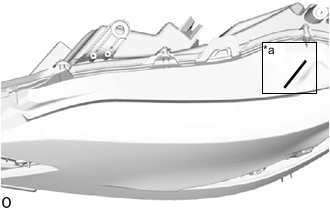
*a Mark-off Line Align with the mark-off line and set the radiator grille protector into place.
-
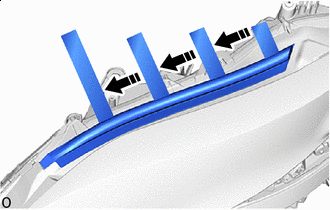
Install in this Direction Align with the curve and set only the part where the peeling type tape was removed from into place.
-
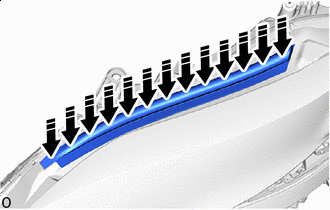
Press Here Press the set portion of the part with your finger to secure it.
Note:Do not slide your finger horizontally, as doing so may stretch the part unnecessarily.
-