Click here
-
PRECAUTION FOR OPERATION CHECK
CAUTION: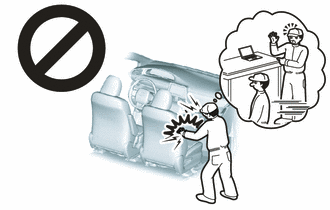
Use the correct procedure to replace the airbag parts.
-
CHECK SRS WARNING LIGHT
-
Primary check
-
Turn the power switch on (IG) and check that the SRS warning light turn on.
-
Turn the power switch off. Wait for at least 2 seconds, and then turn the power switch on (IG). The SRS warning light comes on for approximately 6 seconds and diagnosis of the airbag system (including the seat belt pretensioners) is performed.
Note:Turn the power switch off when the auxiliary battery is connected.
Tip:
-
If the SRS warning light remains on for approximately 6 seconds or more after the power switch has been turned on (IG), there may be a malfunction with the SRS airbag system.
-
If the warning light occasionally turns on approximately 6 seconds or more after the power switch has been turned on (IG), there may be a short to +B, short to ground or an open in the SRS warning light circuit.
-
If the warning light illuminates after turning the power switch off or on (ACC), there may be a malfunction in the power source circuit or combination meter assembly.
-
The SRS warning light turns off, and then turns on. This blinking pattern indicates a source voltage drop. The SRS warning light turns off 10 seconds after the source voltage returns to normal.
-
-
-
-
FUNCTION OF PASSENGER AIRBAG ON/OFF INDICATOR (w/ Airbag Cutoff Switch)
-
Initial check
-
Turn the power switch on (IG).
-
The passenger airbag ON/OFF indicator comes on for approximately 4 seconds, and then goes off for approximately 2 seconds.
-
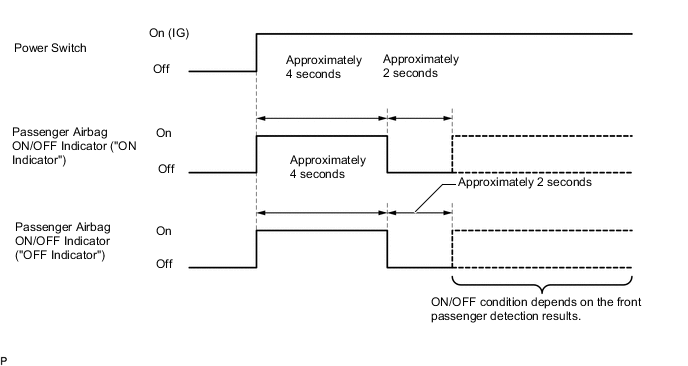
Approximately 6 seconds after the power switch is turned on (IG), the passenger airbag ON/OFF indicator will indicate ON/OFF according to the airbag cutoff switch cylinder sub-assembly condition as listed below.
Table 1. Indicator Operation Airbag Cutoff Switch Cylinder Sub-assembly Condition Passenger Airbag ON/OFF Indicator SRS Warning Light ON Indicator OFF Indicator On On Off Off Off Off On Off Switch failure Off On On Tip:If the passenger airbag ON/OFF indicator does not operate as specified in the table according to the airbag cutoff switch cylinder sub-assembly status and the SRS warning light is not illuminated, no DTC will be output. Therefore, perform troubleshooting for Trouble in Passenger Airbag ON/OFF Indicator.
-
-
-
FUNCTION OF PASSENGER AIRBAG ON/OFF INDICATOR (w/ Occupant Classification System)
-
Initial check
-
Turn the power switch on (IG).
-
The passenger airbag ON/OFF indicator comes on for approximately 4 seconds, and then goes off for approximately 2 seconds.
-
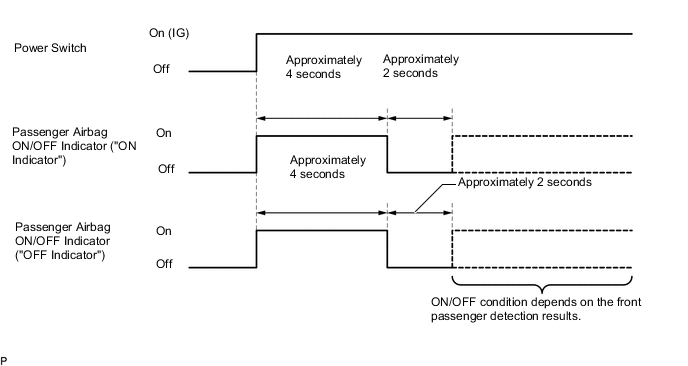
Approximately 6 seconds after the power switch is turned on (IG), the passenger airbag ON/OFF indicator will indicate ON/OFF depending on the following conditions.
Table 2. Indicator Operation Front Passenger Seat Condition Passenger Airbag ON/OFF Indicator SRS Warning Light ON Indicator OFF Indicator Vacant OFF ON OFF Adult*1 is seated ON OFF OFF Child*2 is seated ON or OFF*2 OFF or ON*2 OFF Child restraint system is installed OFF ON OFF Occupant classification system failure OFF ON ON
-
*1: The system judges a person of average adult weight or more as an adult. If a smaller adult sits in the front passenger seat, the system may not recognize them as an adult depending on their physique and posture.
-
*2: The system may not recognize a child or a child in a child restrain system as a child depending on factors such as the positioning of the child restraint system or the child's physique or posture.
Tip:
-
The timing chart below shows the operation of the passenger airbag ON/OFF indicator. Use the chart to check the indicator light circuit.
-
When the occupant classification system has trouble, both the SRS warning light and passenger airbag ON/OFF indicator ("OFF") come on. In this case, check for DTCs for "Airbag System" first. Then troubleshoot the occupant classification system if DTC B1650/32 is output, and troubleshoot the passenger airbag ON/OFF indicator if DTC B1660/43 is output.
-
-
-
-
CHECK PASSENGER AIRBAG ON/OFF INDICATOR (w/ Passenger Airbag ON/OFF Indicator)
-
Turn the power switch on (IG).
-
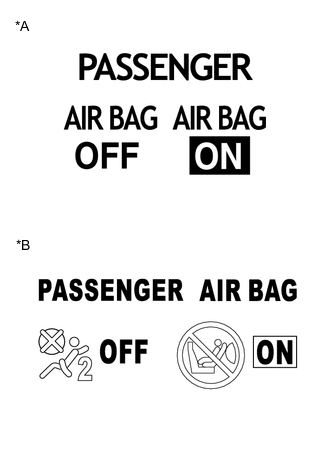
*A Type A *B Type B Check that the passenger airbag ON/OFF indicator ("ON" and "OFF") comes on for approximately 4 seconds, and then goes off for approximately 2 seconds.
Tip:In order to check the operation of the passenger airbag ON/OFF indicator when approximately 6 seconds have elapsed after turning the power switch on (IG), refer to the table in the previous step.
-
-
CHECK HORN BUTTON ASSEMBLY
-
CHECK INSTRUMENT PANEL PASSENGER WITHOUT DOOR AIRBAG ASSEMBLY
-
CHECK FRONT SEAT AIRBAG ASSEMBLY
-
CHECK CURTAIN SHIELD AIRBAG ASSEMBLY
-
CHECK LOWER NO. 1 INSTRUMENT PANEL AIRBAG ASSEMBLY
-
CHECK LOWER NO. 2 INSTRUMENT PANEL AIRBAG ASSEMBLY
-
CHECK REAR SEAT AIRBAG ASSEMBLY
for Fixed Seat Type:
for Power Seat:
-
CHECK REAR SEAT CUSHION AIRBAG ASSEMBLY
-
CHECK FRONT SEAT OUTER BELT ASSEMBLY
-
CHECK REAR NO. 1 SEAT OUTER BELT ASSEMBLY
for Fixed Seat Type:
for Power Seat:
-
CHECK AIRBAG ECU ASSEMBLY
-
CHECK FRONT AIRBAG SENSOR
-
CHECK SIDE AIRBAG SENSOR ASSEMBLY
-
CHECK NO. 2 SIDE AIRBAG SENSOR ASSEMBLY
-
CHECK REAR AIRBAG SENSOR
-
CHECK DOOR SIDE AIRBAG SENSOR
-
CHECK SEAT POSITION AIRBAG SENSOR
-
CHECK HARNESS AND CONNECTOR
-
for Vehicle not Involved in Collision
-
Perform a diagnostic system check.
-
-
for Vehicle Involved in Collision and Airbag not Deployed
-
Perform a diagnostic system check.
-
-
for Vehicle Involved in Collision and Airbag is Deployed
-
Perform a diagnostic system check.
-
Check any of the wire harnesses in exposed contact with the airbag wire harness for damage.
-
Check the connector of the airbag wire harness for scratches, cracks or damage.
-
-