PROCEDURE
- Click here
INSPECT MAP LIGHT ASSEMBLY
-
Inspect the map light sub-assembly.
-
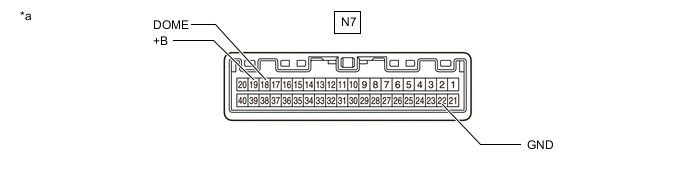
*a Component without harness connected
(Map Light Assembly)
- - Apply auxiliary battery voltage to the connector and check the light illumination condition.
OK Tester Connection Switch Condition Specified Condition N7-19 (+B) - Auxiliary battery positive (+)
N7-18 (DOME) - Auxiliary battery positive (+)
N7-22 (GND) - Auxiliary battery negative (-)
Map light switch LH ON Map light LH illuminates Map light switch RH ON Map light RH illuminates Tip:The map light switch is a capacitive touch switch. Therefore, the illumination turns on or off each time the lens around the light emitting area is touched.
If the result is not as specified, replace the map light assembly.
-
*a Component without harness connected
(Map Light Assembly)
- - Inspect the DOOR switch indicator.
Apply auxiliary battery voltage to the connector and check the light illumination condition.
OK Tester Connection Switch Condition Specified Condition N7-19 (+B) - Auxiliary battery positive (+)
N7-18 (DOME) - Auxiliary battery positive (+)
N7-22 (GND) - Auxiliary battery negative (-)
DOOR switch ON DOOR switch indicator illuminates Tip:Turns off for 10 seconds according to a communication stop judgment during inspection.
If the result is not as specified, replace the map light assembly.
-

*a Component without harness connected
(Map Light Assembly)
- - Inspect the illumination.
Apply auxiliary battery voltage to the connector and check the light illumination condition.
OK Tester Connection Switch Condition Specified Condition N7-17 (ILL) - Auxiliary battery positive (+)
N7-28 (ILL-) - Auxiliary battery negative (-)
Always Illuminates If the result is not as specified, replace the map light assembly.
-
-