| DTC Code | DTC Name |
|---|---|
| B2300 | Disconnection between Auxiliary Battery and Sub Battery Module |
DESCRIPTION
| DTC No. | Detection Item | DTC Detection Condition | Trouble Area | Warning Indicate | Memory |
|---|---|---|---|---|---|
| B2300 | Disconnection between Auxiliary Battery and Sub Battery Module | This DTC is stored when a malfunction is detected in the wire harness between the backup relay and the sub-battery module assembly continuously for 30 seconds. (1 trip detection logic) |
|
Comes on | DTC stored |
The details of a DTC can be checked by using the DTC Sub Code of the freeze frame data that was recorded when the DTC was output.
| DTC Sub Code | Detail |
|---|---|
| "34" | Short between backup relay and sub-battery module assembly |
| "35" | Open between backup relay and sub-battery module assembly |
CONFIRMATION DRIVING PATTERN
-
Connect the GTS to the DLC3.
-
Turn the power switch on (IG) and turn the GTS on.
-
Clear the DTCs.
-
Turn the power switch off and wait for at least 30 seconds.
-
Turn the power switch on and turn the GTS on.
-
Turn the power switch on (READY) and wait for at least 3 minutes.
-
Enter the following menus: Body Electrical / Sub Battery Module / Trouble Codes.
-
Check the DTC.
Tip:If a DTC is output, the system is malfunctioning.
CAUTION / NOTICE / HINT
Read freeze frame data using the GTS. Freeze frame data records the sub-battery module assembly condition when malfunctions are detected.
PROCEDURE
- Click here
INSPECT SUB BATTERY MODULE TERMINAL (+BAT TERMINAL)
-
Refer to the following procedures for removing the connector cover from the luggage compartment mat sub-assembly.
-
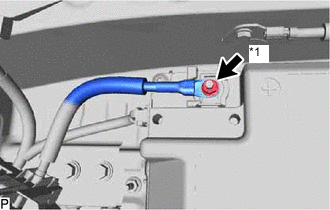
*1 +BAT Terminal Check the installation condition of the +BAT terminal.
Result If there is looseness, tighten it to the specified torque. Result Proceed to OK NG
- OKClick here
- NG
REPAIR OR REPLACE BATTERY TERMINAL
-
- Click here
CHECK NO. 1 LUGGAGE ROOM WIRE
-
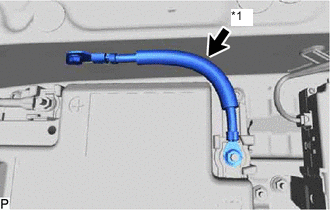
*a No. 1 Luggage Room Wire Check the condition of the No. 1 luggage room wire.
Result The No. 1 luggage room wire is not discolored or corroded. Result Proceed to OK NG
- OKClick here
- NG
REPLACE NO. 1 LUGGAGE ROOM WIRE
-
- Click here
INSPECT NO. 1 LUGGAGE ROOM WIRE
-
Measure the resistance according to the value(s) in the table below.
Standard Resistance Tester Connection Condition Specified Condition P13-1 (+BAT) - 6A-1 (BAT2) Always Below 1 Ω P13-1 (+BAT) - Body ground and other terminals Always 10 kΩ or higher 6A-1 (BAT2) - Body ground and other terminals Always 10 kΩ or higher Result Proceed to OK NG
- OKClick here
- NG
REPLACE NO. 1 LUGGAGE ROOM WIRE
-
- Click here
CHECK DTC OUTPUT
-
Connect the GTS to the DLC3.
-
Turn the power switch on (IG).
-
Turn the GTS on.
-
Clear the DTCs.
- Body Electrical > Sub Battery Module > Clear DTCs
-
-
-
Turn the power switch off and wait for at least 30 seconds.
-
Turn the power switch on (IG) and turn the GTS on.
-
Turn the power switch on (READY) and wait for at least 3 minutes.
-
Enter the following menus: Body Electrical / Sub Battery Module / Trouble Codes.
- Body Electrical > Sub Battery Module > Trouble Codes
-
-
-
Check that DTCs are not output.
Result Proceed to NEXT
- NEXT
END
-