PARKING SUPPORT ALERT SYSTEM Buzzer does not Sound
WIRING DIAGRAM
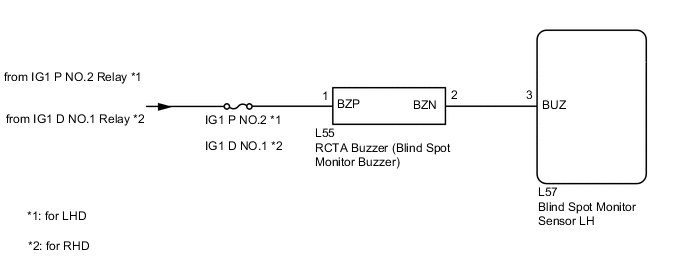
CAUTION / NOTICE / HINT
Note
Inspect the fuses for circuits related to this system before performing the following procedure.
PROCEDURE
-
CHECK FOR DTC
-
Clear the DTCs.
Body Electrical > Blind Spot Monitor Slave > Clear DTCs -
Recheck for DTCs and check if the same DTC is output again.
Body Electrical > Blind Spot Monitor Slave > Trouble CodesOK No DTCs are output. Result Proceed to OK NG
NG 
GO TO DTC CHART Click here
OK 
-
-
CHECK HARNESS AND CONNECTOR (RCTA BUZZER - BLIND SPOT MONITOR SENSOR LH)
-
Disconnect the L55 RCTA buzzer (blind spot monitor buzzer) connector.
-
Measure the voltage according to the value(s) in the table below.
Standard Voltage Tester Connection Switch Condition Specified Condition L55-1 (BZP) - Body ground Power switch on (IG) 11 to 14 V L55-2 (BZN) or L57-3 (BUZ) - Body ground Below 1 V L55-2 (BZN) - L55-1 (BZP) Below 1 V Result Proceed to OK NG
NG
REPAIR OR REPLACE HARNESS OR CONNECTOR
OK
-
-
CHECK HARNESS AND CONNECTOR (RCTA BUZZER - BLIND SPOT MONITOR SENSOR LH AND AUXILIARY BATTERY)
-
Disconnect the L55 RCTA buzzer (blind spot monitor buzzer) connector.
-
Disconnect the L57 blind spot monitor sensor LH connector.
-
Measure the resistance according to the value(s) in the table below.
Standard Resistance Tester Connection Condition Specified Condition L55-2 (BZN) - L57-3 (BUZ) Always Below 1 Ω L55-2 (BZN) or L57-3 (BUZ) - Body ground Always 10 kΩ or higher -
Measure the voltage according to the value(s) in the table below.
Standard Voltage Tester Connection Switch Condition Specified Condition L55-2 (BZN) or L57-3 (BUZ) - Body ground Power switch on (IG) Below 1 V L55-1 (BZP) - Body ground Power switch on (IG) 11 to 14 V L55-1 (BZP) - Body ground Power switch off Below 1 V Result Proceed to OK NG
OK
REPLACE RCTA BUZZER (BLIND SPOT MONITOR BUZZER) Click here
NG
REPAIR OR REPLACE HARNESS OR CONNECTOR
-