ELECTRIC PARKING BRAKE SYSTEM INITIALIZATION
-
Note
If the parking brake ECU assembly or parking brake with bracket actuator assembly is replaced, perform the "Reset Memory" and "Acquire Tension Sensor Zero Point" procedures.
RESET MEMORY AND ACQUIRE TENSION SENSOR ZERO POINT
-
Turn the power switch off.
-
Connect the GTS to the DLC3.
-
Turn the power switch on (IG) and the GTS on.
-
Enter the following menus: Chassis / Electric Parking Brake / Utility / Reset Memory.
-
Follow the GTS display and perform reset memory.
Chassis > Electric Parking Brake > UtilityTester Display Reset Memory Tech Tips
When the reset memory is completed, the parking brake indicator light (red) will blink at 1 second intervals (0.5 seconds on and 0.5 seconds off).
-
Perform the release control. Check that the parking brake indicator light (red) turns off.
Tech Tips
This procedure acquires the tension sensor zero point.
-
-
PARKING BRAKE BEDDING
CAUTION:
-
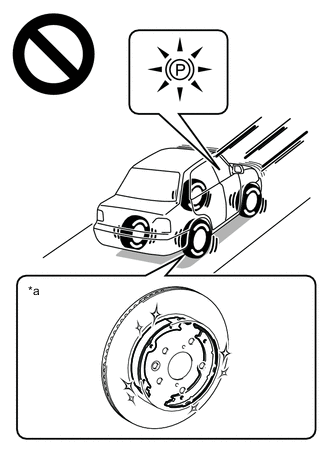
*a Condition without performing brake bedding Do not operate the parking brake without first performing brake bedding of the parking brake shoe and rear disc.
-
Performing bedding creates the basic braking force of the parking brake, so without it the parking brake will not provide sufficient braking performance, which may result in a serious accident.
Note
If one of the following is performed, perform parking brake bedding.
-
Rear disc is replaced or removed and installed.
-
Parking brake shoe is replaced or removed and installed.
-
Parking brake with bracket actuator assembly is replaced or removed and installed.
-
Turn the power switch on (IG).
-
Cancel the AUTO function (shift-linked function).
-
Change the shift state to P.
-
Release the parking brake.
-
Turn the power switch off.
-
Connect the GTS to the DLC3.
-
Turn the power switch on (IG) and the GTS on.
-
Enter the following menus: Chassis / Electric Parking Brake / Utility / Check Mode.
Chassis > Electric Parking Brake > UtilityTester Display Check Mode -
Follow the GTS display and select "Next".
-
Check that test mode is entered.
Tech Tips
The parking brake indicator light (red) will blink at 0.25 second intervals (0.125 seconds on and 0.125 seconds off).
-
Perform parking brake bedding.
-
Drive the vehicle at 30 km/h (19 mph).
-
Push the parking brake switch to the lock side for 5 seconds.
Note
The braking power is generated from the parking brake while driving the vehicle. This will cause the vehicle speed to decrease. Depress the acceleration pedal to maintain the speed at 30 km/h (19 mph).
Tech Tips
-
While the switch is pushed, the parking brake indicator light (red) stops blinking at 0.25 second intervals (0.125 seconds on and 0.125 seconds off) and illuminates steadily.
-
During this operation, the tension is automatically adjusted.
-
-
After 5 seconds, check that the parking brake indicator light (red) turn off.
Tech Tips
The brake force decreases.
-
Release the electric parking brake switch assembly.
-
Stop the vehicle.
-
Turn the power switch off.
-
-