SLIDING ROOF SYSTEM Sliding Roof does not Move by Operating Sliding Roof Control Switch
DESCRIPTION
The sliding roof drive gear sub-assembly (sliding roof ECU) receives each signal when the map light sub-assembly (slide roof switch) is operated and drives its built-in motor.
WIRING DIAGRAM
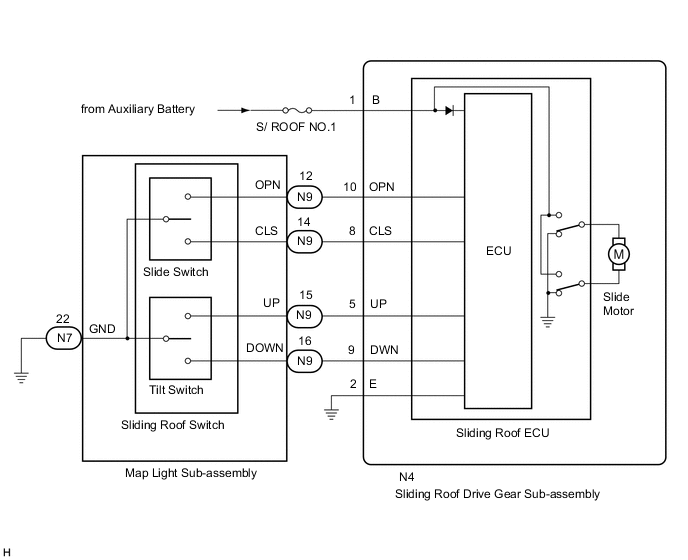
CAUTION / NOTICE / HINT
Note
-
Inspect the fuses for circuits related to this system before performing the following procedure.
-
If the sliding roof drive gear sub-assembly (sliding roof ECU) is replaced, the sliding roof drive gear sub-assembly (sliding roof ECU) must be initialized.
-
The sliding roof system uses the LIN communication system. First, confirm that there are no malfunctions in the LIN communication system. Refer to How to Proceed with Troubleshooting.
-
If a sliding roof drive gear sub-assembly (sliding roof ECU) DTC is output, first perform troubleshooting for the sliding roof drive gear sub-assembly (sliding roof ECU) DTC.
PROCEDURE
-
PERFORM ACTIVE TEST USING GTS (Slide Roof)
-
Perform the Active Test according to the display on the GTS.
Body Electrical > Sliding Roof > Active TestTester Display Measurement Item Control Range Diagnostic Note Slide Roof Operate sliding roof motor OFF / Opn/Dwn / Clos/Up -
Body Electrical > Sliding Roof > Active TestTester Display Slide Roof OK Slide roof is operated using GTS. Result Proceed to OK NG
OK 
REPLACE SLIDING ROOF DRIVE GEAR SUB-ASSEMBLY Click here
NG 
-
-
READ VALUE USING GTS (Open Switch, Close Switch, Up Switch, Down Switch)
-
Read the Data List according to the display on the GTS.
Body Electrical > Sliding Roof > Data ListTester Display Measurement Item Range Normal Condition Diagnostic Note Open Switch OPEN switch signal OFF or ON OFF: OPEN switch not pressed
ON: OPEN switch pressed
- Close Switch CLOSE switch signal OFF or ON OFF: CLOSE switch not pressed
ON: CLOSE switch pressed
- Up Switch UP switch signal OFF or ON OFF: UP switch not pressed
ON: UP switch pressed
- Down Switch DOWN switch signal OFF or ON OFF: DOWN switch not pressed
ON: DOWN switch pressed
-
Body Electrical > Sliding Roof > Data ListTester Display Open Switch Close Switch Up Switch Down Switch OK The GTS display changes according to switch operation as shown in the table. Result Proceed to OK NG
OK
REPLACE SLIDING ROOF DRIVE GEAR SUB-ASSEMBLY Click here
NG
-
-
INSPECT MAP LIGHT SUB-ASSEMBLY
-
Remove the map light sub-assembly (slide roof switch).
-
Inspect the map light sub-assembly (slide roof switch).
Result Proceed to OK NG
NG
REPLACE MAP LIGHT SUB-ASSEMBLY Click here
OK
-
-
CHECK HARNESS AND CONNECTOR (SLIDING ROOF DRIVE GEAR SUB-ASSEMBLY - MAP LIGHT SUB-ASSEMBLY AND BODY GROUND)
-
Disconnect the N4 sliding roof drive gear sub-assembly connector.
-
Disconnect the N7 and N9 map light sub-assembly connectors.
-
Measure the resistance according to the value(s) in the table below.
Standard Resistance Tester Connection Condition Specified Condition N4-10 (OPN) - N9-12 (OPN) Always Below 1 Ω N4-8 (CLS) - N9-14 (CLS) Always Below 1 Ω N4-9 (DWN) - N9-16 (DOWN) Always Below 1 Ω N4-5 (UP) - N9-15 (UP) Always Below 1 Ω N4-2 (E) - Body ground Always Below 1 Ω N7-22 (GND) - Body ground Always Below 1 Ω N4-10 (OPN) or N9-12 (OPN) - Body ground Always 10 kΩ or higher N4-8 (CLS) or N9-14 (CLS) - Body ground Always 10 kΩ or higher N4-9 (DWN) or N9-16 (DOWN) - Body ground Always 10 kΩ or higher N4-5 (UP) or N9-15 (UP) - Body ground Always 10 kΩ or higher Result Proceed to OK NG
OK
REPLACE SLIDING ROOF DRIVE GEAR SUB-ASSEMBLY Click here
NG
REPAIR OR REPLACE HARNESS OR CONNECTOR
-