PROCEDURE
- Click here
INSPECT POWER WINDOW REGULATOR MOTOR ASSEMBLY LH
Note:
-
Do not apply positive (+) auxiliary battery voltage to any terminals, except terminal K15-2 (B), to avoid damaging the pulse sensor inside the motor.
-
Perform initialization of the power window system after removing, inspecting or replacing the power window regulator motor assembly LH.
-
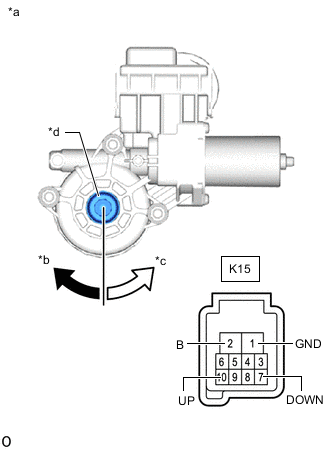
*a Component without harness connected
(Power Window Regulator Motor Assembly LH)
*b Clockwise *c Counterclockwise *d Motor Gear Check that the motor gear rotates smoothly as follows.
Table 1. OK: Tester Connection Specified Condition
-
Connect the positive (+) lead of the auxiliary battery to terminal K15-2 (B) and the negative (-) lead to terminal K15-1 (GND), and hold for 3 seconds or more.
-
While terminals K15-2 (B) and K15-1 (GND) are connected, connect the negative (-) lead of the auxiliary battery to terminal K15-10 (UP).
-
After disconnecting the negative (-) lead of the auxiliary battery from terminal K15-10 (UP), connect terminal K15-10 (UP) to the negative (-) lead of the auxiliary battery again within 1 second.
Motor gear rotates counterclockwise (UP)
-
Connect the positive (+) lead of the auxiliary battery to terminal K15-2 (B) and the negative (-) lead to terminal K15-1 (GND), and hold for 3 seconds or more.
-
While terminals K15-2 (B) and K15-1 (GND) are connected, connect the negative (-) lead of the auxiliary battery to terminal K15-7 (DOWN).
-
After disconnecting the negative (-) lead of the auxiliary battery from terminal K15-7 (DOWN), connect terminal K15-7 (DOWN) to the negative (-) lead of the auxiliary battery again within 1 second.
Motor gear rotates clockwise (DOWN) If the result is not as specified, replace the power window regulator motor assembly LH.
-
-
- Click here
INSPECT POWER WINDOW REGULATOR MOTOR ASSEMBLY RH
Note:
-
Do not apply positive (+) auxiliary battery voltage to any terminals, except terminal K1-2 (B), to avoid damaging the pulse sensor inside the motor.
-
Perform initialization of the power window system after removing, inspecting or replacing the power window regulator motor assembly RH.
-
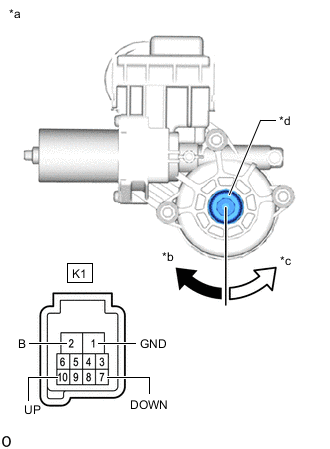
*a Component without harness connected
(Power Window Regulator Motor Assembly RH)
*b Clockwise *c Counterclockwise *d Motor Gear Check that the motor gear rotates smoothly as follows.
Table 2. OK: Tester Connection Specified Condition
-
Connect the positive (+) lead of the auxiliary battery to terminal K1-2 (B) and the negative (-) lead to terminal K1-1 (GND), and hold for 3 seconds or more.
-
While terminals K1-2 (B) and K1-1 (GND) are connected, connect the negative (-) lead of the auxiliary battery to terminal K1-10 (UP).
-
After disconnecting the negative (-) lead of the auxiliary battery from terminal K1-10 (UP), connect terminal K1-10 (UP) to the negative (-) lead of the auxiliary battery again within 1 second.
Motor gear rotates clockwise (UP)
-
Connect the positive (+) lead of the auxiliary battery to terminal K1-2 (B) and the negative (-) lead to terminal K1-1 (GND), and hold for 3 seconds or more.
-
While terminals K1-2 (B) and K1-1 (GND) are connected, connect the negative (-) lead of the auxiliary battery to terminal K1-7 (DOWN).
-
After disconnecting the negative (-) lead of the auxiliary battery from terminal K1-7 (DOWN), connect terminal K1-7 (DOWN) to the negative (-) lead of the auxiliary battery again within 1 second.
Motor gear rotates counterclockwise (DOWN) If the result is not as specified, replace the power window regulator motor assembly RH.
-
-