PROCEDURE
- Click here
INSTALL NO. 2 ECM BRACKET
-
Install the No. 2 ECM bracket to the ECM with the 2 bolts.
4.5 N*m 46 kgf*cm 40 in.*lbf Note:If the ECM has been struck or dropped, replace it.
-
- Click here
INSTALL NO. 1 ECM BRACKET
-
Install the No. 1 ECM bracket to the ECM with the 2 bolts.
4.5 N*m 46 kgf*cm 40 in.*lbf Note:If the ECM has been struck or dropped, replace it.
-
- Click here
INSTALL ECM
-
Install the ECM with the 2 nuts.
8.0 N*m 82 kgf*cm 71 in.*lbf Note:If the ECM has been struck or dropped, replace it.
-
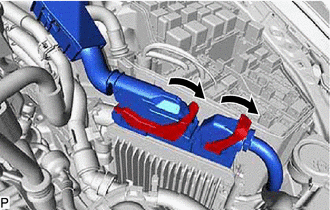
Connect the 2 connectors to the ECM and push down the lever to lock it.
Note:
-
When connecting the connectors, make sure that dirt, water or other foreign matter does not become stuck between the connectors and other parts.
-
Make sure that the 2 levers are securely locked.
-
-
- Click here
INSTALL LOWER RADIATOR AIR DEFLECTOR
- Click here
INSTALL UPPER RADIATOR SUPPORT SEAL
- Click here
INSTALL RADIATOR COVER PLATE
- Click here
CONNECT CABLE TO NEGATIVE AUXILIARY BATTERY TERMINAL
Note:When disconnecting the cable, some systems need to be initialized after the cable is reconnected.