PROCEDURE
- Click here
REMOVE FORWARD RECOGNITION CAMERA
- Click here
REMOVE FORWARD RECOGNITION WITH HEATER HOOD SUB-ASSEMBLY
Note: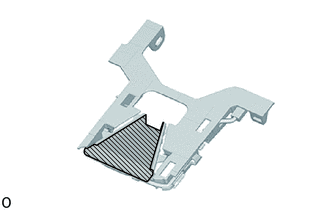
Do not touch the internal components of the forward recognition with heater hood sub-assembly or press on the heater when working on the forward recognition with heater hood sub-assembly.
-
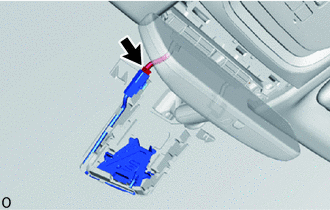
Disconnect the connector.
Note:When disconnecting the connector, do not forcibly pull the wire harness.
-
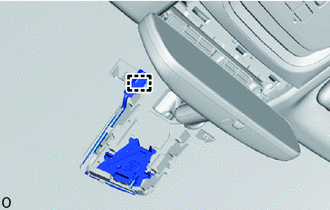
Detach the connector clamp.
-
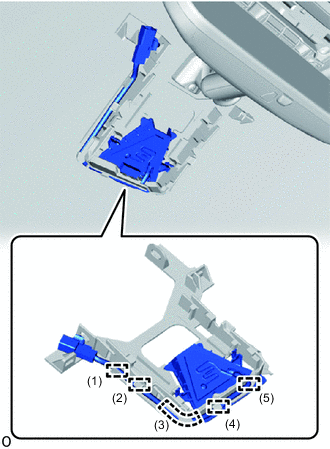
Remove the wire harness from the guide as shown in the illustration.
-
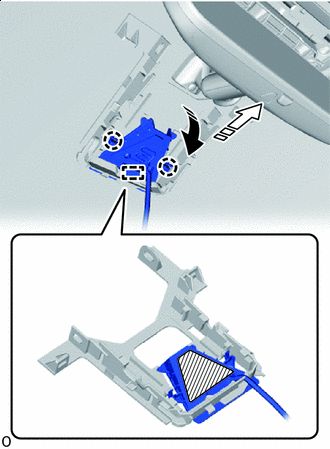

Remove in this Direction (1) 
Remove in this Direction (2) 
Heater Area Pull the forward recognition with heater hood sub-assembly in the direction indicated by the arrow (1) in the illustration to detach the claw.
Note:Do not press the heater area.
-
Pull the forward recognition with heater hood sub-assembly in the direction indicated by the arrow (2) in the illustration to detach the guide and remove the forward recognition with heater hood sub-assembly.
-