REAR BUMPER REASSEMBLY
PROCEDURE
-
INSTALL REAR BUMPER REINFORCEMENT SUB-ASSEMBLY (for Reinforcement Type A)
-
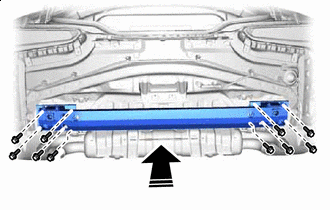

Install in this Direction Install the rear bumper reinforcement sub-assembly with the 10 bolts.
- Torque:
- 20 N*m { 204 kgf*cm, 15 ft.*lbf }
-
-
INSTALL REAR BUMPER ENERGY ABSORBER (for Reinforcement Type A)
-
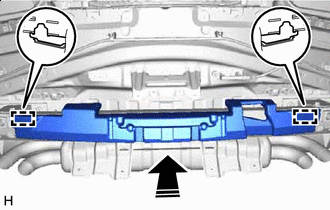
Install in this Direction Attach the guides to install the rear bumper energy absorber.
-
-
INSTALL REAR BUMPER REINFORCEMENT SUB-ASSEMBLY (for Reinforcement Type B)
-
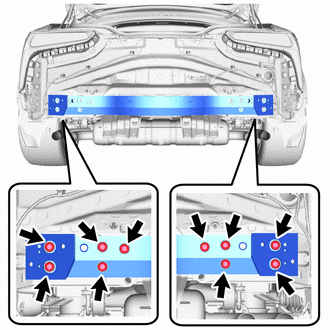
Install the rear bumper reinforcement sub-assembly with the 10 bolts.
- Torque:
- 20 N*m { 204 kgf*cm, 15 ft.*lbf }
-
-
INSTALL REAR BUMPER ENERGY ABSORBER (for Reinforcement Type B)
-

Attach the guides and claws to install the rear bumper energy absorber.
-
-
INSTALL REAR BUMPER BAR REINFORCEMENT LH (for Reinforcement Type B)
-
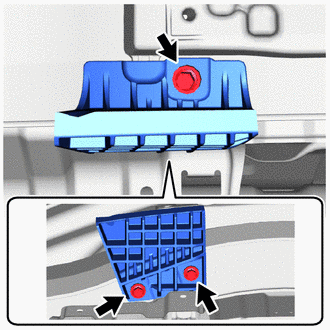
Install the rear bumper bar reinforcement LH with the 3 bolts.
- Torque:
- 23 N*m { 235 kgf*cm, 17 ft.*lbf }
-
-
INSTALL REAR BUMPER BAR REINFORCEMENT RH (for Reinforcement Type B)
Tech Tips
Use the same procedure described for the LH side.
-
INSTALL REAR BUMPER ARM REINFORCEMENT LH (for Reinforcement Type B)
-

Attach the guide.
-
Install the rear bumper arm reinforcement LH with 2 bolts.
-
-
INSTALL REAR BUMPER ARM REINFORCEMENT RH (for Reinforcement Type B)
Tech Tips
Use the same procedure described for the LH side.
-
INSTALL REAR BUMPER NO. 1 SIDE SUPPORT LH
-
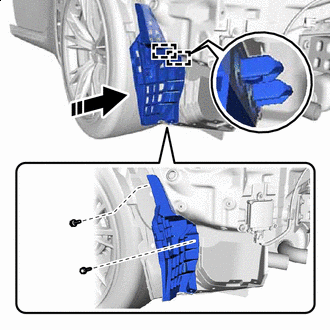
Install in this Direction Attach the guides and install the rear bumper No. 1 side support LH with the 2 screws.
-

Install the 2 grommets.
-
-
INSTALL REAR BUMPER NO. 1 SIDE SUPPORT RH
Tech Tips
Use the same procedure described for the LH side.
-
INSTALL REAR BUMPER NO. 4 SIDE SUPPORT LH
-
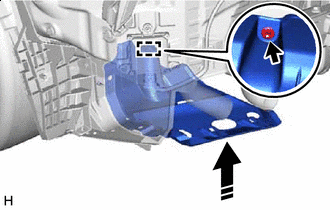
Install in this Direction Temporarily install the rear bumper No. 4 side support LH with the grommet.
-
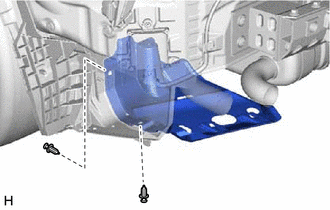
Install the rear bumper No. 4 side support LH with the 2 clips.
-
-
INSTALL REAR BUMPER NO. 4 SIDE SUPPORT RH
Tech Tips
Use the same procedure described for the LH side.
-
INSTALL REAR BUMPER NO. 2 SIDE SUPPORT LH
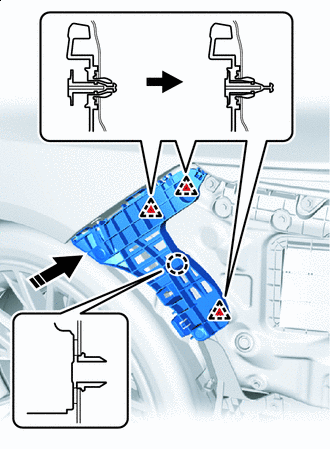
Install in this Direction
-
Attach the claw.
-
Attach the clips to install the rear bumper No. 2 side support LH.
-
-
INSTALL REAR BUMPER NO. 2 SIDE SUPPORT RH
Tech Tips
Use the same procedure described for the LH side.
-
INSTALL REAR BUMPER NO. 2 PAD
Tech Tips
When installing the rear bumper No. 2 pad, heat the rear bumper corner extension LH using a heat light.
Standard Item Temperature Rear Bumper Corner Extension LH 20 to 30°C (68 to 86°F) Note
Do not heat the rear bumper corner extension LH excessively.
-
When reusing the rear bumper corner extension LH:
-
Using a heat light, heat the rear bumper corner extension LH installation surface.
-
Remove the double-sided tape from the rear bumper corner extension LH.
-
Wipe off any tape adhesive residue with cleaner.
-
-
Using a heat light, heat the rear bumper corner extension LH.
-
Remove the peeling paper from a new rear bumper No. 2 pad.
-
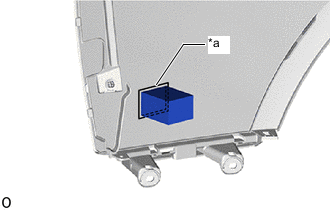
*a Mark-off Line Align the rear bumper No. 2 pad with the mark-off line of the rear bumper corner extension LH.
Tech Tips
-
Press the rear bumper No. 2 pad firmly to install it.
-
Use the same procedure for the RH side and LH side.
-
-
-
INSTALL REAR BUMPER NO. 3 PAD
Tech Tips
When installing the rear bumper No. 3 pad, heat the rear bumper corner extension LH using a heat light.
Standard Item Temperature Rear Bumper Corner Extension LH 20 to 30°C (68 to 86°F) Note
Do not heat the rear bumper corner extension LH excessively.
-
When reusing the rear bumper corner extension LH:
-
Using a heat light, heat the rear bumper corner extension LH installation surface.
-
Remove the double-sided tape from the rear bumper corner extension LH.
-
Wipe off any tape adhesive residue with cleaner.
-
-
Using a heat light, heat the rear bumper corner extension LH.
-
Remove the peeling paper from a new rear bumper No. 3 pad.
-
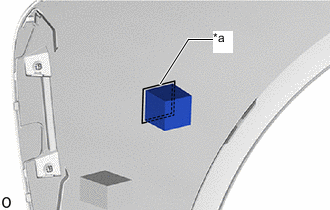
*a Mark-off Line Align the rear bumper No. 3 pad with the mark-off line of the rear bumper corner extension LH.
Tech Tips
-
Press the rear bumper No. 3 pad firmly to install it.
-
Use the same procedure for the RH side and LH side.
-
-
-
INSTALL REAR BUMPER PAD INSERT
Tech Tips
When installing the rear bumper pad insert, heat the rear bumper corner extension LH using a heat light.
Standard Item Temperature Rear Bumper Corner Extension LH 20 to 30°C (68 to 86°F) Note
Do not heat the rear bumper corner extension LH excessively.
-
When reusing the rear bumper corner extension LH:
-
Using a heat light, heat the rear bumper corner extension LH installation surface.
-
Remove the double-sided tape from the rear bumper corner extension LH.
-
Wipe off any tape adhesive residue with cleaner.
-
-
Using a heat light, heat the rear bumper corner extension LH.
-
Remove the peeling paper from a new rear bumper pad insert.
-
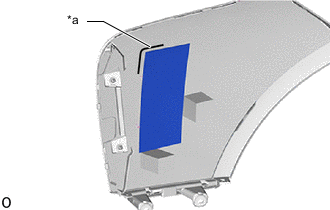
*a Mark-off Line Align the rear bumper pad insert with the mark-off line of the rear bumper corner extension LH.
Tech Tips
-
Press the rear bumper pad insert firmly to install it.
-
Use the same procedure for the RH side and LH side.
-
-
-
INSTALL REAR BUMPER CORNER EXTENSION LH
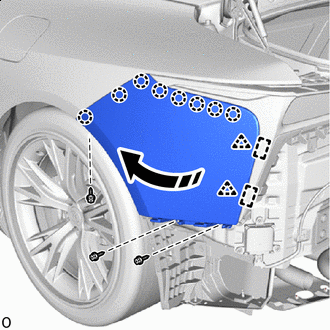
Turn Direction
-
Attach the guides, turn the rear bumper corner extension LH with the guides as a starting point and install the clips.
-
Attach the claws.
-
Install the rear bumper corner extension LH with the 3 screws.
-
-
INSTALL REAR BUMPER CORNER EXTENSION RH
Tech Tips
Use the same procedure described for the LH side.
-
INSTALL REAR BUMPER EXTENSION
-
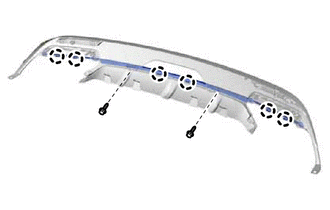
Attach the claws.
-
Install the rear bumper extension with the 2 screws.
-
-
INSTALL REAR BUMPER EXTENSION LH
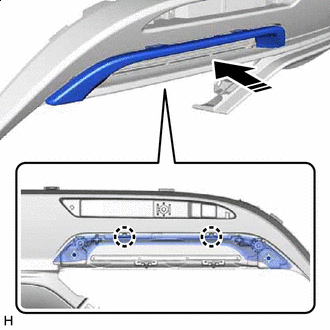
Install in this Direction
-
Attach the claws to install the rear bumper extension LH.
-

Install the 2 screws.
-
-
INSTALL REAR BUMPER EXTENSION RH
Tech Tips
Use the same procedure described for the LH side.
-
INSTALL REFLEX REFLECTOR ASSEMBLY LH
-
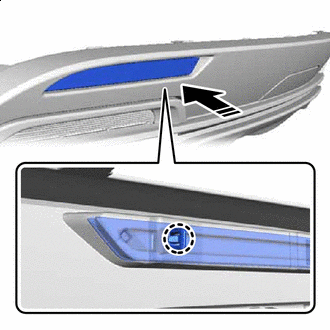
Install in this Direction Attach the claw.
-
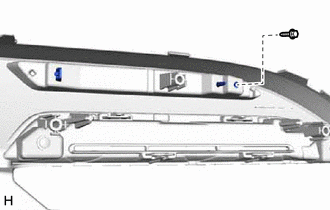
Install the reflex reflector assembly LH with the screw.
-
-
INSTALL REFLEX REFLECTOR ASSEMBLY RH
Tech Tips
Use the same procedure described for the LH side.
-
INSTALL REAR BUMPER PAD (w/ Rear Bumper Pad)
Tech Tips
When installing the rear bumper pad, heat the rear bumper cover using a heat light.
Standard Item Temperature Rear Bumper Cover 20 to 30°C (68 to 86°F) Note
Do not heat the rear bumper cover excessively.
-
When reusing the rear bumper cover:
-
Using a heat light, heat the rear bumper cover installation surface.
-
Remove the double-sided tape from the rear bumper cover.
-
Wipe off any tape adhesive residue with cleaner.
-
-
Using a heat light, heat the rear bumper cover.
-
Remove the peeling paper from a new rear bumper pad.
-
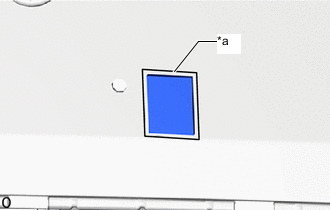
*a Mark-off Line Align the rear bumper pad with the mark-off line of the rear bumper cover.
Tech Tips
-
Press the rear bumper pad firmly to install it.
-
Use the same procedure for the RH side and LH side.
-
-
-
INSTALL REAR BUMPER NO. 1 PAD
Tech Tips
When installing the rear bumper No. 1 pad, heat the rear bumper cover using a heat light.
Standard Item Temperature Rear Bumper Cover 20 to 30°C (68 to 86°F) Note
Do not heat the rear bumper cover excessively.
-
When reusing the rear bumper cover:
-
Using a heat light, heat the rear bumper cover installation surface.
-
Remove the double-sided tape from the rear bumper cover.
-
Wipe off any tape adhesive residue with cleaner.
-
-
Using a heat light, heat the rear bumper cover.
-
Remove the peeling paper from a new rear bumper No. 1 pad.
-
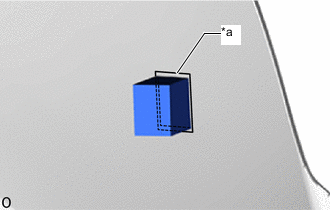
*a Mark-off Line Align the rear bumper No. 1 pad with the mark-off line of the rear bumper cover.
Tech Tips
-
Press the rear bumper No. 1 pad firmly to install it.
-
Use the same procedure for the RH side and LH side.
-
-
-
INSTALL REAR BUMPER CENTER PAD
Tech Tips
When installing the rear bumper center pad, heat the rear bumper cover using a heat light.
Standard Item Temperature Rear Bumper Cover 20 to 30°C (68 to 86°F) Note
Do not heat the rear bumper cover excessively.
-
When reusing the rear bumper cover:
-
Using a heat light, heat the rear bumper cover installation surface.
-
Remove the double-sided tape from the rear bumper cover.
-
Wipe off any tape adhesive residue with cleaner.
-
-
Using a heat light, heat the rear bumper cover.
-
Remove the peeling paper from a new rear bumper center pad.
-
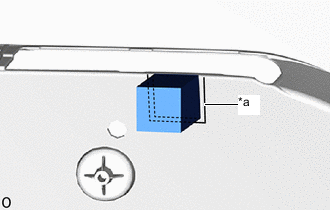
*a Mark-off Line Align the rear bumper center pad with the mark-off line of the rear bumper cover.
Tech Tips
-
Press the rear bumper center pad firmly to install it.
-
Use the same procedure for the RH side and LH side.
-
-
-
INSTALL REAR BUMPER CENTER EXTENSION SUB-ASSEMBLY
-
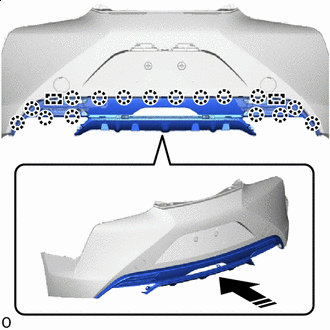
Install in this Direction Attach the guides and claws as shown in the illustration.
-
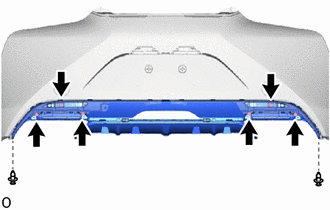
Install the 2 clips.
-
Install the rear bumper center extension sub-assembly with the 6 screws.
-
-
INSTALL REAR BUMPER EXTENSION SUB-ASSEMBLY LH
-
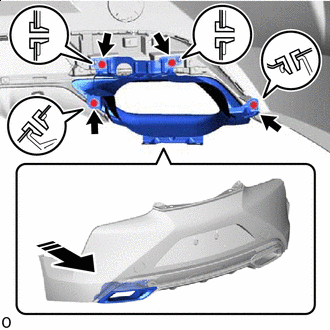
Install in this Direction Temporarily install the rear bumper extension sub-assembly LH with the 4 grommets.
-
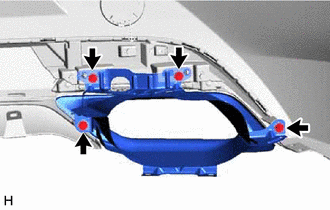
Install the rear bumper extension sub-assembly LH with the 4 screws.
-
-
INSTALL REAR BUMPER EXTENSION SUB-ASSEMBLY RH
Tech Tips
Use the same procedure described for the LH side.
-
INSTALL REAR BUMPER PIECE LH
-
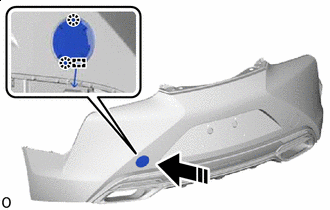
Install in this Direction Install the anti-drop hook.
-
Attach the claws to install the rear bumper piece LH.
-
-
INSTALL REAR BUMPER PIECE RH
Tech Tips
Use the same procedure described for the LH side.
-
INSTALL NO. 1 MOULDING TAPE
Tech Tips
When installing the No. 1 moulding tape, heat the rear bumper cover using a heat light.
Standard Item Temperature Rear Bumper Cover 20 to 30°C (68 to 86°F) Note
Do not heat the rear bumper cover excessively.
-
When reusing the rear bumper cover:
-
Using a heat light, heat the rear bumper cover installation surface.
-
Remove the double-sided tape from the rear bumper cover.
-
Wipe off any tape adhesive residue with cleaner.
-
-
Using a heat light, heat the rear bumper cover.
-
Remove the peeling paper from a new No. 1 moulding tape.
-
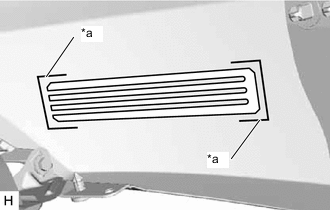
*a Mark-off Line Align the No. 1 moulding tape with the mark-off line of the rear bumper cover.
Tech Tips
-
Press the No. 1 moulding tape firmly to install it.
-
Use the same procedure for the RH side and LH side.
-
-
Remove the application tape.
-
-
INSTALL LICENSE PLATE LIGHT SUB-ASSEMBLY
-

Attach the claws to install the license plate light sub-assembly.
-
Install the retainer.
-
-
INSTALL BACK-UP LIGHT ASSEMBLY
-
INSTALL ULTRASONIC SENSOR CLIP
-
INSTALL REAR CORNER ULTRASONIC SENSOR RETAINER
-
INSTALL REAR CORNER ULTRASONIC SENSOR
-
INSTALL REAR CENTER ULTRASONIC SENSOR RETAINER
Tech Tips
Use the same procedure described for the rear corner ultrasonic sensor retainer.
-
INSTALL REAR CENTER ULTRASONIC SENSOR
Tech Tips
Use the same procedure described for the rear center ultrasonic sensor.
-
INSTALL NO. 3 LUGGAGE ROOM WIRE