AIR CONDITIONING SYSTEM, Diagnostic DTC:B1455
| DTC Code | DTC Name |
|---|---|
| B1455 | Air Outlet Damper FOOT/DEF Control Servo Motor Circuit (Passenger Side) |
DESCRIPTION
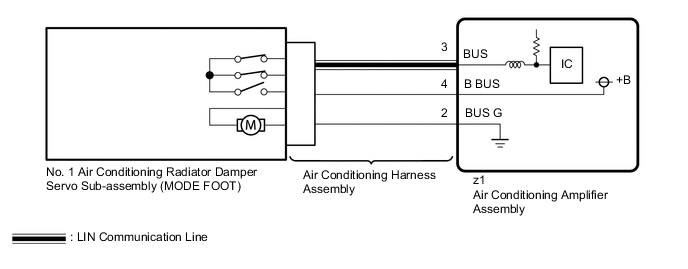
The No. 3 air conditioning radiator damper servo sub-assembly (MODE FOOT) (for LHD) or the No. 1 air conditioning radiator damper servo sub-assembly (MODE FOOT) (for RHD) sends pulse signals to inform the air conditioning amplifier assembly of the damper position. The air conditioning amplifier assembly activates the motor (normal or reverse) based on these signals to move the No. 3 air conditioning radiator damper servo sub-assembly (MODE FOOT) (for LHD) or the No. 1 air conditioning radiator damper servo sub-assembly (MODE FOOT) (for RHD) to the appropriate position, which controls the air outlet switching.
The air conditioning amplifier assembly communicates with the servo through a communication/driver IC and wiring assembly called the air conditioning harness assembly.
| DTC No. | Detection Item | DTC Detection Condition | Trouble Area | Memory |
|---|---|---|---|---|
| B1455 | Air Outlet Damper FOOT/DEF Control Servo Motor Circuit (Passenger Side) |
|
|
Memorized |
| Vehicle Condition | |||
|---|---|---|---|
| Pattern 1 | Pattern 2 | ||
| Diagnosis Condition | During No. 3 air conditioning radiator damper servo sub-assembly (MODE FOOT) (for LHD) or the No. 1 air conditioning radiator damper servo sub-assembly (MODE FOOT) (for RHD) operation | ○ | ○ |
| Malfunction Status | The damper servo operation request signal is output but the position information of the servo does not change | ○ | - |
| The damper servo operation request signal is output but the position information of the servo is malfunctioning | - | ○ | |
| Detection Time | Continuously for 30 seconds or more | Continuously for 30 seconds or more | |
| Trip Count | 1 trip | 1 trip | |
Tech Tips
If the conditions match either of these patterns, a DTC will be output.
WIRING DIAGRAM
Figure 1. for LHD:
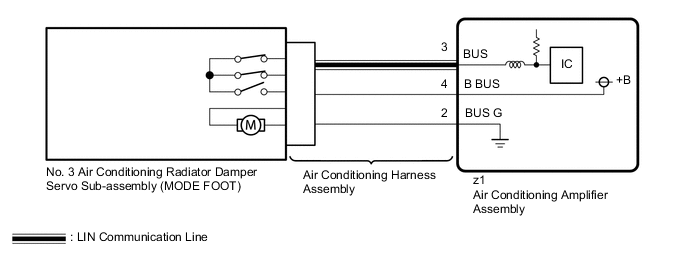
Figure 2. for RHD:
CAUTION / NOTICE / HINT
Note
-
When DTC B1443 and B1455 are output at same time, there would be malfunctioning on No. 3 air conditioning radiator damper servo sub-assembly (for LHD) or No. 1 air conditioning radiator damper servo sub-assembly (for RHD).
-
Confirm that no mechanical problem is present because this diagnostic code can be output when either a damper link or the damper is mechanically locked.
-
When installing the damper servo motor, make sure to install it correctly.
-
When the servo motor is replaced, be sure to perform servo motor initialization.
PROCEDURE
-
CHECK FOR DTC
-
Check for DTCs.
Body Electrical > Air Conditioner > Trouble CodesResult Result Proceed to DTC B1455 is output (for LHD) A DTC B1455 is output (for RHD) B DTC B1455 and B1497 are output C
B 
CHECK NO. 1 AIR CONDITIONING RADIATOR DAMPER SERVO SUB-ASSEMBLY Click here
C 
GO TO DTC B1497 Click here
A 
-
-
CHECK NO. 3 AIR CONDITIONING RADIATOR DAMPER SERVO SUB-ASSEMBLY
-
Check for No. 3 air conditioning radiator damper servo sub-assembly is installed correctly.
OK No. 3 air conditioning radiator damper servo sub-assembly is installed correctly. Result Proceed to OK NG
NG
REINSTALL NO. 3 AIR CONDITIONING RADIATOR DAMPER SERVO SUB-ASSEMBLY Click here
OK
-
-
CHECK NO. 3 AIR CONDITIONING RADIATOR DAMPER SERVO SUB-ASSEMBLY (MOTOR, LINK, DAMPER)
-
Check for a wire harness caught between the links of the motors and dampers.
OK No wire harnesses are caught between the links of the motors and dampers. Result Proceed to OK NG
NG
REMOVE PINCHED WIRE HARNESS
OK
-
-
CHECK AIR CONDITIONING RADIATOR ASSEMBLY (DAMPER)
-
Remove the No. 3 air conditioning radiator damper servo sub-assembly.
-
Operate the dampers by hand.
OK The dampers are easily operated by hand. Result Proceed to OK NG
NG
REPAIR OR REPLACE AIR CONDITIONING RADIATOR ASSEMBLY
OK
-
-
PERFORM ACTIVE TEST USING GTS (FACE A/O SERVO PULSE(D))
-
Remove the No. 3 air conditioning radiator damper servo sub-assembly.
-
Connect the No. 3 air conditioning radiator damper servo sub-assembly (MODE FACE) connector to No. 3 air conditioning radiator damper servo sub-assembly (MODE FOOT).
-
Connect the GTS to the DLC3.
-
Turn the power switch on (IG).
-
Turn the GTS on.
-
Enter the following menus: Body Electrical / Air Conditioner / Active Test.
-
Check the operation by referring to the table below.
Body Electrical > Air Conditioner > Active TestTester Display Measurement Item Control Range Restrict Condition Face A/O Servo Pulse(D) No. 3 air conditioning radiator damper servo sub-assembly (MODE FACE) operation* Min.: 128
Max.: 383
Operates between 258 and 364 pulses
-
*: Actually operates the No. 3 air conditioning radiator damper servo sub-assembly (MODE FOOT).
Body Electrical > Air Conditioner > Active TestTester Display Face A/O Servo Pulse(D) OK No. 3 air conditioning radiator damper servo sub-assembly (MODE FOOT) is operated. Result Proceed to OK NG -
OK
REPLACE AIR CONDITIONING HARNESS ASSEMBLY Click here
NG
-
-
CHECK NO. 3 AIR CONDITIONING RADIATOR DAMPER SERVO SUB-ASSEMBLY
-
Interchange the MODE FOOT servo motor with MODE FACE servo motor and connect the connectors to them.
-
Clear the DTCs.
-
Check for DTCs.
Result Result Proceed to DTC B1443 is output A DTC B1455 is output B DTCs are not output C Tech Tips
Codes other than DTC B1443 and B1455 may be output at this time, but they are not related to this check.
A
REPLACE NO. 3 AIR CONDITIONING RADIATOR DAMPER SERVO SUB-ASSEMBLY Click here
B
REPLACE AIR CONDITIONING AMPLIFIER ASSEMBLY Click here
C
USE SIMULATION METHOD TO CHECK Click here
-
-
CHECK NO. 1 AIR CONDITIONING RADIATOR DAMPER SERVO SUB-ASSEMBLY
-
Check for No. 1 air conditioning radiator damper servo sub-assembly is installed correctly.
OK No. 1 air conditioning radiator damper servo sub-assembly is installed correctly. Result Proceed to OK NG
NG
REINSTALL NO. 1 AIR CONDITIONING RADIATOR DAMPER SERVO SUB-ASSEMBLY Click here
OK
-
-
CHECK NO. 1 AIR CONDITIONING RADIATOR DAMPER SERVO SUB-ASSEMBLY (MOTOR, LINK, DAMPER)
-
Check for a wire harness caught between the links of the motors and dampers.
OK No wire harnesses are caught between the links of the motors and dampers. Result Proceed to OK NG
NG
REMOVE PINCHED WIRE HARNESS
OK
-
-
CHECK AIR CONDITIONING RADIATOR ASSEMBLY (DAMPER)
-
Remove the No. 1 air conditioning radiator damper servo sub-assembly.
-
Operate the dampers by hand.
OK The dampers are easily operated by hand. Result Proceed to OK NG
NG
REPAIR OR REPLACE AIR CONDITIONING RADIATOR ASSEMBLY
OK
-
-
PERFORM ACTIVE TEST USING GTS (FACE A/O SERVO PULSE(D))
-
Remove the No. 1 air conditioning radiator damper servo sub-assembly.
-
Connect the No. 1 air conditioning radiator damper servo sub-assembly (MODE FACE) connector to No. 1 air conditioning radiator damper servo sub-assembly (MODE FOOT).
-
Connect the GTS to the DLC3.
-
Turn the power switch on (IG).
-
Turn the GTS on.
-
Enter the following menus: Body Electrical / Air Conditioner / Active Test.
-
Check the operation by referring to the table below.
Body Electrical > Air Conditioner > Active TestTester Display Measurement Item Control Range Restrict Condition Face A/O Servo Pulse(D) No. 1 air conditioning radiator damper servo sub-assembly (MODE FACE) operation* Min.: 128
Max.: 383
Operates between 258 and 364 pulses
-
*: Actually operates the No. 1 air conditioning radiator damper servo sub-assembly (MODE FOOT).
Body Electrical > Air Conditioner > Active TestTester Display Face A/O Servo Pulse(D) OK No. 1 air conditioning radiator damper servo sub-assembly (MODE FOOT) is operated. Result Proceed to OK NG -
OK
REPLACE AIR CONDITIONING HARNESS ASSEMBLY Click here
NG
-
-
CHECK NO. 1 AIR CONDITIONING RADIATOR DAMPER SERVO SUB-ASSEMBLY
-
Interchange the MODE FOOT servo motor with MODE FACE servo motor and connect the connectors to them.
-
Clear the DTCs.
-
Check for DTCs.
Result Result Proceed to DTC B1443 is output A DTC B1455 is output B DTCs are not output C Tech Tips
Codes other than DTC B1443 and B1455 may be output at this time, but they are not related to this check.
A
REPLACE NO. 1 AIR CONDITIONING RADIATOR DAMPER SERVO SUB-ASSEMBLY Click here
B
REPLACE AIR CONDITIONING AMPLIFIER ASSEMBLY Click here
C
USE SIMULATION METHOD TO CHECK Click here
-