FRONT POWER SEAT CONTROL SYSTEM OPERATION CHECK
-
CHECK POWER SEAT FUNCTION
-
Check the basic functions.
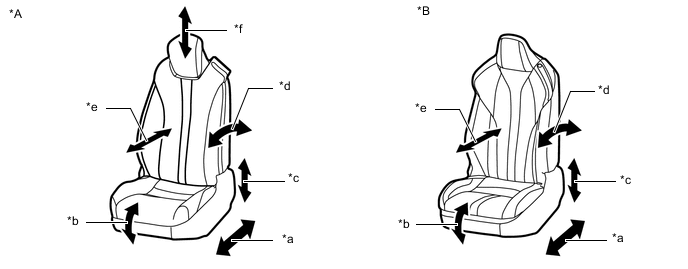
*A for Standard Seat Type *B for Sports Seat Type *a Slide Function *b Front Vertical Function *c Rear Lifter Function *d Reclining Function *e Lumbar Support Adjustment Function *f Headrest Adjustment Function
-
Operate the front power seat switches and check that the following seat functions operate properly:
-
Slide function
-
Reclining function
-
Rear lifter function
-
Front vertical function
-
Lumbar support adjustment function
-
Headrest adjustment function*
-
*: for Standard Seat Type
-
-
-
-
CHECK POWER SEAT MOTOR (SLIDING, FRONT VERTICAL, LIFTER AND RECLINING FUNCTIONS)
-
Check the PTC operation inside the power seat motor.
Note
-
The inspection should be performed with the seat installed in the vehicle.
-
Perform the 4 steps below to check the full range of motion for each power seat function.
Tech Tips
The resistance of the PTC thermistor increases when a switch of the front power seat switch is held down even after the seat has been moved to the farthest possible position in one direction. If the resistance increases beyond a specified level, the current is shut off to prevent a short circuit.
-
Choose a power seat function. Operate a switch of the front power seat switch and move the seat to the farthest possible position in one direction. Keep the seat in that position for approximately 60 seconds.
-
Operate the front power seat switch again and continue to try to move the seat in the same direction as in the previous step. Measure the time until the current is shut off (motor operation sound will stop).
-
After the current is shut off, release the front power seat switch and wait for approximately 60 seconds.
-
Operate the same front power seat switch and move the seat in the opposite direction. Check that the motor operates.
-
-
-
CHECK LUMBAR SUPPORT ADJUSTMENT MOTOR
-
Check the PTC operation inside the lumbar support adjustment motor.
Note
The inspection should be performed with the seat installed in the vehicle.
-
Operate the front lumbar power seat switch and move the lumbar support to either the foremost or rearmost position. Keep the seat in that position for approximately 60 seconds.
-
Operate the front lumbar power seat switch again and continue to try to move the lumbar support in the same direction as in the previous step. Measure the time until the current is shut off (motor operation sound will stop).
-
After the current is shut off, release the front lumbar power seat switch and wait for approximately 60 seconds.
-
Operate the front lumbar power seat switch and move the lumbar support in the opposite direction. Check that the motor operates.
-
-
-
CHECK SEAT POSITION MEMORY AND RESTORING FUNCTION
Tech Tips
-
The SET, M1, M2 and M3 seat memory switches are shown in the illustration.
-
The seat position will not be stored if the SET switch and 2 or more of the seat memory switches (for example, M1 switch and M2 switch) are pressed simultaneously.
If a memorizing operation has failed, release all switches. The seat memory function does not operate unless the switches are released.
-
The seat will not return to the memorized position if 2 or more of the seat memory switches (for example, M1 switch and M2 switch) are pressed simultaneously.
If a restoring operation has failed, release all switches. The seat memory restoring function does not operate unless the switches are released.
-
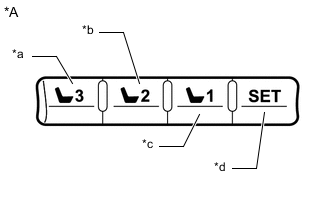
*A for LHD *a M3 Switch *b M2 Switch *c M1 Switch *d SET Switch 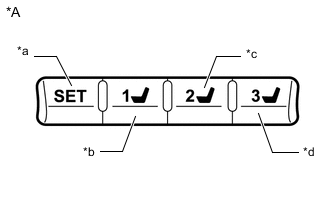
*A for RHD *a SET Switch *b M1 Switch *c M2 Switch *d M3 Switch Turn the power switch on (IG) and check that the P position indicator is on.
-
Move the seat to the foremost and uppermost positions using the front power seat switch (for Driver Seat).
-
Check that the buzzer sounds for 0.5 seconds and the seat position is memorized when the M1 switch is pressed within 3 seconds of the SET switch being pressed or the M1 switch is pressed while the SET switch is being pressed.
-
Move the seat out of the foremost and uppermost positions using the front power seat switch (for Driver Seat).
-
Check that the buzzer sounds for 0.5 seconds and the seat position is memorized when the M2 switch is pressed within 3 seconds of the SET switch being pressed or the M2 switch is pressed while the SET switch is being pressed.
-
Move the seat to the rearmost and lowermost positions using the front power seat switch (for Driver Seat).
-
Check that the buzzer sounds for 0.5 seconds and the seat position is memorized when the M3 switch is pressed within 3 seconds of the SET switch being pressed or the M3 switch is pressed while the SET switch is being pressed.
-
Check that the buzzer sounds for 0.1 seconds and the seat automatically moves into the foremost and uppermost positions (memorized positions) when the M1 switch is pressed.
-
Check that the buzzer sounds for 0.1 seconds and the seat automatically moves out of the foremost and uppermost positions (memorized positions) when the M2 switch is pressed.
-
Check that the buzzer sounds for 0.1 seconds and the seat automatically moves into the rearmost and lowermost positions (memorized positions) when the M3 switch is pressed.
-
Turn the power switch off and open the driver door. Check that the buzzer sounds for 0.1 seconds and the seat automatically moves to the memorized position by pressing the M1, M2 or M3 switch within 180 seconds after the power switch is turned off.
-
Turn the power switch off and close the driver door. Check that the buzzer sounds for 0.1 seconds and the seat automatically moves to the memorized position by pressing the M1, M2 or M3 switch within 60 seconds after the power switch is turned off.
-
Operate the front vertical function of the front power seat switch (for Driver Seat) to tilt the seat down 3 times.
Within 10 seconds after operating the front vertical function of the front power seat switch (for Driver Seat), operate the lifter function of the front power seat switch (for Driver Seat) to tilt up and the reclining function of the front power seat switch (for Driver Seat) to recline the seat simultaneously. Hold both switches for 10 seconds.
Tech Tips
The buzzer sounds for 0.5 seconds when the memory is cleared.
-
-
CHECK MEMORY CALL FUNCTION
-
Automatic memory call function
-
With the identification code of the electrical key transmitter sub-assembly registered and the entry unlock function operated or wireless door unlock operation performed, check that the buzzer sounds for 0.1 seconds and the seat automatically moves to the memorized position when the driver door is opened.
-
-
-
EMERGENCY STOP FUNCTION
-
While a memory recall is operating, check that performing one of the following will stop the memory call operation: 1) press the SET switch, M1 switch, M2 switch or M3 switch or 2) press the front power seat switch (for Driver Seat).
-
-
CHECK ONE-TOUCH WALK-IN FUNCTION
Tech Tips
-
Make sure to initialize the position control ECU assembly after replacing the seat assembly or any related parts (including removal and installation).
-
When any of the following conditions are met, the seat position Information in the seat ECU will be cleared.
-
The power switch is turned off with any of the seat switches being operated and the D/C CUT fuse removed.
-
The power switch is turned off within 1 second of any of the seat switches being operated with the D/C CUT fuse removed.
-
Forward operation
-
When all of the following conditions are met, operate the reclining remote control lever sub-assembly and fold the front seatback frame sub-assembly forward, and check that the front seat assembly moves to the foremost position without contacting the roof headlining assembly:
-
The power switch is off or on (IG) and the shift lever is in P.
-
The driver seat belt is not fastened.
-
The front passenger seat belt is not fastened.
-
The occupant detection sensor is OFF (the occupant detection sensor detects that the seat is vacant).
Tech Tips
-
The movement of the front seat assembly varies depending on its original position.
-
If the front power seat switch (for Driver Seat) or seat memory switch*1, or position control ECU assembly RH*2 is operated during the forward operation, the forward operation will be stopped.
-
*1: for forward operation of the driver seat
-
*2: for forward operation of the front passenger seat
-
-
-
Return operation
-
When all of the following conditions are met, move the front seatback frame sub-assembly backward, and check that the front seat assembly moves to its original position without contacting the roof headlining assembly:
-
The power switch is off or on (IG) and the shift lever is in P.
-
The driver seat belt is not fastened.
-
The front passenger seat belt is not fastened.
-
The occupant detection sensor is OFF (the occupant detection sensor detects that the seat is vacant).
Tech Tips
-
The movement of the front seat assembly varies depending on its original position.
-
If the front power seat switch (for Driver Seat) or seat memory switch*1, or position control ECU assembly RH*2 is operated during the sliding motion of the return operation, the return operation will be stopped.
-
*1: for return operation of the driver seat
-
*2: for return operation of the front passenger seat
-
-
-
-
JAM PROTECTION FUNCTION
-
Operate the one-touch walk-in function, memory recall function or memory call function to automatically move the front seat assembly backwards. While the front seat assembly is moving backwards within the jam protection detection area, push a wooden block or equivalent object into the seatback of the front seat assembly at the seam shown in the illustration and check that the front seat assembly stops and then moves forward.
Note
Wrap the wooden block or equivalent object with a piece of cloth before use.
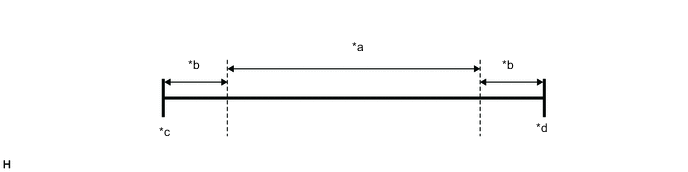
*a Jam Protection Detection Area *b 61 edge *c Front Seat Assembly Foremost Position *d Front Seat Assembly Rearmost Position
-