STEERING PAD INSTALLATION

CAUTION / NOTICE / HINT
Tech Tips
-
Use the same procedure as for the RHD and LHD vehicles.
-
The procedure listed below is for the LHD vehicles.
PROCEDURE
-
INSTALL HORN BUTTON ASSEMBLY
-
Check that the power switch is off.
-
Check that the cable is disconnected from the negative (-) auxiliary battery terminal.
CAUTION:
-
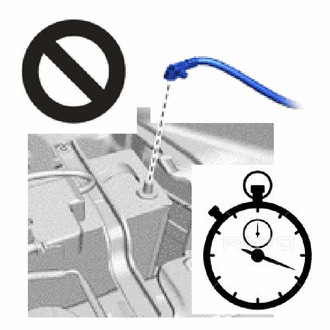
Wait at least 90 seconds after disconnecting the cable from the negative (-) auxiliary battery terminal to disable the SRS system.
-
If the airbag deploys for any reason, it may cause a serious accident.
-
-
Support the horn button assembly with one hand.
-
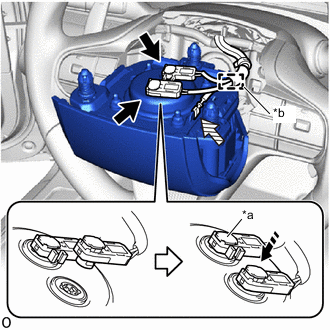
*a Lock Button *b Wire Harness Clamp 
Airbag Connector 
Horn Connector 
Push Attach the wire harness clamp.
-
Connect the 2 airbag connectors and lock the 2 lock buttons.
Note
-
When connecting any airbag connector, take care not to damage the airbag wire harness.
-
Be sure to connect the connectors to each corresponding color.
-
Make sure the lock button is securely locked.
-
-
Connect the horn connector.
-
Set the horn button assembly to the steering wheel assembly.
-
Check that the airbag wire harness and horn wire harness are not pinched.
-
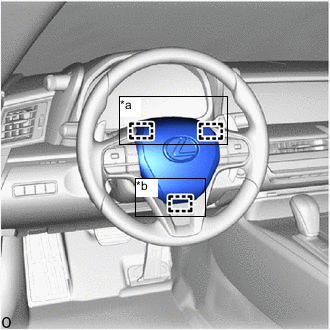
*a Upper Pin *b Lower Pin Press the horn button assembly with both hands to attach the upper springs.
-
Press the horn button assembly with both hands to attach the lower spring.
Note
After installation, try to pull the horn button assembly and check that the horn button assembly is securely installed.
-
-
INSTALL LOWER NO. 3 STEERING WHEEL COVER
-
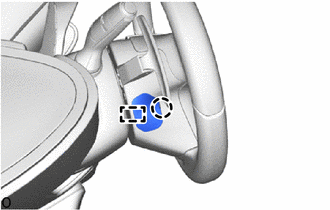
Attach the guide and claw to install the lower No. 3 steering wheel cover.
-
-
INSTALL LOWER NO. 2 STEERING WHEEL COVER
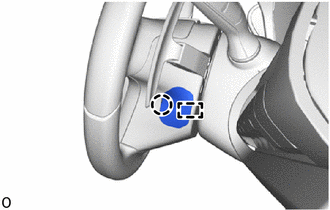
-
Attach the guide and claw to install the lower No. 2 steering wheel cover.
-
-
CONNECT CABLE TO NEGATIVE AUXILIARY BATTERY TERMINAL
Note
When disconnecting the cable, some systems need to be initialized after the cable is reconnected.
-
INSTALL NO. 2 DECK BOARD
-
INSPECT HORN BUTTON ASSEMBLY
-
Make sure that the horn sounds.
If the horn does not sound, inspect the horn system.
-
-
PERFORM DIAGNOSTIC SYSTEM CHECK
-
CHECK SRS WARNING LIGHT