STEERING PAD REMOVAL

CAUTION / NOTICE / HINT
The necessary procedures (adjustment, calibration, initialization or registration) that must be performed after parts are removed, installed or replaced during the horn button assembly removal/installation are shown below.
| Replacement Part or Procedure | Necessary Procedures | Effects / Inoperative when not Performed | Link |
|---|---|---|---|
| Disconnect cable from negative (-) auxiliary battery terminal | Memorize steering angle neutral point | LKA/LDA system | |
| Pre-collision system | |||
| Parking assist monitor system | |||
| Steering sensor zero point calibration | Variable gear ratio steering system |
Tech Tips
-
Use the same procedure as for the RHD and LHD vehicles.
-
The procedure listed below is for the LHD vehicles.
PROCEDURE
-
PRECAUTION
Note
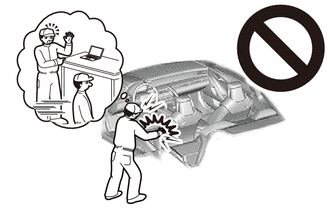
After turning the power switch off, waiting time may be required before disconnecting the cable from the negative (-) auxiliary battery terminal. Therefore, make sure to read the disconnecting the cable from the negative (-) auxiliary battery terminal notices before proceeding with work.
-
REMOVE NO. 2 DECK BOARD
-
DISCONNECT CABLE FROM NEGATIVE AUXILIARY BATTERY TERMINAL
CAUTION:
-
Wait at least 90 seconds after disconnecting the cable from the negative (-) auxiliary battery terminal to disable the SRS system.
-
If the airbag deploys for any reason, it may cause a serious accident.
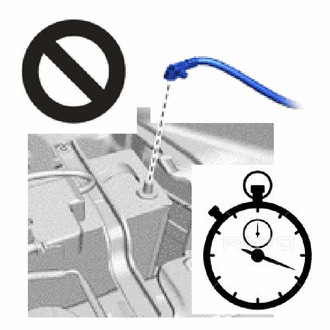
Note
When disconnecting the cable, some systems need to be initialized after the cable is reconnected.
-
-
REMOVE LOWER NO. 3 STEERING WHEEL COVER
-
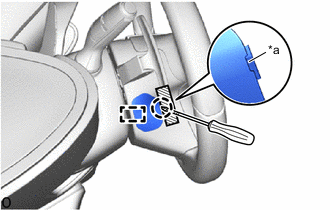
*a Cutout 
Protective Tape Using a screwdriver, insert the screwdriver into the cutout of the lower No. 3 steering wheel cover and detach the claw and guide to remove the lower No.3 steering wheel cover.
Tech Tips
Tape the screwdriver tip before use.
-
-
REMOVE LOWER NO. 2 STEERING WHEEL COVER
-
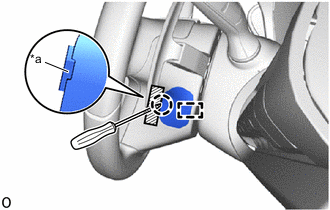
*a Cutout Protective Tape Using a screwdriver, insert the screwdriver into the cutout of the lower No. 2 steering wheel cover and detach the claw and guide to remove the lower No.2 steering wheel cover.
Tech Tips
Tape the screwdriver tip before use.
-
-
REMOVE HORN BUTTON ASSEMBLY
CAUTION:
-
When storing the horn button assembly, keep the airbag deployment side facing upward.
-
If the airbag deploys for any reason, it may cause a serious accident.
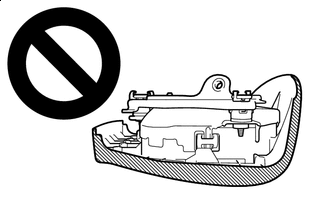
Deployment Side
-
Check that the power switch is off.
-
Check that the cable is disconnected from the negative (-) auxiliary battery terminal.
CAUTION:
-
Wait at least 90 seconds after disconnecting the cable from the negative (-) auxiliary battery terminal to disable the SRS system.
-
If the airbag deploys for any reason, it may cause a serious accident.
-
-
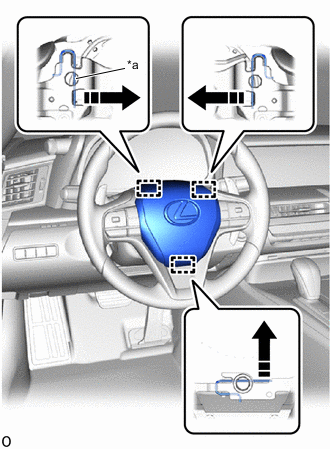
*a Torsion Spring 
Release in this Direction Using a T25H "TORX" screwdriver, push in the torsion spring to detach the pin and remove the horn button assembly.
Note
-
Do not drop the horn button assembly.
-
When disconnecting the horn button assembly, do not pull the airbag wire harness.
Tech Tips
Insert the T25H "TORX" screwdriver into the installation areas of the lower No. 2 steering wheel cover and lower No. 3 steering wheel cover.
-
-
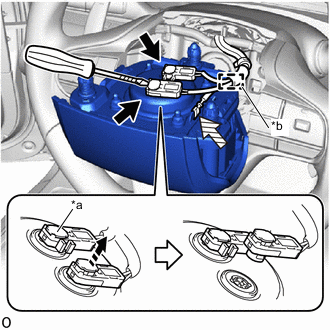
*a Lock Button *b Wire Harness Clamp 
Airbag connector 
Horn connector Release in this Direction Protective Tape Tilt the horn button assembly toward the seat and support it with one hand.
-
Using a screwdriver, release the 2 lock buttons and disconnect the 2 airbag connectors.
Note
When disconnecting any airbag connector, take care not to damage the airbag wire harness.
Tech Tips
Tape the screwdriver tip before use.
-
Detach the wire harness clamp.
Note
When disconnecting any airbag connector, take care not to damage the airbag wire harness.
-
Disconnect the horn connector from the horn button assembly.
-