ULTRASONIC SENSOR(for Front) INSTALLATION
CAUTION / NOTICE / HINT
Tech Tips
-
Use the same procedure for the RH and LH sides.
-
The procedure listed below is for the LH side.
PROCEDURE
-
INSTALL ULTRASONIC SENSOR CLIP
Note
-
Installing the ultrasonic sensor clip with some double-sided tape remaining may cause poor adhesion. Perform this procedure until sufficiently removed it.
-
Make sure to use a cloth when removing. Using a screwdriver, etc., may cause damage and poor adhesion.
Tech Tips
Use the same procedure for all ultrasonic sensor clips.
-
Clean the front bumper assembly surface.
-
Remove any remaining double-sided tape from the front bumper assembly.
-
Wipe off any tape adhesive residue with cleaner.
-
-
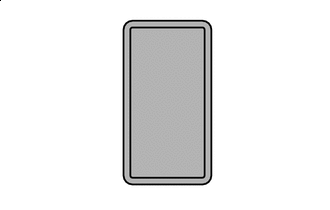

Primer Apply primer to front bumper assembly on the installation area of the ultrasonic sensor clip using a brush or felt.
Note
-
Replace the brush or felt if it is dirty or has become hardened.
-
Keep any painted surface free from primer.
-
If the primer contacts a painted surface, it may leave light primer marks. Therefore, use protective tape when using liquid primer.
-
Do not touch surfaces to which primer has been applied until the ultrasonic sensor clip has been attached.
-
-
Let the primer dry sufficiently.
Note
Do not touch applied surfaces until the primer is dry.
Recommended drying time 10 minutes or more (at 23°C) -
Confirm that the primer has completely dried by touching the front bumper assembly. Then remove the tape.
-
Remove the peeling paper of the new ultrasonic sensor clip trying not to touch the adhesional surface.
Note
After removing the peeling paper, do not touch the surface of the tape with your fingers or cotton work gloves.
-
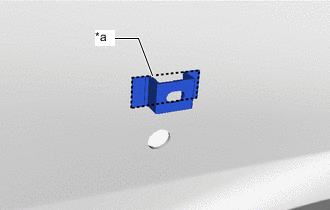
*a Scribed Line Align the ultrasonic sensor clip with the scribed line on the front bumper assembly and install it as shown in the illustration.
Note
The application strength of the ultrasonic sensor clip will weaken if reapplied. If reapplication is necessary, be sure to replace it with a new one.
Tech Tips
Apply pressure so that it does not lift up from the front bumper assembly.
-
-
INSTALL FRONT CENTER ULTRASONIC SENSOR
-
Attach the claws and install the front center ultrasonic sensor.
Note
When reusing the sensor, make sure that each sensor is returned to its original position.
-
-
INSTALL FRONT CORNER ULTRASONIC SENSOR RETAINER
Note
-
Installing the front corner ultrasonic sensor retainer with some double-sided tape remaining may cause poor adhesion. Perform this procedure until sufficiently removed.
-
Make sure to use a cloth when removing. Using a screwdriver, etc., may cause damage and poor adhesion.
-
Clean the front bumper assembly surface.
-
Remove any remaining double-sided tape from the front bumper assembly.
-
Wipe off any tape adhesive residue with cleaner.
-
-
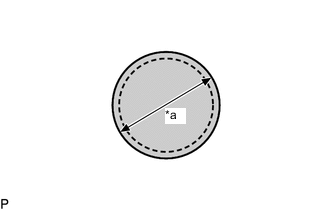
*a 20 mm (0.787 in.) Cover the sensor installation hole with a 20 mm (0.787 in.) circular piece of protective tape.
-
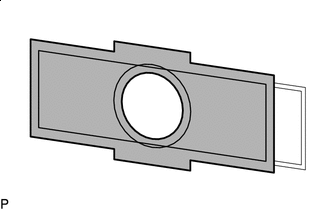
Primer application Apply primer to the area shown in the illustration using a brush or felt.
Note
-
Replace the brush or felt if it is dirty or has become hardened.
-
Keep any painted surface free from primer.
-
If the primer contacts a painted surface, it may leave light primer marks. Therefore, use protective tape when using liquid primer.
-
Do not touch surfaces to which primer has been applied until the ultrasonic sensor retainer front corner has been attached.
-
-
Let the primer dry sufficiently.
Note
Do not touch applied surfaces until the primer is dry.
Recommended drying time 10 minutes or more (at 23°C) -
Confirm that the primer has completely dried by touching the front bumper assembly. Then remove the tape.
-
Remove the peeling paper of the new front corner ultrasonic sensor retainer trying not to touch the adhesional surface.
Note
After removing the peeling paper, do not touch the surface of the tape with your fingers or cotton work gloves.
-
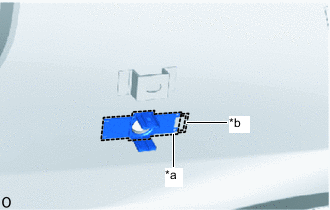
*a Scribed Line *b Protrusion of the mark Align the front corner ultrasonic sensor retainer with the mark on the front bumper assembly and install it as shown in the illustration.
Note
The application strength of the front corner ultrasonic sensor retainer will weaken if reapplied. If reapplication is necessary, be sure to replace it with a new one.
Tech Tips
-
Apply pressure so that it does not lift up from the front bumper assembly.
-
Pushing force: 30 N (3.0 kgf) for 3 seconds
-
-
-
INSTALL FRONT CORNER ULTRASONIC SENSOR
-
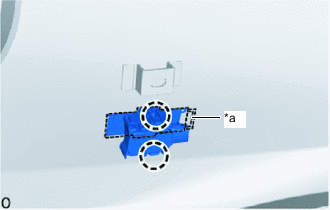
*a Protrusion of the mark Attach the claws to install the front corner ultrasonic sensor.
Note
When reusing the sensor, make sure that each sensor is returned to its original position.
Tech Tips
Align the connector with the protrusion of the mark when connecting it.
-
-
INSTALL NO. 4 ENGINE ROOM WIRE
-
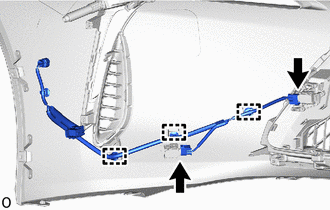
Attach the clamps and connect the No. 4 engine room wire.
-
Connect the 2 connectors.
-
-
INSTALL FRONT BUMPER ASSEMBLY
-
INSPECT LEXUS PARKING ASSIST-SENSOR SYSTEM