HYBRID TRANSMISSION SYSTEM REGISTRATION
PROCEDURE
-
INPUT TRANSMISSION COMPENSATION CODE INTO HYBRID VEHICLE CONTROL ECU
Note
When replacing either the hybrid vehicle transmission assembly or the hybrid vehicle control ECU assembly, perform "A/T Code Registration".
-
Perform A/T Code Registration (Set Compensation Code)
Tech Tips
-
When replacing the hybrid vehicle transmission assembly, perform drive learning after AT/CVT learning value initialization and A/T unit compensation (register compensation code).
-
When replacing the hybrid vehicle control ECU assembly (when vehicle ECU compensation code cannot be read), perform drive learning after A/T unit compensation (register compensation code).
-
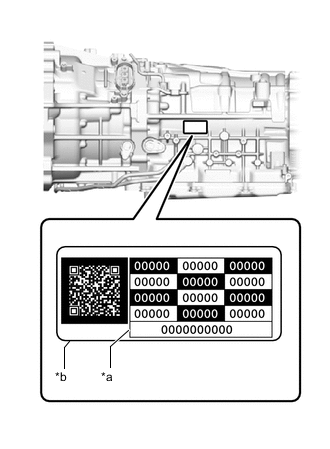
*a Transmission Compensation Code *b QR Code Label Record the compensation code (5 digits in 12 blocks) recorded on the A/T unit compensation code label on the transmission service part.
-
Complete the replacement of the hybrid vehicle transmission assembly.
-
Connect the GTS to the DLC3 with the power switch off.
-
Turn the power switch on (IG).
Note
-
Do not start the engine.
-
Do not operate the shift lever or power switch until the compensation task is completed.
-
-
Turn the GTS on.
-
Enter the following menus: Powertrain / Hybrid Control / Utility / A/T Code Registration.
Powertrain > Hybrid Control > UtilityTester Display A/T Code Registration -
While checking the display on the GTS, select "Set Compensation Code", and press "Next".
-
Using the on-screen buttons, input the compensation code recorded on the A/T unit compensation code label so that the codes are in the same position.
-
Check that inputted compensation code matches the A/T unit compensation code label, and then press "Next".
-
Check the screen to see that the operation is complete.
-
-
Perform A/T unit compensation (read compensation code) and AT unit compensation (register compensation code (automatic input))
Tech Tips
When replacing the hybrid vehicle control ECU (when vehicle ECU compensation code can be read), perform AT unit compensation (read compensation code) before carrying out the replacement. When the replacement is complete, perform AT unit compensation (register compensation code (automatic input)).
-
Connect the GTS to the DLC3 with the power switch off.
-
Turn the power switch on (IG).
Note
-
Do not start the engine.
-
Do not operate the shift lever or power switch until the task is completed.
-
-
Turn the GTS on.
-
Enter the following menus: Powertrain / Hybrid Control / Utility / A/T Code Registration.
Powertrain > Hybrid Control > UtilityTester Display A/T Code Registration -
While checking the display on the GTS, select "Read Compensation Code", and press "Next".
-
After reading the compensation code (5 digits in 12 blocks), press "Save" to record the compensation code on the GTS.
Note
If the compensation code cannot be read, perform drive learning after A/T unit compensation (initialization).
Tech Tips
If a compensation code is already saved on the GTS, check the save date before overwriting.
-
Turn the power switch off and replace the hybrid vehicle control ECU.
-
After the replacement is complete, enter the following menus: Powertrain / Hybrid Control / Utility / A/T Code Registration.
Powertrain > Hybrid Control > UtilityTester Display A/T Code Registration -
While checking the display on the GTS, select "Register Compensation Code", and press "Next".
-
Press "Automatic Input" on the compensation code registration screen.
-
Check the save date and press "Yes".
-
Check that the compensation code (5 digits in 12 blocks) has been input, and press "Next".
-
Check the screen to see that the operation is complete.
-
-