FRONT CAMERA REMOVAL

CAUTION / NOTICE / HINT
The necessary procedures (adjustment, calibration, initialization, or registration) that must be performed after parts are removed, installed, or replaced during the forward recognition camera removal/installation are shown below.
| Replacement Part or Procedure | Necessary Procedure | Effect/Inoperative when not Performed | Link |
|---|---|---|---|
| Removal/installation of forward recognition camera | Adjust forward recognition camera |
|
Note
-
When replacing the forward recognition camera (camera sensor), replace it with a new one.
-
Do not touch the camera lens or the front windshield glass in front of the camera.
-
If the forward recognition camera (camera sensor) has been struck or dropped, replace it with a new one.
-
When replacing the windshield glass of a vehicle equipped with a forward recognition camera, make sure to use a Lexus genuine part. If a non-Lexus genuine part is used, the forward recognition camera may not be able to be installed due to a missing bracket. Also, the dynamic radar cruise control system, forward recognition camera system, LKA/LDA system, road sign assist system, pre-collision system or automatic high beam system may not operate properly due to a difference in the transmissivity or black ceramic border.
Tech Tips
-
Use the same procedure as for the LHD and RHD vehicles.
-
The procedure listed below is for the LHD vehicles.
PROCEDURE
-
REMOVE NO. 1 FORWARD RECOGNITION COVER
-
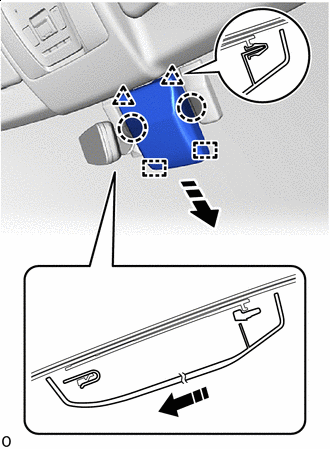

Place Hands Here 
Remove in this Direction Place your hand at the position shown in the illustration and detach the clip and guide and remove the No. 1 forward recognition cover as shown in the illustration.
Note
When removing, press the cover parallel to the windshield glass surface and remove.
-
-
REMOVE FORWARD RECOGNITION LATCH
-

Place Hands Here Remove in this Direction (1) 
Remove in this Direction (2) Place your hand at the position shown in the illustration and detach the claw in the direction indicated by the arrow (1) in the illustration.
-
Detach the guide in the direction indicated by the arrow (2) in the illustration to remove the forward recognition latch.
-
-
REMOVE FORWARD RECOGNITION CAMERA
Note
If the forward recognition camera has been struck or dropped, replace it with a new one.
-
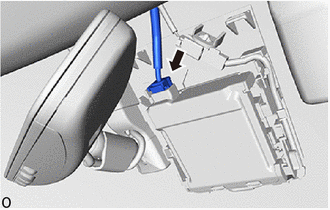
Disconnect the connector.
Note
Do not pull the harness forcibly when disconnecting the connector.
-
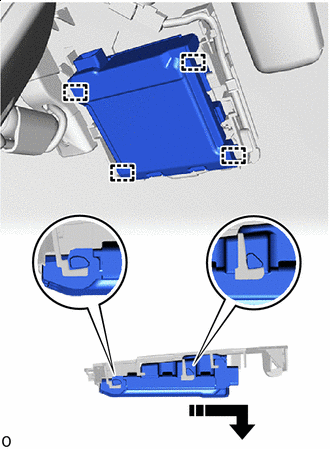
Remove in this Direction Detach the guide and remove the forward recognition camera as shown in the illustration.
Note
-
Do not apply excessive force.
-
If the forward recognition camera bracket is deformed or damaged, replace it together with the windshield glass.
-
-
-
REMOVE FORWARD RECOGNITION WITH HEATER HOOD SUB-ASSEMBLY
-
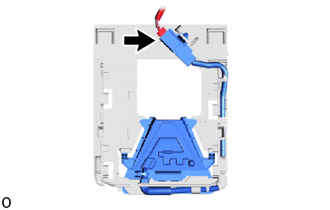
Disconnect the connector.
Note
Do not pull the harness forcibly when disconnecting the connector.
-
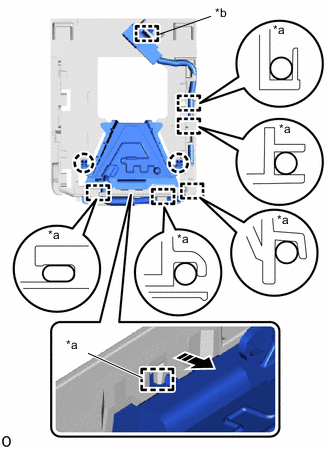
*a Guide *b Connector Clamp Remove in this Direction Detach the connector clamp.
-
Detach the guide and remove the wire harness.
-
Detach the guide and claw and remove the forward recognition camera as shown in the illustration.
-