FORWARD RECOGNITION CAMERA SYSTEM TERMINALS OF ECU
-
CHECK FORWARD RECOGNITION CAMERA

-
Disconnect the a1 forward recognition camera connector.
Note
-
DTCs may be output when connectors are disconnected during inspection. Therefore, be sure to clear the DTCs using the GTS once the inspection has been completed.
-
Do not apply excessive force to the a1 forward recognition camera connector.
-
-
Measure the voltage and resistance according to the value(s) in the table below.
Tech Tips
If the result is not as specified, there may be a malfunction on the wire harness side.
Terminal No. (Symbol) Wiring Color Terminal Description Condition Specified Condition a1-7 (IGB) - Body ground LA-B - Body ground Power source Power switch on (IG) 11 to 14 V Power switch off Below 1 V a1-10 (GND) - Body ground W-B - Body ground Ground Always Below 1 Ω -
Reconnect the a1 forward recognition camera connector.
-
Measure the voltage according to the value(s) in the table below.
Tech Tips
If the result is not as specified, there may be a malfunction on the wire harness side.
Terminal No. (Symbol) Wiring Color Terminal Description Condition Specified Condition a1-1 (HTR) - Body ground L - Body ground Forward recognition with heater hood sub-assembly operation signal Power switch on (IG)
Forward recognition with heater hood sub-assembly not operating
11 to 14 V Power switch on (IG)
Forward recognition with heater hood sub-assembly operating
Below 1 V -
Check for pulses according to the value(s) in the table below.
Terminal No. (Symbol) Wiring Color Terminal Description Condition Specified Condition a1-5 (CA1P) - a1-10 (GND) R - W-B CAN communication signal Power switch on (IG) Pulse generation
(See waveform 1)
a1-11 (CA1N) - a1-10 (GND) P - W-B CAN communication signal Power switch on (IG) Pulse generation
(See waveform 2)
a1-6 (CANH) - a1-10 (GND) W - W-B CAN communication signal Power switch on (IG) Pulse generation
(See waveform 1)
a1-12 (CANL) - a1-10 (GND) R - W-B CAN communication signal Power switch on (IG) Pulse generation
(See waveform 2)
-
WAVEFORM 1
-
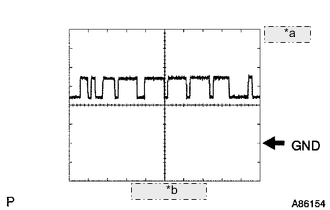
*a 1 V/DIV. *b 10 μsec./DIV. CAN communication signal
Item Content Terminal Name Between a1-5 (CA1P) and a1-10 (GND)
Between a1-6 (CANH) and a1-10 (GND)
Tester Range 1 V/DIV., 10 μsec./DIV. Condition Power switch on (IG) Tech Tips
The waveform varies depending on the CAN communication signal.
-
-
WAVEFORM 2
-
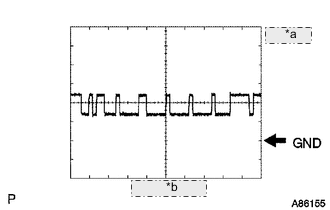
*a 1 V/DIV. *b 10 μsec./DIV. CAN communication signal
Item Content Terminal Name Between a1-11 (CA1N) and a1-10 (GND)
Between a1-12 (CANL) and a1-10 (GND)
Tester Range 1 V/DIV., 10 μsec./DIV. Condition Power switch on (IG) Tech Tips
The waveform varies depending on the CAN communication signal.
-
-