INVERTER WITH CONVERTER INSTALLATION

PROCEDURE
-
INSTALL HIGH VOLTAGE FUSE
CAUTION:
Wear insulated gloves.
Tech Tips
Perform this procedure only when replacement of the high voltage fuse is necessary.
-
Remove the connector cover assembly.
-
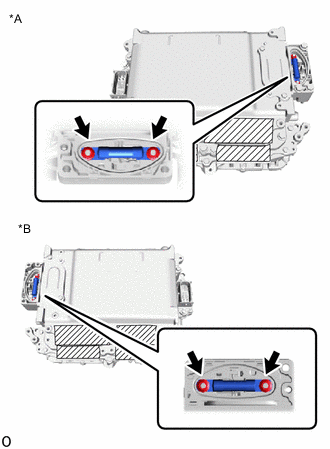
*A for LHD *B for RHD Install the high voltage fuse with the 2 new nuts.
- Torque:
- 4.0 N*m { 41 kgf*cm, 35 in.*lbf }
Note
Be sure to use a torque wrench to tighten the nuts.
-
Temporarily install the connector cover assembly.
-
-
INSTALL NO. 1 INVERTER COOLING HOSE
Tech Tips
Perform this procedure only when replacement of the No. 1 inverter cooling hose is necessary.
-
Install the No. 1 inverter cooling hose to the inverter with converter assembly and slide the 2 hose clips to secure it.
Note
Do not remove the pieces of cloth or plastic bags from the pipes until installation.
Tech Tips
Make sure that the 2 hose clips are positioned as shown in the illustration.
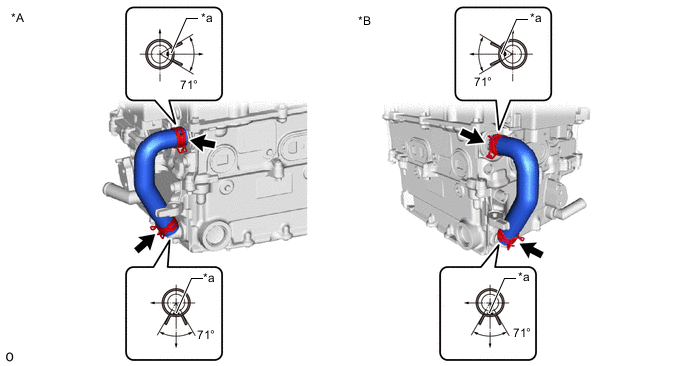
*A for LHD *B for RHD *a Alignment Mark - -
-
-
INSTALL INVERTER BUS-BAR PLATE SUB-ASSEMBLY
-
Temporarily install the inverter bus-bar plate sub-assembly with the nut by tightening the nut 3 or more revolutions.
Note
If the inverter bus-bar plate sub-assembly is dropped or deformed, replace it with a new one.
Tech Tips
When installing, align with the stopper.
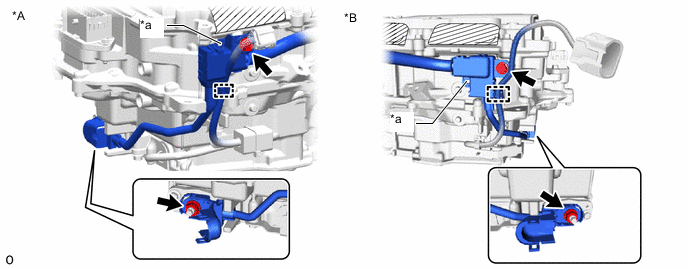
*A for LHD *B for RHD *a Stopper - - -
Install the bolt and attach the clamp.
- Torque:
- 8.0 N*m { 82 kgf*cm, 71 in.*lbf }
-
Tighten the nut.
- Torque:
- 18 N*m { 184 kgf*cm, 13 ft.*lbf }
-
Close the terminal cover.
-
-
INSTALL NO. 4 INVERTER BRACKET
-
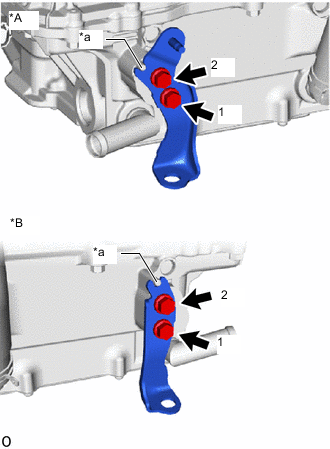
*A for LHD *B for RHD *a Stopper Temporarily install the No. 4 inverter bracket to the inverter with converter assembly with the 2 bolts.
Tech Tips
When installing, align with the stopper.
-
Tighten the 2 bolts in the sequence shown in the illustration.
- Torque:
- 8.0 N*m { 82 kgf*cm, 71 in.*lbf }
-
-
INSTALL INVERTER WITH CONVERTER ASSEMBLY
CAUTION:
Wear insulated gloves.
-
Temporarily install the No. 6 inverter bracket with the 2 bolts.
Note
-
Since the inverter with converter assembly is very heavy, 2 people are needed to install the inverter with converter assembly. When installing the inverter with converter assembly, do not damage the parts around it.
-
To prevent damage, do not hold the inverter with converter assembly by the connectors.
-
To prevent damage due to static electricity, do not touch the terminals of the disconnected connectors.
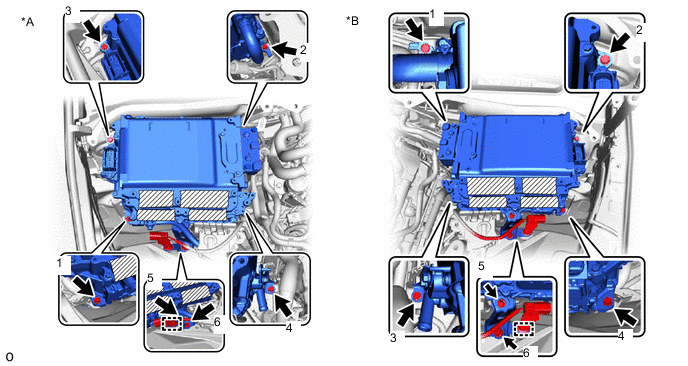
*A for LHD *B for RHD -
-
Temporarily install the inverter with converter assembly with the 4 bolts.
-
Tighten the 6 bolts in the order shown in the illustration.
- Torque:
- 8.0 N*m { 82 kgf*cm, 71 in.*lbf }
-
Attach the clamp.
-
Open the inverter bus-bar plate sub-assembly cover.
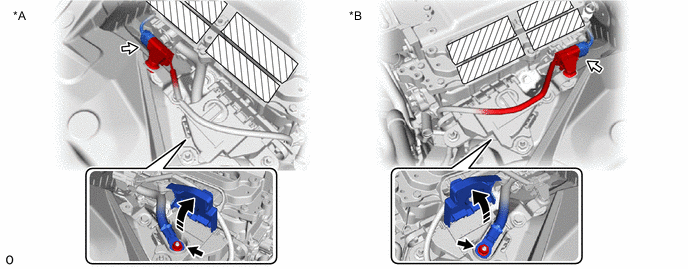
*A for LHD *B for RHD -
Connect the inverter bus-bar plate sub-assembly with the nut.
- Torque:
- 8.0 N*m { 82 kgf*cm, 71 in.*lbf }
-
Connect the connector.
-
-
INSTALL HV FLOOR UNDER WIRE
CAUTION:
Wear insulated gloves.
-
Remove the connector cover assembly.
-
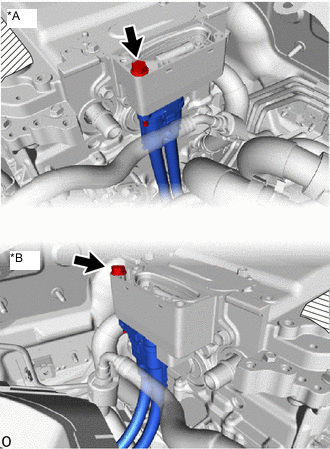
*A for LHD *B for RHD Connect the HV floor under wire.
Note
-
Do not allow any foreign matter or water to enter the inverter with converter assembly.
-
Do not touch the connector waterproofing rubber or terminals.
-
Do not damage the connectors, connector housings or inverter with converter assembly during connection.
-
Make sure that the connector is fully engaged.
-
-
Secure the HV floor under wire to the inverter with converter assembly with the bolt.
- Torque:
- 8.0 N*m { 82 kgf*cm, 71 in.*lbf }
-
Temporarily install the connector cover assembly.
-
-
INSTALL ENGINE ROOM MAIN WIRE
CAUTION:
Wear insulated gloves.
-
Remove the connector cover assembly.
-
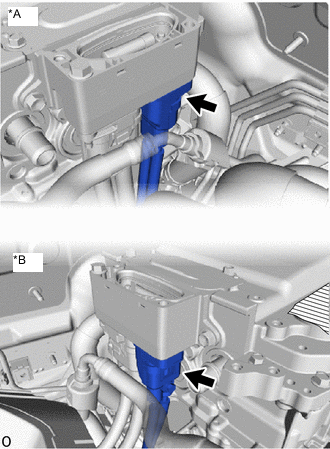
*A for LHD *B for RHD Connect the engine room main wire (air conditioning harness) to the inverter with converter assembly.
Note
-
Do not allow any foreign matter or water to enter the inverter with converter assembly.
-
Do not touch the connector waterproofing rubber or terminals.
-
Do not damage the connectors, connector housings or inverter with converter assembly during connection.
-
Make sure that the connector is fully engaged.
-
-
Temporarily install the connector cover assembly.
-
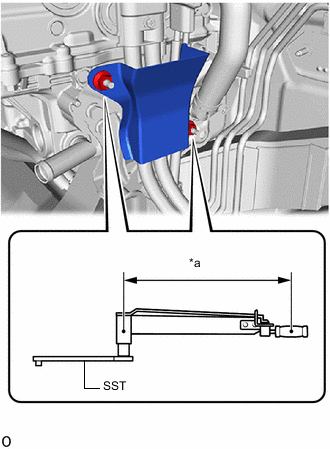
*a Torque Wrench Fulcrum Length for LHD:
Install the wiring harness clamp bracket.
-
Temporarily install the wiring harness clamp bracket with the 2 nuts.
-
Using SST, tighten the 2 nuts.
- SST
- 09961-00950
- Torque:
- Specified tightening torque
- 8.0 N*m { 82 kgf*cm, 71 in.*lbf }
Tech Tips
-
Calculate the torque wrench reading when changing the fulcrum length of the torque wrench.
-
When using SST (fulcrum length of 150 mm (5.906 in.)) + torque wrench (fulcrum length of 300 mm (11.811 in.)): 5.3 N*m (54 kgf*cm, 47 in.*lbf)
-
-
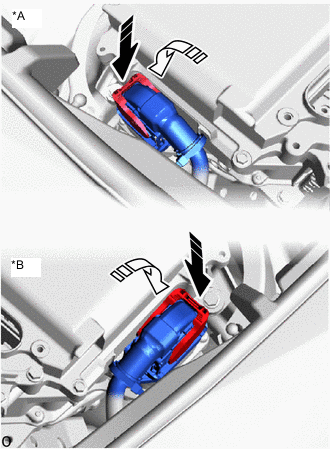
*A for LHD *B for RHD Connect the engine room main wire (inverter with converter assembly connector) to the inverter with converter assembly and lock the connector with the lock lever as shown in the illustration.
-
-
CONNECT NO. 4 INVERTER COOLING HOSE
-
Connect the No. 4 inverter cooling hose to the inverter with converter assembly and slide the hose clip to secure it.
Note
Do not remove the pieces of cloth or plastic bags from the pipe and disconnected hose until installation.
Tech Tips
Make sure that the hose clip is positioned as shown in the illustration.
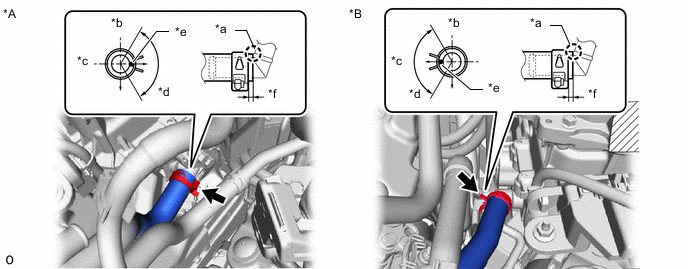
*A for LHD *B for RHD *a Insert *b Upper *c RH Side *d 120° *e Mark (Yellow) *f 2.0 to 5.0 mm (0.079 to 0.196 in.)
-
-
CONNECT NO. 5 INVERTER COOLING HOSE
-
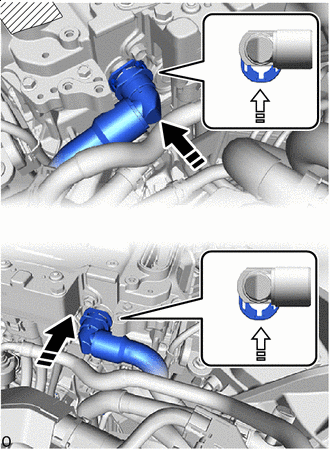
*A for LHD *B for RHD Connect the No. 5 inverter cooling hose to the inverter with converter assembly and lock the hose with the retainer as shown in the illustration.
Note
-
Push in the retainer until a click sound is heard.
-
Pull on the hose to confirm that the hose is securely connected.
-
If there is foreign matter on the union or the O-ring, clean it with water and finger scouring.
-
To prevent foreign matter from entering the cooling system, do not remove the pieces of cloth or plastic bags from the pipe and disconnected hose until installation.
-
-
-
INSTALL FENDER APRON BRACE SUB-ASSEMBLY RH
-
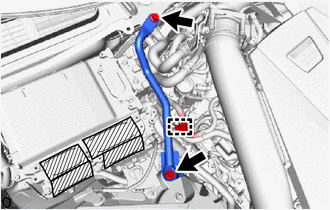
Install the fender apron brace sub-assembly RH with the 2 bolts.
- Torque:
- 49 N*m { 500 kgf*cm, 36 ft.*lbf }
-
Attach the clamp.
-
-
INSTALL FENDER APRON BRACE SUB-ASSEMBLY LH
-
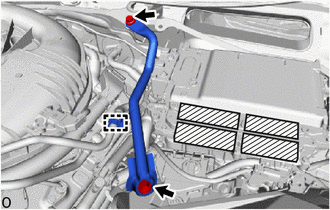
Install the fender apron brace sub-assembly LH with the 2 bolts.
- Torque:
- 49 N*m { 500 kgf*cm, 36 ft.*lbf }
-
Attach the clamp.
-
-
INSTALL INVERTER MOTOR CABLE BRACKET ASSEMBLY
-
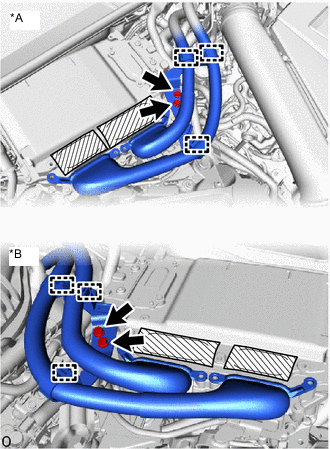
*A for LHD *B for RHD Install the inverter motor cable bracket assembly with the 2 bolts.
- Torque:
- 8.0 N*m { 82 kgf*cm, 71 in.*lbf }
-
Attach the 3 clamps.
-
-
CONNECT MOTOR CABLE
CAUTION:
Wear insulated gloves.
-
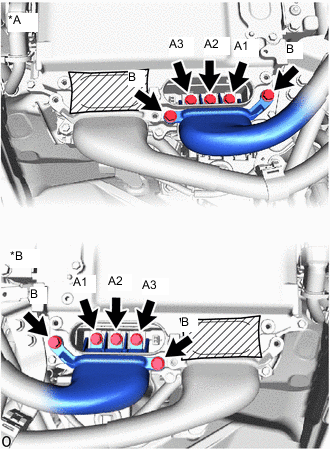
*A for LHD *B for RHD Temporarily install the motor cable to the inverter with converter assembly with the 5 bolts.
Note
-
Do not allow any foreign matter or water to enter the inverter with converter assembly.
-
Do not touch the connector waterproofing rubber or terminals.
-
Do not damage the terminals, connector housings or inverter with converter assembly when connecting them.
-
-
Using an insulated tool, tighten the 3 bolts (A) in the order shown in the illustration.
- Torque:
- 8.0 N*m { 82 kgf*cm, 71 in.*lbf }
-
Using an insulated tool, tighten the 2 bolts (B).
- Torque:
- 8.0 N*m { 82 kgf*cm, 71 in.*lbf }
-
-
CONNECT GENERATOR CABLE
CAUTION:
Wear insulated gloves.
-
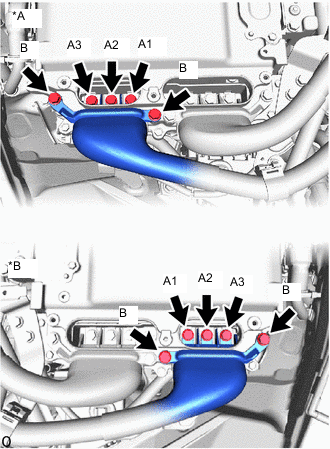
*A for LHD *B for RHD Temporarily install the generator cable to the inverter with converter assembly with the 5 bolts.
Note
-
Do not allow any foreign matter or water to enter the inverter with converter assembly.
-
Do not touch the connector waterproofing rubber or terminals.
-
Do not damage the terminals, connector housings or inverter with converter assembly when connecting them.
-
-
Using an insulated tool, tighten the 3 bolts (A) in the order shown in the illustration.
- Torque:
- 8.0 N*m { 82 kgf*cm, 71 in.*lbf }
-
Using an insulated tool, tighten the 2 bolts (B).
- Torque:
- 8.0 N*m { 82 kgf*cm, 71 in.*lbf }
-
-
INSTALL INVERTER TERMINAL COVER
CAUTION:
Wear insulated gloves.
-
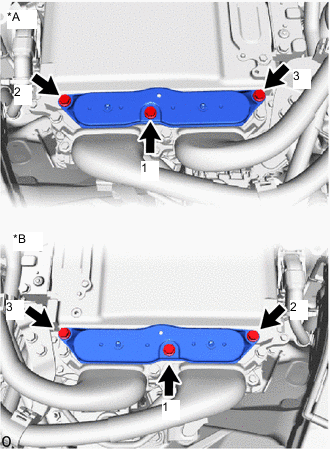
*A for LHD *B for RHD Temporarily install the inverter terminal cover to the inverter with converter assembly.
Note
-
Do not touch the inverter terminal cover waterproofing rubber.
-
Do not allow any foreign matter or water to enter the inverter with converter assembly.
-
Make sure that the interlock is fully engaged.
-
-
Press the inverter terminal cover by hand until it is firmly attached to the inverter with converter assembly.
-
Tighten the 3 bolts to the inverter terminal cover.
- Torque:
- 8.0 N*m { 82 kgf*cm, 71 in.*lbf }
Note
Tighten the 3 bolts in the sequence shown in the illustration.
-
-
INSTALL CONNECTOR COVER ASSEMBLY
CAUTION:
Wear insulated gloves.
-
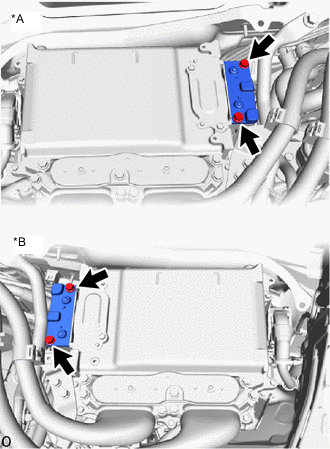
*A for LHD *B for RHD Install the connector cover assembly to the inverter with converter assembly with the 2 bolts.
- Torque:
- 8.0 N*m { 82 kgf*cm, 71 in.*lbf }
Note
-
Visually confirm that the connector cover assembly waterproofing rubber is securely installed before installing the connector cover assembly.
-
Do not touch the connector cover assembly waterproofing rubber.
-
Make sure that the interlock is fully engaged.
-
-
INSTALL COWL TOP VENTILATOR LOUVER SUB-ASSEMBLY
-
INSTALL CENTER COWL TOP VENTILATOR LOUVER
-
INSTALL WASHER GROMMET
-
INSTALL NO. 3 COWL TOP PANEL INSULATOR
-
for LHD:
-
for RHD:
-
-
INSTALL NO. 2 COWL TOP PANEL INSULATOR
-
for LHD:
-
for RHD:
-
-
INSTALL WINDSHIELD WIPER ARM AND BLADE ASSEMBLY RH
-
for LHD:
-
for RHD:
-
-
INSTALL WINDSHIELD WIPER ARM AND BLADE ASSEMBLY LH
-
for LHD:
-
for RHD:
-
-
INSTALL FRONT WIPER ARM HEAD CAP
-
INSTALL SERVICE PLUG GRIP
-
CONNECT CABLE TO NEGATIVE AUXILIARY BATTERY TERMINAL
Note
When disconnecting the cable, some systems need to be initialized after the cable is reconnected.
-
INSTALL NO. 2 DECK BOARD
-
ADD COOLANT (for Inverter)
-
INSPECT FOR COOLANT LEAK (for Inverter)
-
PERFORM RESOLVER LEARNING