INVERTER WITH CONVERTER REMOVAL

CAUTION / NOTICE / HINT
The necessary procedures (adjustment, calibration, initialization, or registration) that must be performed after parts are removed and installed, or replaced during inverter with converter assembly removal/installation are shown below.
| Replaced Part or Performed Procedure | Necessary Procedures | Effect/Inoperative Function when Necessary Procedure not Performed | Link |
|---|---|---|---|
| Disconnect cable from negative auxiliary battery terminal | Memorize steering angle neutral point | LKA/LDA system | |
| Pre-collision system | |||
| Parking assist monitor system | |||
| Steering sensor zero point calibration | Variable gear ratio steering system | ||
| Inverter with converter assembly | Resolver learning |
|
CAUTION:
-
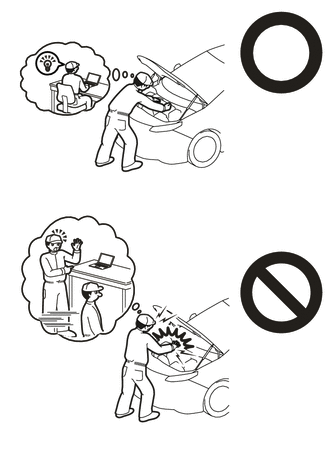
Orange wire harnesses and connectors indicate high-voltage circuits. To prevent electric shock, always follow the procedure described in the repair manual.
-
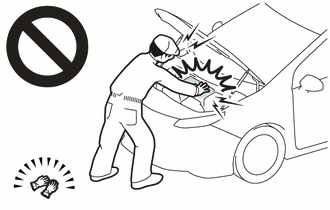
To prevent electric shock, wear insulated gloves when working on wire harnesses and components of the high voltage system.
PROCEDURE
-
PRECAUTION
Note
After turning the power switch off, waiting time may be required before disconnecting the cable from the negative (-) auxiliary battery terminal. Therefore, make sure to read the disconnecting the cable from the negative (-) auxiliary battery terminal notices before proceeding with work.
-
REMOVE NO. 2 DECK BOARD
-
DISCONNECT CABLE FROM NEGATIVE AUXILIARY BATTERY TERMINAL
Note
When disconnecting the cable, some systems need to be initialized after the cable is reconnected.
-
REMOVE SERVICE PLUG GRIP
-
DRAIN COOLANT (for Inverter)
CAUTION:
-
To avoid the danger of being burned, do not remove the reserve tank cap or drain cock plug while the coolant (for inverter) is still hot.
-
Pressurized, hot coolant (for inverter) and steam may be released and cause serious burns.
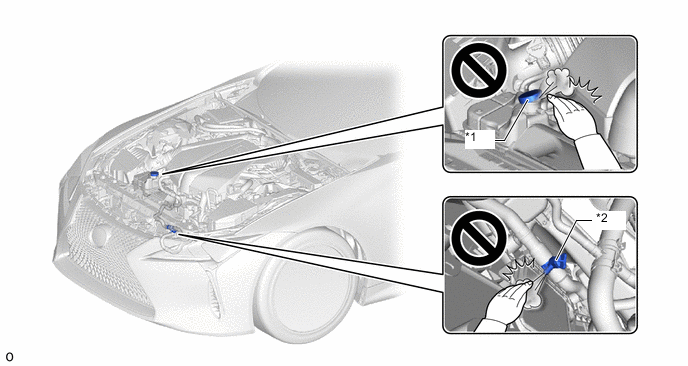
*1 Inverter Reserve Tank Cap *2 Drain Cock Plug
-
Remove the engine under cover reinforcement.
-
Drain the coolant.
-
-
REMOVE FRONT WIPER ARM HEAD CAP
-
REMOVE WINDSHIELD WIPER ARM AND BLADE ASSEMBLY LH
-
REMOVE WINDSHIELD WIPER ARM AND BLADE ASSEMBLY RH
-
REMOVE NO. 2 COWL TOP PANEL INSULATOR
-
for LHD:
-
for RHD:
-
-
REMOVE NO. 3 COWL TOP PANEL INSULATOR
-
for LHD:
-
for RHD:
-
-
REMOVE WASHER GROMMET
-
REMOVE CENTER COWL TOP VENTILATOR LOUVER
-
REMOVE COWL TOP VENTILATOR LOUVER SUB-ASSEMBLY
-
REMOVE CONNECTOR COVER ASSEMBLY
CAUTION:
Wear insulated gloves.
-
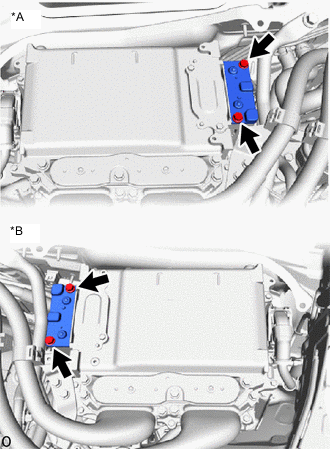
*A for LHD *B for RHD Remove the 2 bolts and connector cover assembly.
Note
-
Make sure to pull the connector cover assembly straight up, as a connector is connected to the bottom of the cover.
-
Do not touch the connector cover assembly waterproofing rubber.
-
Do not allow any foreign matter or water to enter the inverter with converter assembly.
-
-
-
CHECK TERMINAL VOLTAGE
CAUTION:
Wear insulated gloves.
-
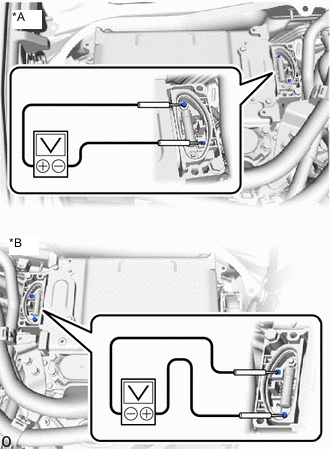
*A for LHD *B for RHD Using a voltmeter, measure the voltage between the terminals of the 2 phase connectors.
Standard Voltage 0 V Note
Do not allow any foreign matter or water to enter the inverter with converter assembly.
Tech Tips
Use a measuring range of DC 750 V or more on the voltmeter.
-
-
TEMPORARILY INSTALL CONNECTOR COVER ASSEMBLY
CAUTION:
Wear insulated gloves.
-
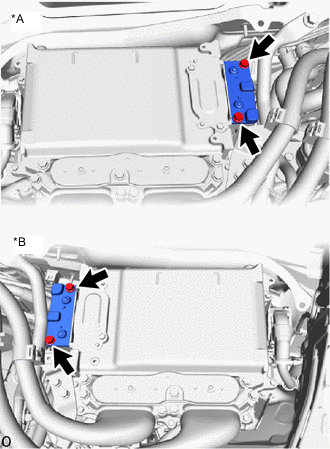
*A for LHD *B for RHD Temporarily install the connector cover assembly with the 2 bolts to prevent any foreign matter or water from entering the inverter with converter assembly.
Note
-
Visually confirm that the connector cover assembly waterproofing rubber is securely installed before installing the connector cover assembly.
-
Do not touch the connector cover assembly waterproofing rubber.
-
Make sure that the interlock is fully engaged.
-
-
-
REMOVE INVERTER TERMINAL COVER
CAUTION:
Wear insulated gloves.
-
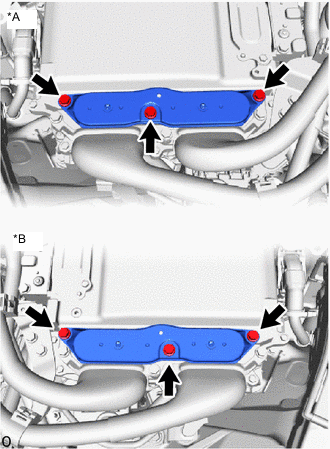
*A for LHD *B for RHD Remove the 3 bolts and inverter terminal cover from the inverter with converter assembly.
Note
-
Make sure to pull the inverter terminal cover straight up, as a connector is connected to the bottom of the cover.
-
Do not touch the inverter terminal cover waterproofing rubber.
-
Do not allow any foreign matter or water to enter the inverter with converter assembly.
-
-
-
DISCONNECT GENERATOR CABLE
CAUTION:
Wear insulated gloves.
-
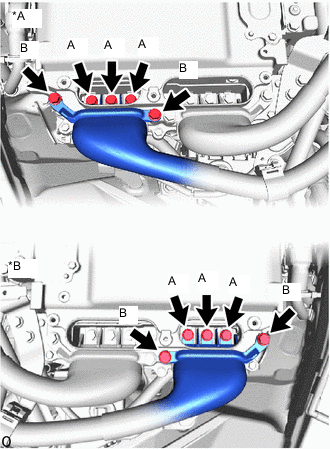
*A for LHD *B for RHD Using an insulated tool, remove the 3 bolts (A).
-
Using an insulated tool, remove the 2 bolts (B), and disconnect the generator cable from the inverter with converter assembly.
Note
-
Do not allow any foreign matter or water to enter the inverter with converter assembly.
-
Do not touch the connector waterproofing rubber or terminals.
-
Do not damage the terminals, connector housings or inverter with converter assembly during disconnection.
-
Insulate the disconnected terminals with insulating tape.
-
Cover the hole where the cable was connected with tape (non-residue type) or equivalent to prevent entry of foreign matter.
-
-
-
DISCONNECT MOTOR CABLE
CAUTION:
Wear insulated gloves.
-
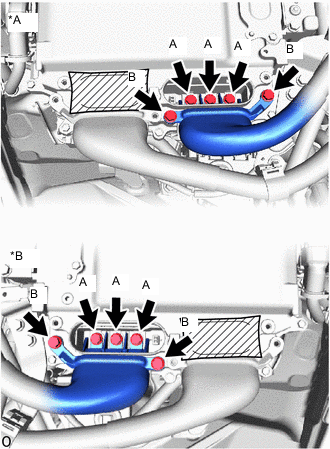
*A for LHD *B for RHD Using an insulated tool, remove the 3 bolts (A).
-
Using an insulated tool, remove the 2 bolts (B), and disconnect the motor cable from the inverter with converter assembly.
Note
-
Do not allow any foreign matter or water to enter the inverter with converter assembly.
-
Do not touch the connector waterproofing rubber or terminals.
-
Do not damage the terminals, connector housings or inverter with converter assembly during disconnection.
-
Insulate the disconnected terminals with insulating tape.
-
Cover the hole where the cable was connected with tape (non-residue type) or equivalent to prevent entry of foreign matter.
-
-
-
REMOVE INVERTER MOTOR CABLE BRACKET ASSEMBLY
-
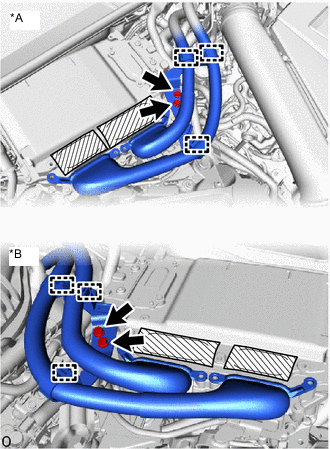
*A for LHD *B for RHD Detach the 3 clamps from the inverter motor cable bracket assembly.
-
Remove the 2 bolts and inverter motor cable bracket from the inverter with converter assembly.
-
-
REMOVE FENDER APRON BRACE SUB-ASSEMBLY RH (for LHD)
-
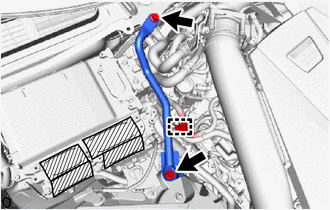
Detach the clamp from the fender apron brace sub-assembly RH.
-
Remove the 2 bolts and fender apron brace sub-assembly RH.
-
-
REMOVE FENDER APRON BRACE SUB-ASSEMBLY LH (for RHD)
-
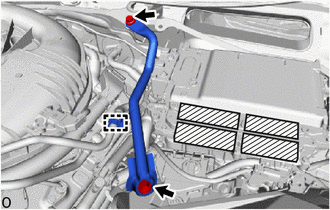
Detach the clamp from the fender apron brace sub-assembly LH.
-
Remove the 2 bolts and fender apron brace sub-assembly LH.
-
-
DISCONNECT NO. 5 INVERTER COOLING HOSE
-
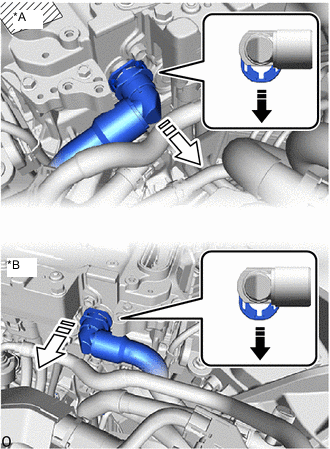
*A for LHD *B for RHD Release the retainer and disconnect the No. 5 inverter cooling hose from the inverter with converter assembly as shown in the illustration.
Note
Apply insulating tape to the pipes and in the disconnected hoses, or cover the pipes and hoses with plastic bags to prevent foreign matter from entering the cooling system and to prevent coolant from spilling near the inverter with converter assembly.
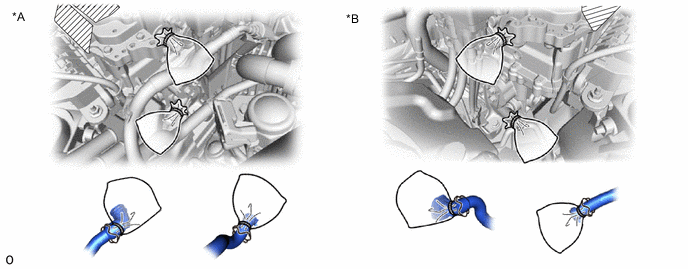
*A for LHD *B for RHD
-
-
DISCONNECT NO. 4 INVERTER COOLING HOSE
-
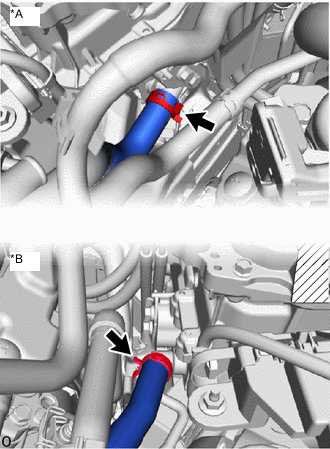
*A for LHD *B for RHD Slide the hose clip and disconnect the No. 4 inverter cooling hose from the inverter with converter assembly.
Note
Apply insulating tape to the pipes and in the disconnected hoses, or cover the pipes and hoses with plastic bags to prevent foreign matter from entering the cooling system and to prevent coolant from spilling near the inverter with converter assembly.
*A for LHD *B for RHD
-
-
DISCONNECT ENGINE ROOM MAIN WIRE
CAUTION:
Wear insulated gloves.
-
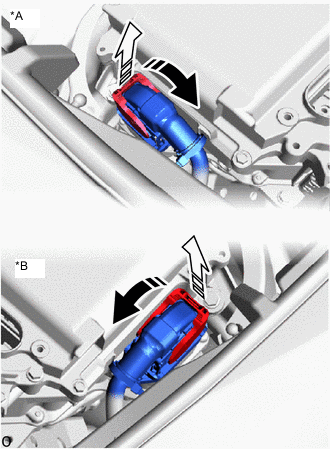
*A for LHD *B for RHD Raise the lock lever and disconnect the engine room main wire (inverter with converter assembly connector) from the inverter with converter assembly as shown in the illustration.
Note
-
Insulate the disconnected connector with insulating tape.
-
Cover the hole where the connector was connected with tape (non-residue type) or equivalent to prevent entry of foreign matter.
-
-
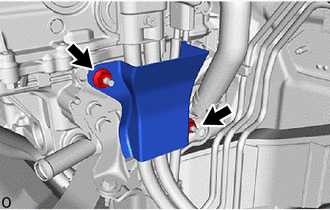
for LHD:
Remove the 2 nuts and wiring harness clamp bracket.
-
Remove the connector cover assembly.
-
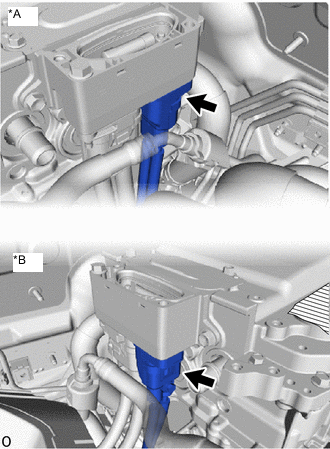
*A for LHD *B for RHD Disconnect the engine room main wire (air conditioning harness) from the inverter with converter assembly.
Note
-
Do not allow any foreign matter or water to enter the inverter with converter assembly.
-
Do not touch the connector waterproofing rubber or terminals.
-
Do not damage the connectors, connector housings or inverter with converter assembly during disconnection.
-
Insulate the disconnected terminals with insulating tape.
-
Cover the hole where the cable was connected with tape (non-residue type) or equivalent to prevent entry of foreign matter.
-
-
Temporarily install the connector cover assembly.
-
-
DISCONNECT HV FLOOR UNDER WIRE
CAUTION:
Wear insulated gloves.
-
Remove the connector cover assembly.
-
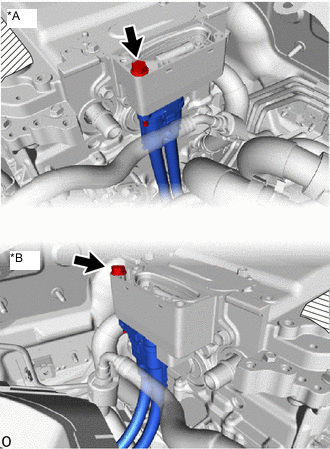
*A for LHD *B for RHD Remove the bolt, and disconnect the HV floor under wire from the inverter with converter assembly.
Note
-
Do not allow any foreign matter or water to enter the inverter with converter assembly.
-
Do not touch the connector waterproofing rubber or terminals.
-
Do not damage the connectors, connector housings or inverter with converter assembly during disconnection.
-
Insulate the disconnected terminals with insulating tape.
-
Cover the hole where the cable was connected with tape (non-residue type) or equivalent to prevent entry of foreign matter.
-
-
Temporarily install the connector cover assembly.
-
-
REMOVE INVERTER WITH CONVERTER ASSEMBLY
CAUTION:
Wear insulated gloves.
-
Open the inverter bus-bar plate sub-assembly cover.
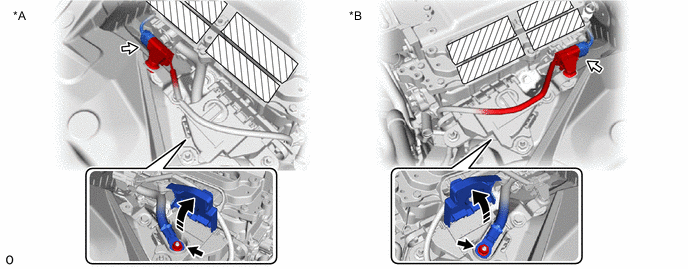
*A for LHD *B for RHD -
Remove the nut and disconnect the inverter bus-bar plate sub-assembly.
-
Disconnect the connector.
-
Detach the clamp from the No. 6 inverter bracket.
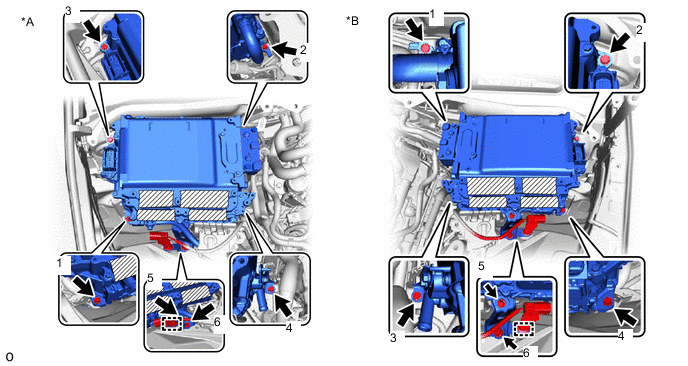
*A for LHD *B for RHD -
Remove the 6 bolts, No. 6 inverter bracket and inverter with converter assembly.
Note
-
Since the inverter with converter assembly is very heavy, 2 people are needed to remove the inverter with converter assembly. When removing the inverter with converter assembly, do not damage the parts around it.
-
To prevent damage, do not hold the inverter with converter assembly by the connectors.
-
To prevent damage due to static electricity, do not touch the terminals of the disconnected connectors.
-
Cover the connectors with insulating tape to prevent foreign matter or water from entering.
Tech Tips
Even after the coolant is drained, coolant remains in the inverter due to its internal structure. Therefore, seal or cover the pipes when removing the inverter so that coolant does not spill out.
-
-
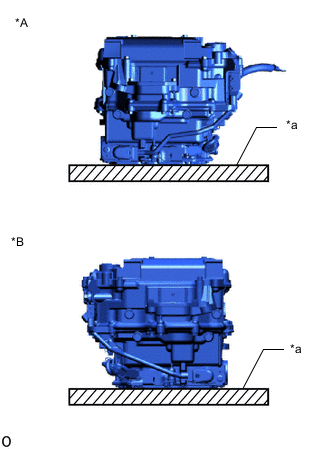
*A for LHD *B for RHD *a Cushion When removing and storing the inverter with converter assembly, make sure to install the inverter terminal cover and place a cushion under the inverter with converter assembly to protect it.
Note
Do not place the inverter with converter assembly upside down.
-
-
REMOVE NO. 4 INVERTER BRACKET
-
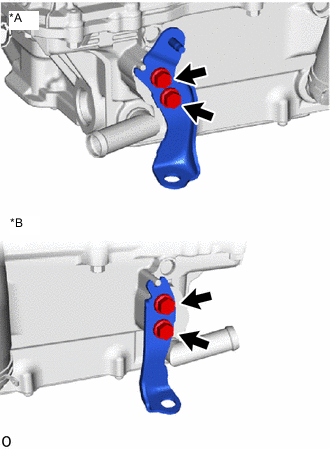
*A for LHD *B for RHD Remove the 2 bolts and No. 4 inverter bracket.
-
-
REMOVE INVERTER BUS-BAR PLATE SUB-ASSEMBLY
-
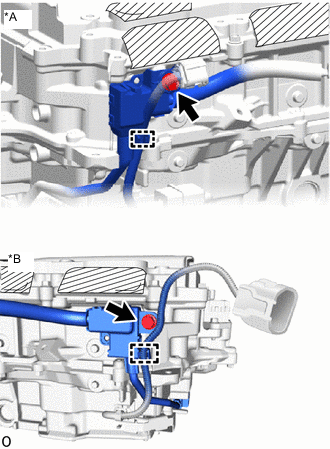
*A for LHD *B for RHD Detach the clamp and remove the bolt.
-
Remove the bolt from the inverter bus-bar plate sub-assembly.
-
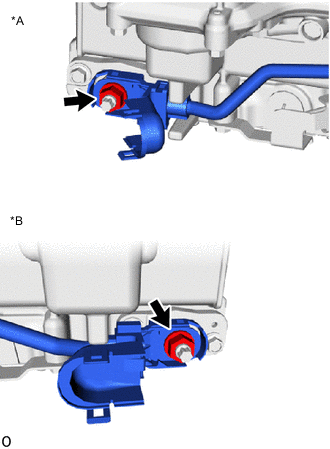
*A for LHD *B for RHD Open the terminal cover.
-
Remove the nut.
Note
If the stud bolt becomes loose when removing the nut, tighten the stud bolt to a torque of 10 N*m (102 kgf*cm 7 ft.*lbf).
-
Remove the inverter bus-bar plate sub-assembly.
Note
If the inverter bus-bar plate sub-assembly is dropped or deformed, replace it with a new one.
-
-
REMOVE NO. 1 INVERTER COOLING HOSE
Tech Tips
Perform this procedure only when replacement of the No. 1 inverter cooling hose is necessary.
-
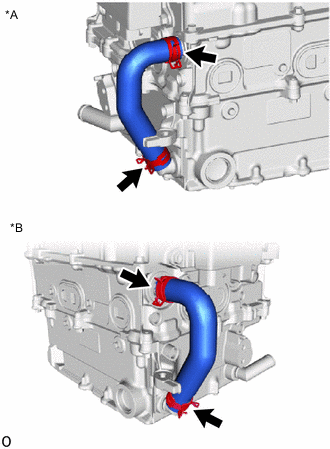
*A for LHD *B for RHD Slide the 2 hose clips and remove the No. 1 inverter cooling hose from the inverter with converter assembly.
Note
Put pieces of cloth into the pipes or cover the pipes with plastic bags to prevent entry of foreign matter.
-
-
REMOVE HIGH VOLTAGE FUSE
CAUTION:
Wear insulated gloves.
Tech Tips
Perform this procedure only when replacement of the high voltage fuse is necessary.
-
Remove the connector cover assembly.
-
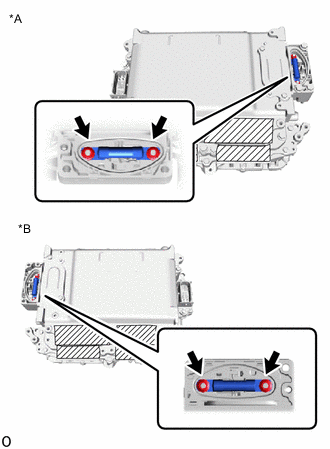
*A for LHD *B for RHD Remove the 2 nuts and high voltage fuse.
Note
Do not allow any foreign matter or water to enter the inverter with converter assembly.
-
Temporarily install the connector cover assembly.
-