REAR BUMPER REMOVAL
CAUTION / NOTICE / HINT
Tech Tips
If the bumper is damaged, there is a possibility that the installation area of the blind spot monitor sensor may be deformed and the blind spot monitor system may not operate correctly, so visually inspect the blind spot monitor sensor installation area (frame, stud bolt) to make sure it is not dented or bent.
If the visual inspection finds a problem, check the installation condition of the blind spot monitor sensor, and adjust the installation position of the blind spot monitor sensor as necessary.
PROCEDURE
-
REMOVE REAR COMBINATION LIGHT COVER LH
-
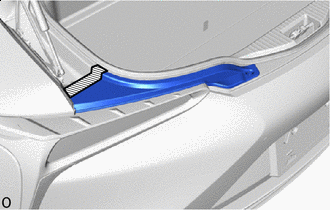

Protective Tape Apply protective tape at the position as shown in the illustration.
-
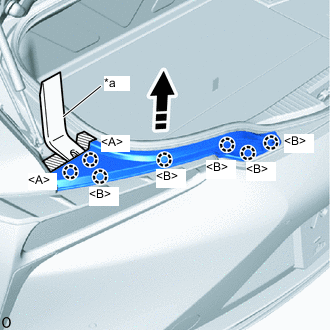
*a Moulding Remover B 
Remove in this Direction Using moulding remover B, detach the claws <A>.
-
Detach the claws <B> and remove the rear combination light cover LH.
-
-
REMOVE REAR COMBINATION LIGHT COVER RH
Tech Tips
Use the same procedure described for the LH side.
-
REMOVE REAR BUMPER CENTER GUARD
-
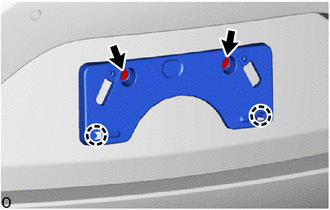
for Type A:
-
Remove the 2 screws.
-
Detach the claws and remove the rear bumper center guard.
-
-
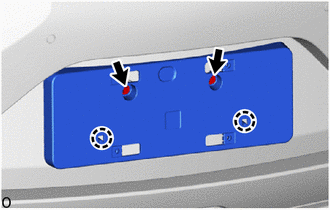
for Type B:
-
Remove the 2 screws.
-
Detach the claws and remove the rear bumper center guard.
-
-
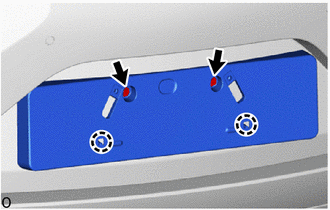
for Type C:
-
Remove the 2 screws.
-
Detach the claws and remove the rear bumper center guard.
-
-
-
REMOVE REAR BUMPER COVER
-
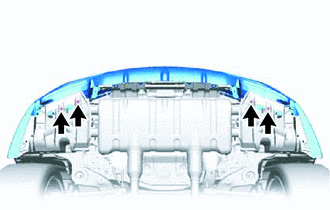
Remove the 4 screws.
-
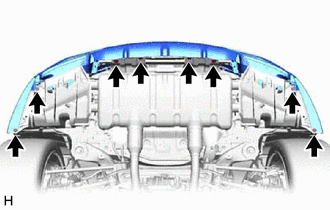
Remove the 8 clips.
-
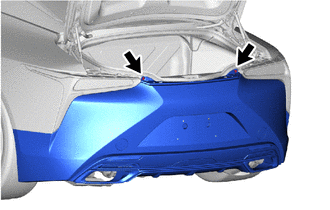
Remove the 2 screws.
-
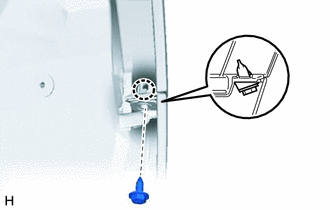
Fold back a part of edge of the rear fender liner, remove the screw and detach the claw and grommet.
Tech Tips
Use the same procedure for the RH and LH sides.
-
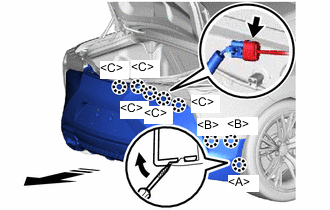
Remove in this Direction Protective Tape Using a screwdriver with its tip wrapped with protective tape, detach the claw <A>.
Tech Tips
Use the same procedure for the RH and LH sides.
-
Detach the claws <B>.
Tech Tips
Use the same procedure for the RH and LH sides.
-
Detach the claws <C>.
Tech Tips
Use the same procedure for the RH and LH sides.
-
Disconnect the connector and remove the rear bumper cover as shown in the illustration.
-