TELEMATICS SYSTEM OPERATION CHECK
-
ENTER TEST MODE
Tech Tips
-
By performing a test call, it is possible to check the operation of the telephone transceiver assembly.
-
Make sure to perform a test call after troubleshooting the telematics system.
-
Depending on radio wave signal conditions and the test center condition, a test call may fail even though the vehicle is not malfunctioning.
-
Enter test mode by using either of the following methods:
-
Method 1 (Recommended)
-
Connect the GTS to the DLC3.
-
Turn the engine switch on (IG).
-
Turn the GTS on.
-
Enter the following menus: Body Electrical / Telematics / Utility / Emergency Call Check
Body Electrical > Telematics > UtilityTester Display Emergency Call Check -
According to the display on the GTS, perform Emergency Call Check to enter test mode.
-
-
Method 2
-
Turn the engine switch on (IG) and wait for 60 seconds with the vehicle stopped.
-
Turn the taillights on and off at an interval of 10 seconds or less as follows:
-
Operate the light control switch to dim the manual (SOS) switch green indicator on and off as follows: Off → Tail → Off → Tail → Off → Tail → Off → Tail → Off → Tail →Off → Tail → Off → Tail → Off → Tail → Off → Tail → Off → Tail.
for Light Control Switch with Off Position:
-
Expose the automatic light control sensor to a light and then operate the light control switch to dim the manual (SOS) switch green indicator on and off as follows: AUTO → Tail → AUTO → Tail → AUTO → Tail → AUTO → Tail → AUTO → Tail →AUTO → Tail → AUTO → Tail → AUTO → Tail → AUTO → Tail → AUTO → Tail.
for Light Control Switch without Off Position:
-
Turn the light control switch to the AUTO position, expose the automatic light control sensor to a light and then cover and uncover the light control sensor to dim the manual (SOS) switch green indicator on and off as follows: Off → On → Off → On → Off → On → Off → On → Off → On →Off → On → Off → On → Off → On → Off → On → Off → On.
for Light Control Switch without Off Position (if the above procedure cannot be completed successfully):
-
-
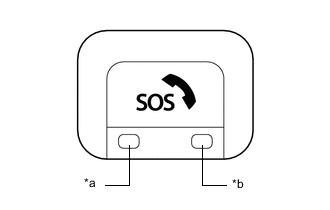
*a Manual (SOS) Switch Green Indicator *b Manual (SOS) Switch Red Indicator Push the manual (SOS) switch within 10 seconds that the red and green indicators are flashing, or during the indicators turning off within 5 seconds.
-
Check that the manual (SOS) switch indicator (green) blinks 3 times and then enters test mode.
Tech Tips
The manual (SOS) switch is pushed for less than 3 seconds.
-
-
-
PERFORM TEST CALL
-
Enter test mode.
Tech Tips
The manual (SOS) switch indicator (green) will blink 3 times to indicate that test mode has been entered.
-
Speak into the telephone microphone assembly and confirm that your voice can be heard from the speakers, and then press the manual (SOS) switch for 3 seconds or less to enter test call mode.
Tech Tips
-
If your voice cannot be heard from the speakers, press and hold the manual (SOS) switch for 3 to 10 seconds.
-
The manual (SOS) switch indicator (green) will blink 4 times.
-
-
Press the manual (SOS) switch and check that the manual (SOS) switch indicator (green) blinks 1 time. A test call will be performed and test data will be transmitted.
Tech Tips
-
The manual (SOS) switch indicator (green) will illuminate for 10 seconds if test data transmission was successful.
-
The manual (SOS) switch indicator (red) will illuminate for 10 seconds if test data transmission fails.
-
-
-
DCM Operation History
Tech Tips
This function is used to display operation history information and the time at which it was stored in the telephone transceiver assembly.
-
Check DCM Operation History
Tech Tips
When problem symptoms due to wave interference cannot be reproduced, this function provides telephone transceiver assembly operation history information which can be used to explain the cause of the malfunction to the customer.
-
Connect the GTS to the DLC3.
-
Turn the engine switch on (IG).
-
Turn the GTS on.
-
Enter the following menus: Body Electrical / Telematics / Utility / DCM Operation History
Body Electrical > Telematics > UtilityTester Display DCM Operation History Item Function Parameter Name Operation History Displays the result of an attempt emergency call. Success Fail Activation Failed Displays the reason for failure if communication failed. Unrecognized VIN Unrecognized DCM-ID Unrecognized IMSI Unavailable Service Center Service Already Activated Backup Battery Status Displays the mobilephone battery condition. Low Battery Amount Low Battery Voltage Battery Exhaustion Abnormal
-
-