MULTI-DISPLAY REMOVAL
CAUTION / NOTICE / HINT
The necessary procedures (adjustment, calibration, initialization or registration) that must be performed after parts are removed, installed or replaced during the multi-display removal/installation are shown below.
| Replacement Part or Procedure | Necessary Procedures | Effects / Inoperative when not Performed | Link |
|---|---|---|---|
| Disconnect cable from negative battery terminal | Memorize steering angle neutral point | LKA/LDA system | |
| Pre-collision system | |||
| Parking assist monitor system | |||
| Steering sensor zero point calibration | Variable gear ratio steering system |
CAUTION:
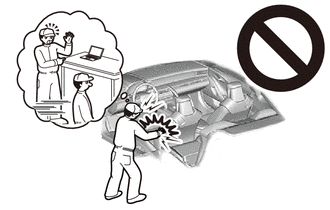
Some of these service operations affect the SRS airbag system. Read the precautionary notices concerning the SRS airbag system before servicing.
PROCEDURE
-
PRECAUTION
Note
After turning the engine switch off, waiting time may be required before disconnecting the cable from the negative (-) battery terminal. Therefore, make sure to read the disconnecting the cable from the negative (-) battery terminal notices before proceeding with work.
-
REMOVE NO. 2 DECK BOARD
-
DISCONNECT CABLE FROM NEGATIVE BATTERY TERMINAL
CAUTION:
-
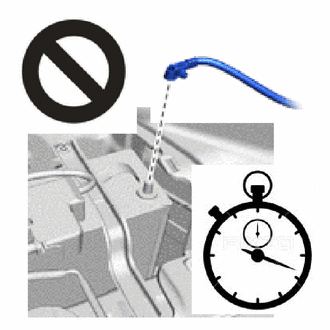
Wait at least 90 seconds after disconnecting the cable from the negative (-) battery terminal to disable the SRS system.
-
If the airbag deploys for any reason, it may cause a serious accident.
Note
When disconnecting the cable, some systems need to be initialized after the cable is reconnected.
-
-
REMOVE COMBINATION METER ASSEMBLY
-
REMOVE INTEGRATION CONTROL AND PANEL ASSEMBLY
-
REMOVE LOWER NO. 2 INSTRUMENT PANEL AIRBAG ASSEMBLY
-
REMOVE NO. 2 INSTRUMENT PANEL REGISTER ASSEMBLY
-
REMOVE GLOVE COMPARTMENT DOOR ASSEMBLY
-
REMOVE MULTI-DISPLAY
-
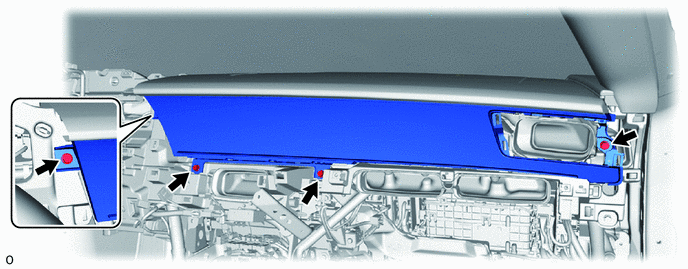
Remove the 4 bolts.
-
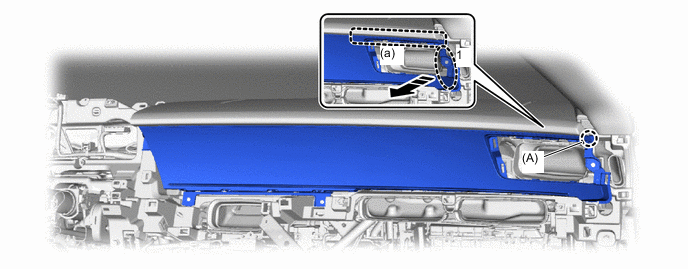
Hold area 1 as shown in the illustration and detach claw (A) while moving it towards the rear of the vehicle.

Place Hands Here 
Remove in this Direction Note
If excessive force is applied to the multi-display it may become damaged.
Tech Tips
The top area of the instrument panel (a) can be easily detached by lifting it up slightly from the bottom as shown in the illustration.
-
Insert your hand from the area where the register is installed, hold area 2 as shown in the illustration and detach claw (B) while moving it towards the rear of the vehicle.
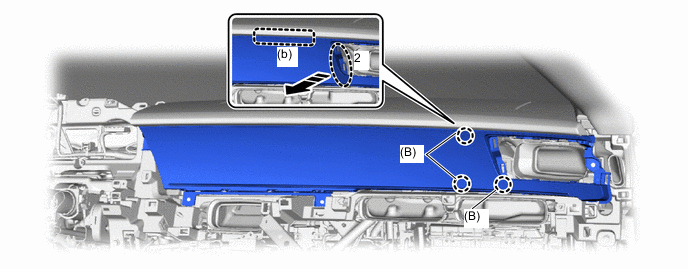
Place Hands Here Remove in this Direction Note
If excessive force is applied to the multi-display it may become damaged.
Tech Tips
The top area of the instrument panel (b) can be easily detached by lifting it up slightly from the bottom as shown in the illustration.
-
Insert your hand through the gap between the instrument panel, hold area 3 as shown in the illustration and detach claw (C) while moving it towards the rear of the vehicle.
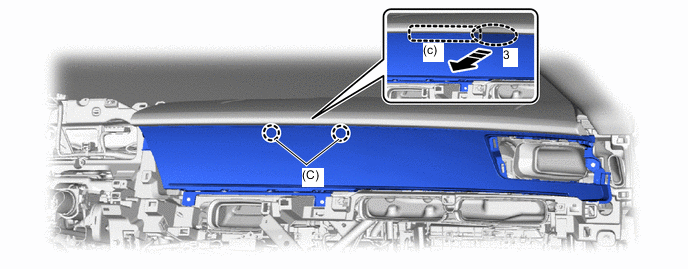
Place Hands Here Remove in this Direction Note
If excessive force is applied to the multi-display it may become damaged.
Tech Tips
The top area of the instrument panel (c) can be easily detached by lifting it up slightly from the bottom as shown in the illustration.
-
Hold area 4 as shown in the illustration and detach claw (D) from the instrument panel while pulling it towards the rear of the vehicle.
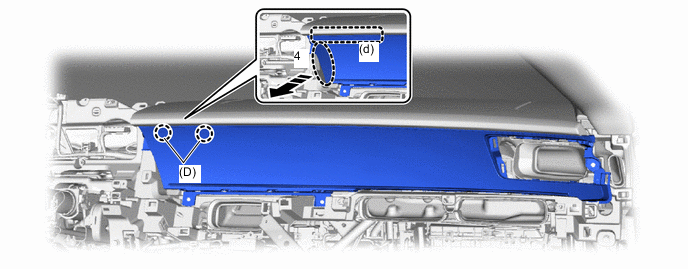
Place Hands Here Remove in this Direction Note
If excessive force is applied to the multi-display it may become damaged.
Tech Tips
The top area of the instrument panel (d) can be easily detached by lifting it up slightly from the bottom as shown in the illustration.
-
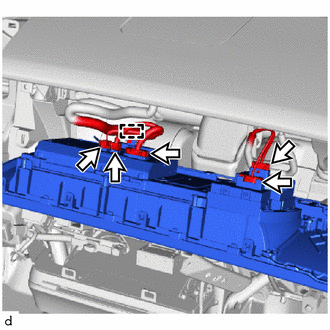
Detach the clamp and disconnect the 5 connectors.
-