INSTRUMENT PANEL SPEAKER INSPECTION
PROCEDURE
-
INSPECT FRONT NO.1 SPEAKER ASSEMBLY
-
With the speaker in the installed condition, check there are no abnormalities such looseness or rattling.
-
Check that there is no foreign matter inside the speaker.
-
Check that the speaker cone is not damaged.
-
Replace and check
-
Replace the No. 1 front speaker assembly with a normally functioning one and operate it again.
OK Malfunction disappears. Tech Tips
Switch the right and left speakers and perform a check when either the right or left No. 1 front speaker assembly is suspected to be malfunctioning.
-
-
-
INSPECT FRONT NO.2 SPEAKER ASSEMBLY
-
With the speaker in the installed condition, check there are no abnormalities such looseness or rattling.
-
Check that there is no foreign matter inside the speaker.
-
Check that the speaker cone is not damaged.
-
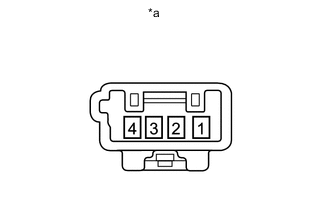
*a Component without harness connected
(Front No. 2 Speaker Assembly)
for 12 Speakers:
-
Measure the resistance according to the value(s) in the table below.
Standard Resistance Tester Connection Condition Specified Condition 1 - 2 Always 4 Ω If the result is not as specified, replace the front No. 2 speaker assembly.
-
-
for 13 Speakers:
-
Replace and check
Replace the No. 2 front speaker assembly with a normally functioning one and operate it again.
OK Malfunction disappears.
-
-