STEERING COLUMN ASSEMBLY REMOVAL
CAUTION / NOTICE / HINT
The necessary procedures (adjustment, calibration, initialization, or registration) that must be performed after parts are removed, installed, or replaced during the steering column assembly removal/installation are shown below.
| Replacement Part or Procedure | Necessary Procedure | Effect/Inoperative when not Performed | Link |
|---|---|---|---|
| Disconnect cable from negative battery terminal | Memorize steering angle neutral point | LKA/LDA system | |
| Pre-collision system | |||
| Parking assist monitor system | |||
| Steering sensor zero point calibration | Variable gear ratio steering system | ||
| Steering sensor (Including removal and installation) |
|
Parking assist monitor system | for Initialization: for Calibration: |
|
Perform Actuator Angle Neutral Point Calibration and Initialization |
|
Tech Tips
-
Use the same procedure for RHD and LHD vehicles.
-
The procedure listed below is for LHD vehicles.
PROCEDURE
-
PRECAUTION
-
CUSTOMIZE POWER TILT AND POWER TELESCOPIC STEERING COLUMN SYSTEM
-
Disable the auto tilt away function by changing the customize settings.
Note
Record the current customize setting (whether the auto tilt away function is enabled or disabled) in order to restore the current setting after finishing the operation.
Tech Tips
Performing the above operation causes the auto tilt away function to be disabled when the engine switch is turned off.
-
Turn the engine switch on (IG). Operate the tilt and telescopic switch to fully extend and lower the steering column assembly.
-
-
ALIGN FRONT WHEELS FACING STRAIGHT AHEAD
-
REMOVE HORN BUTTON ASSEMBLY
-
REMOVE STEERING WHEEL ASSEMBLY
-
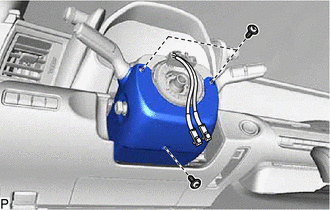
REMOVE LOWER STEERING COLUMN COVER SUB-ASSEMBLY
-
Remove the 3 screws.
-
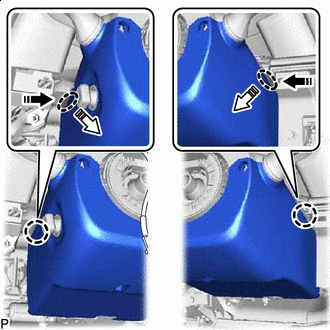

Push Area 
Remove in this Direction (1) 
Remove in this Direction (2) Press in, in the direction shown by the arrow (1) in the illustration, and disengage the claws.
-
Pull out in the direction indicated by the arrow (2) in the illustration, disengage the claws to remove the lower steering column cover.
-
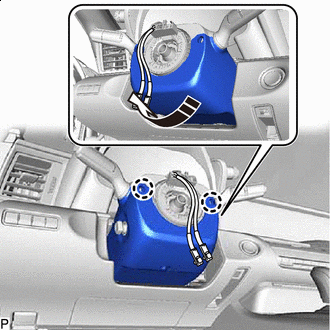
Remove in this Direction Disengage the 2 claws.
-
Pull in the direction indicated by the arrow to remove the lower steering column cover sub-assembly.
Note
Do not damage the tilt and telescopic switch.
-
-
REMOVE UPPER STEERING COLUMN COVER
-
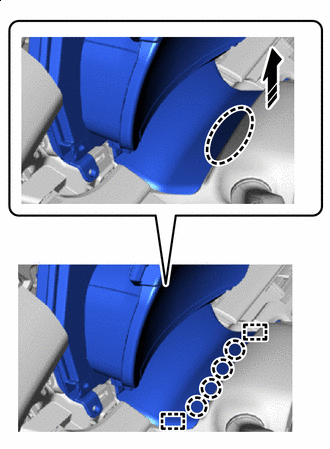
Place Hand Here Remove in this Direction Detach the claws and guides as shown in the illustration.
-
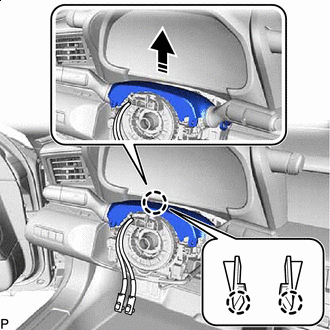
Remove in this Direction Disengage the claw to remove the upper steering column cover.
-
-
REMOVE TURN SIGNAL SWITCH ASSEMBLY WITH SPIRAL CABLE SUB-ASSEMBLY
Note
-
Do not replace the spiral cable with sensor sub-assembly with the battery connected and the engine switch on (IG).
-
Do not rotate the spiral cable with sensor sub-assembly without the steering wheel assembly installed, with the battery connected and the engine switch on (IG).
-
Ensure that the steering wheel assembly is installed and aligned straight when inspecting the steering sensor.
-
Disconnect each connector from the turn signal switch assembly with spiral cable sub-assembly.
-
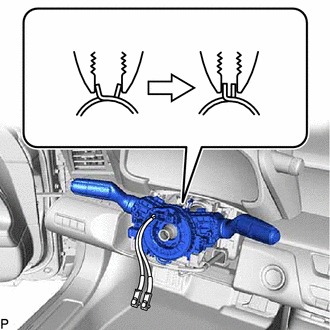
Using pliers, support the band clamp while loosened.
-
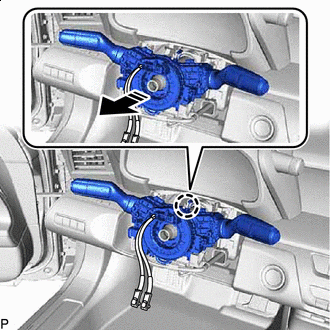
Remove in this Direction Disengage the claw to remove the turn signal switch assembly with spiral cable sub-assembly from the steering column assembly.
-
-
REMOVE LOWER NO. 1 INSTRUMENT PANEL AIRBAG ASSEMBLY
-
REMOVE NO. 2 AIR DUCT
-
REMOVE HEATER TO CENTER REGISTER SUB DUCT
-
REMOVE STEERING COLUMN ASSEMBLY
-
w/o VGRS:
-
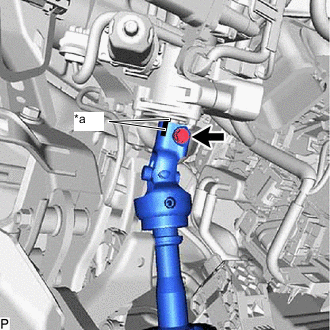
*a Matchmark Put matchmarks on the No. 2 steering intermediate shaft assembly and steering column assembly.
-
Remove the bolt.
-
-
w/ VGRS:
-
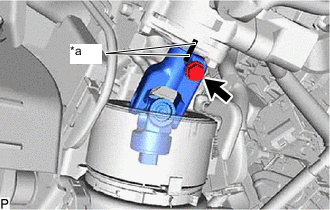
*a Matchmark Put matchmarks on the steering actuator assembly and steering column assembly.
-
Remove the bolt.
-
-
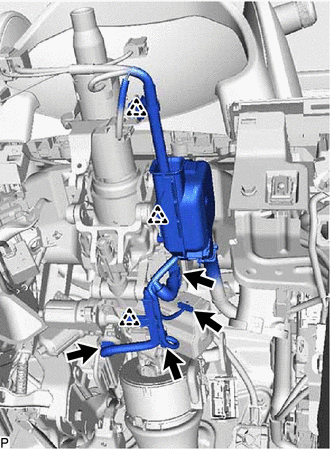
Disconnect each connector and disengage each wire harness clamp from the steering column assembly.
-
Remove the 2 nuts, bolt and steering column assembly.
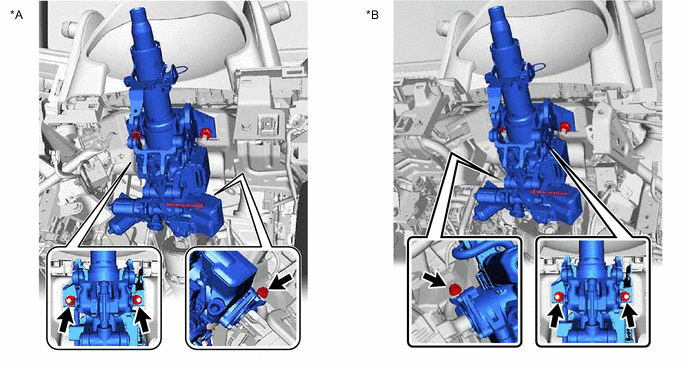
*A for LHD *B for RHD -
w/o VGRS:
-
Separate the steering column assembly from the No. 2 steering intermediate shaft assembly.
-
-
w/ VGRS:
-
Separate the steering column assembly from the steering actuator assembly.
-
-
-
REMOVE NO. 2 ENGINE UNDER COVER ASSEMBLY
-
REMOVE NO. 2 STEERING INTERMEDIATE SHAFT ASSEMBLY (w/o VGRS)
-
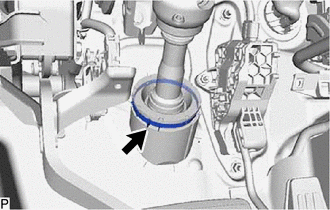
Loosen the clamp.
-
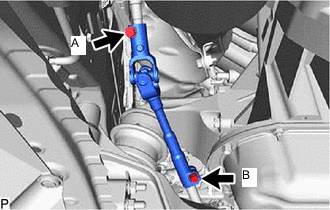
Loosen the bolt (A).
Note
Do not remove the bolt (A).
-
Remove the bolt (B).
-
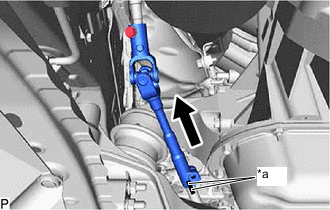
*a Matchmark Slide the steering sliding with shaft yoke sub-assembly and put matchmarks on the steering sliding with shaft yoke sub-assembly and rack and pinion power steering gear assembly.
-
Separate the steering sliding with shaft yoke sub-assembly from the rack and pinion power steering gear assembly.
-
Remove the steering sliding with shaft yoke sub-assembly with the No. 2 steering intermediate shaft assembly from the vehicle.
-
-
REMOVE STEERING ACTUATOR ASSEMBLY (w/ VGRS)
-
REMOVE STEERING SLIDING WITH SHAFT YOKE SUB-ASSEMBLY
-
w/o VGRS:
-
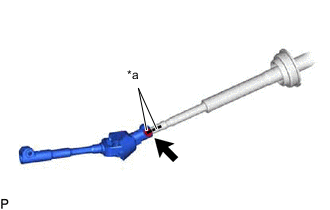
*a Matchmark Put matchmarks on the steering sliding yoke sub-assembly and No. 2 steering intermediate shaft assembly.
-
Remove the bolt.
-
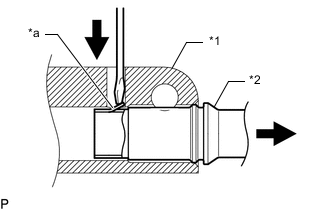
*1 Steering Sliding Yoke with Shaft Sub-assembly *2 No. 2 Steering Intermediate Shaft Assembly *a Claw Using a screwdriver, disengage the claw and remove the steering sliding yoke sub-assembly from the No. 2 steering intermediate shaft assembly.
Tech Tips
Even if the claw is broken, the No. 2 steering intermediate shaft assembly can be reused if the claw is removed.
-
-
w/ VGRS:
-
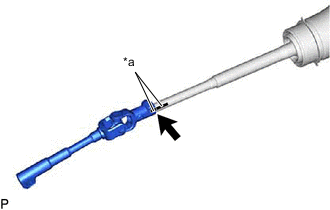
*a Matchmark Put matchmarks on the steering sliding yoke sub-assembly and steering actuator assembly.
-
Remove the bolt.
-
*1 Steering Sliding Yoke with Shaft Sub-assembly *2 Steering Actuator Assembly *a Claw Using a screwdriver, disengage the claw and remove the steering sliding yoke sub-assembly from the steering actuator assembly.
-
-