POWER STEERING SYSTEM DTC CHECK / CLEAR
-
CHECK DTCs (USING GTS)
-
Turn the engine switch off.
-
Connect the GTS to the DLC3.
-
Turn the engine switch on (IG).
-
Turn the GTS on.
-
Enter the following menus: Chassis / EMPS / Trouble Codes.
Chassis > EMPS > Trouble Codes
Note
If a malfunction is found, repair it, and then check the DTCs again to make sure that no DTCs are output.
-
-
CHECK DTCs (USING SST CHECK WIRE)
-
Turn the engine switch off.
-
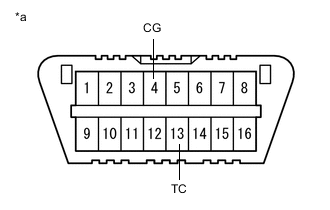
*a DLC3 Using SST, connect terminals 13 (TC) and 4 (CG) of the DLC3.
- SST
- 09843-18040
Note
Be sure to connect the connectors in the correct locations. Incorrect installation may cause a malfunction.
-
Turn the engine switch on (IG).
-
Read and write down any DTCs indicated by the blinking of the EPS warning light in the combination meter assembly.
Tech Tips
-
When the system is normal, the light turns on and off at 0.25-second intervals (2 Hz blink) repeatedly.
-
When only 1 DTC is output, the same code is displayed repeatedly at 4-second intervals. When multiple DTCs are output, the codes are displayed one by one at 2.5-second intervals. After all DTCs are displayed, the codes will be output again in 4 seconds.
-
When multiple DTCs are output, the lowest numbered DTC is output first.
-
-
Disconnect terminals 13 (TC) - 4 (CG) of the DLC3.
Note
If a malfunction is found, repair it, and then check the DTCs again to make sure that no DTCs are output.
EPS DTC EPS Warning Light Display Tester Display 11 C1511 C1512 C1513 C1514 12 C1528 13 C1541 15 C1515 16 C1516 22 C1552 23 C1554 24 C1521 C1522 C1523 25 C1531 C1532 C1533 C1534 C1551 C1555 26 C1581 C1582 31 C1548 41 U0100 42 U0129 44 C1567 U0130 U0134 45 U023A 47 U0126 -
-
CLEAR DTCs (USING GTS)
-
Turn the engine switch off.
-
Connect the GTS to the DLC3.
-
Turn the engine switch on (IG).
-
Turn the GTS on.
-
Enter the following menus: Chassis / EMPS / Trouble Codes.
Chassis > EMPS > Clear DTCs -
Select the clear button and clear the DTCs according to the display.
-