AMBIENT LIGHT(for Instrument Panel Side) INSTALLATION
CAUTION / NOTICE / HINT
Tech Tips
-
Use the same procedure for RHD and LHD vehicles.
-
The procedure listed below is for LHD vehicles.
PROCEDURE
-
INSTALL MULTI-DISPLAY
-
Connect the 5 connectors and attach the wire harness clamp.
-
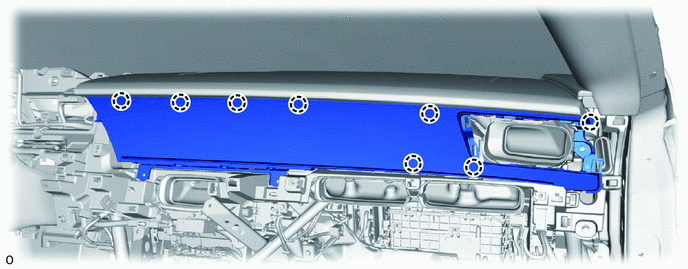
Temporarily place the claw of the multi-display.
-
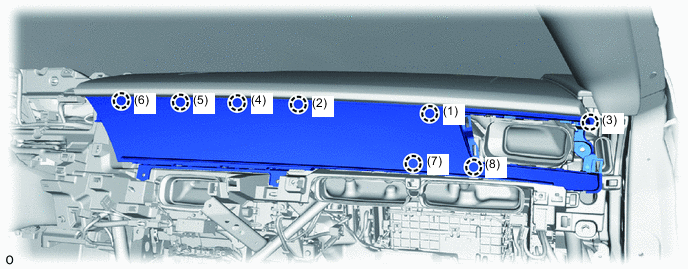
Attach the claw in the order shown in the illustration to install the multi-display.
Note
If the claws are not attached in the order shown in the illustration, the multi-display may become damaged.
-
Install the 4 bolts.
-
-
INSTALL NO. 2 INSTRUMENT PANEL REGISTER ASSEMBLY
-
INSTALL GLOVE COMPARTMENT DOOR ASSEMBLY
-
INSTALL LOWER NO. 2 INSTRUMENT PANEL AIRBAG ASSEMBLY
-
INSTALL INTEGRATION CONTROL AND PANEL ASSEMBLY
-
INSTALL COMBINATION METER ASSEMBLY
-
CONNECT CABLE TO NEGATIVE BATTERY TERMINAL
Note
When disconnecting the cable, some systems need to be initialized after the cable is reconnected.
-
INSTALL NO. 2 DECK BOARD
-
CUSTOMIZE POWER TILT AND POWER TELESCOPIC STEERING COLUMN SYSTEM