DYNAMIC RADAR CRUISE CONTROL SYSTEM OPERATION CHECK
-
INPUT SIGNAL CHECK
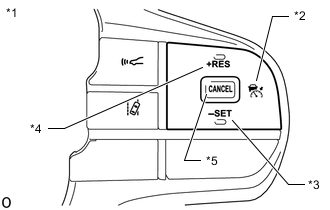
*1 Steering Pad Switch Assembly *2 Cruise Control Main Switch *3 -SET Switch *4 +RES Switch *5 CANCEL Switch
-
Connect the GTS to the DLC3.
-
Check the steering pad switch assembly using the Data List function of the GTS (cruise control main switch, -SET switch, +RES switch and CANCEL switch).
-
-
INSPECT CRUISE CONTROL MAIN SWITCH
-
Turn the engine switch on (IG).
-
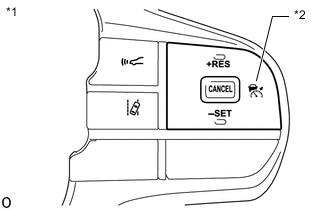
*1 Steering Pad Switch Assembly *2 Cruise Control Main Switch Turn the dynamic radar cruise control system on using the cruise control main switch.
-
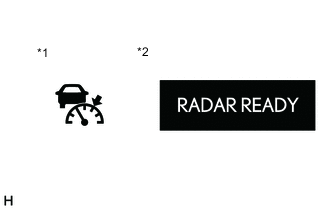
*1 Cruise Control Indicator (Vehicle-to-vehicle Distance Control Mode) *2 Multi-information Display Check that the cruise control indicator (vehicle-to-vehicle distance control mode) in the combination meter assembly illuminates and "RADAR READY" is displayed on the multi-information display.
-
Turn the cruise control system off using the cruise control main switch. Check that the cruise control indicator (vehicle-to-vehicle distance control mode) in the combination meter assembly and "RADAR READY" on the multi-information display turn off.
-
Turn the engine switch off with the cruise control indicator (vehicle-to-vehicle distance control mode) in the combination meter assembly illuminated and "RADAR READY" on the multi-information display displayed. Turn the engine switch back on (IG) and check the cruise control indicator (vehicle-to-vehicle distance control mode) in the combination meter assembly and "RADAR READY" on the multi-information display are turned off.
-
-
INSPECT MODE SELECT
-
Turn the engine switch on (IG).
-
*1 Steering Pad Switch Assembly *2 Cruise Control Main Switch Push and hold the cruise control main switch for approximately 1.5 seconds. Check that the cruise control indicator (vehicle-to-vehicle distance control mode) in the combination meter assembly and "RADAR READY" on the multi-information display turn off and the cruise control indicator (constant speed control mode) illuminates.
-
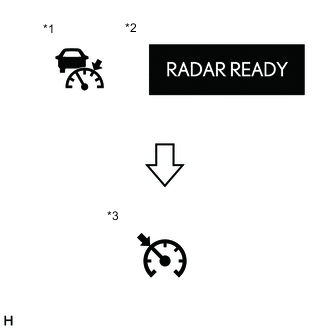
*1 Cruise Control Indicator (Vehicle-to-vehicle Distance Control Mode) *2 Multi-information Display *3 Cruise Control Indicator (Constant Speed Control Mode) Check that the cruise control indicator (vehicle-to-vehicle distance control mode) turns off and the cruise control indicator (constant speed control mode) illuminates.
Note
The mode does not change to the constant speed control mode when other operations (setting) are performed after the cruise control main switch is pressed. In this case, press the cruise control main switch to turn the radar cruise control system off and then perform the check again.
-
-
INSPECT VEHICLE-TO-VEHICLE DISTANCE CONTROL SWITCH
-
Turn the engine switch on (IG).
-
*1 Steering Pad Switch Assembly *2 Cruise Control Main Switch Turn the dynamic radar cruise control system on using the cruise control main switch.
-
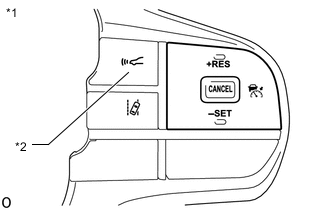
*1 Steering Pad Switch Assembly *2 Vehicle-to-vehicle Distance Control Switch Press the vehicle-to-vehicle distance control switch.
-
Check that the indicator of the vehicle-to-vehicle distance, which is shown on the multi-information display in the combination meter assembly changes from long to middle to short in that order.
Tech Tips
Long is automatically selected each time the engine switch is turned on (IG).
-