REAR SUNSHADE SYSTEM CUSTOMIZE PARAMETERS
-
CUSTOMIZE REAR SUNSHADE SYSTEM
Tech Tips
The following items can be customized.
Note
-
When the customer requests a change in a function, first make sure that the function can be customized.
-
Record the current settings before customizing.
-
Customizing with the GTS
-
Connect the GTS to the DLC3.
-
Turn the ignition switch to ON.
-
Turn the GTS on.
-
Enter the following menus: Customize Setting / Others.
-
Select the setting by referring to the table below.
OthersTester Display Description Default Setting ECU Rear Shade Delay Time Function to change the time lag of the shift-linked operation 0.7 s 00:0.7 s,10:0.9 s,01:1.2 s,11:0.0 s Main body ECU (Multiplex network body ECU) R-pos to Rear Sun Shade COM Function to lower the rear sunshade when the shift lever is moved to R with the rear sunshade raised ON 0:OFF,1:ON Main body ECU (Multiplex network body ECU)
-
-
-
CUSTOMIZE COOLER CONTROL SWITCH ASSEMBLY (Sensitivity Level)
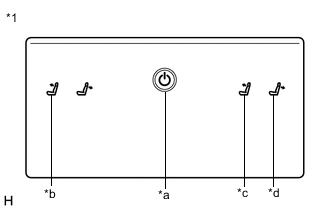
*1 Cooler Control Switch Assembly *a Home Switch *b Left Seat Reclining Forward Switch *c Right Seat Reclining Forward Switch *d Right Seat Reclining Back Switch
-
Turn the ignition switch to ACC.
-
While pressing and holding the home switch, touch the left seat reclining forward switch and right seat reclining back switch for 20 seconds or more.
Tech Tips
Make sure not to touch any switch except the left seat reclining forward switch and right seat reclining back switch.
-
When a beep emitted, release the home switch, left seat reclining forward switch and right seat reclining back switch.
-
Touch the right seat reclining forward switch or right seat reclining back switch to adjust the sensitivity level.
Setting Switch Sensitivity Level Adjustment Right seat reclining forward switch Up Right seat reclining back switch Down -
Check the selected sensitivity level according to the number of times the seat reclining switches blink.
Answer-back Function Sensitivity Level Number of Blinks High
(Default)
10 Medium 9 Low 8 -
Perform any of the following to end customization.
-
Wait 10 seconds or more without touching a seat reclining switch.
-
Press the home switch.
-
Turn the ignition switch off.
-
Turn the ignition switch to ON.
-
-