AIR CONDITIONING SYSTEM(for Automatic Air Conditioning System) CUSTOMIZE PARAMETERS
-
CUSTOMIZE AIR CONDITIONING SYSTEM
-
Customizing with the GTS.
Note
-
When the customer requests a change in a function, first make sure that the function can be customized.
-
Be sure to make a note of the current settings before customizing.
-
When troubleshooting a function, first make sure that the function is set to the default setting.
Tech Tips
The following items can be customized.
-
Connect the GTS.
-
Turn the ignition switch to ON.
-
Turn the GTS on.
-
Enter the following menus: Customize Setting / Air Conditioner.
-
Select the setting by referring to the table below.
Air ConditionerTester Display Description Default Setting ECU Set Temperature Shift Function to perform control with the shifted temperature versus the displayed temperature Normal 00001:-2C,00010:-1C,00100:Normal,01000:+1C,10000:+2C Air conditioning amplifier assembly Evaporator Control Function to set the evaporator control to the automatic position (Automatic) to save power or to the coldest position (Manual) to dehumidify the air and to prevent the windows from fogging up Automatic 0:Automatic,1:Manual Air conditioning amplifier assembly Compressor Mode Function to turn the A/C on automatically by pressing the AUTO switch when the blower is on and the A/C is off Automatic 0:Automatic,1:Manual Air conditioning amplifier assembly Air Inlet Mode Function to change the mode automatically to recirculation air mode when turning the A/C on to cool the cabin quickly Automatic 0:Automatic,1:Manual Air conditioning amplifier assembly Foot/DEF Auto Mode Function to change the air outlet mode to foot/defroster automatically when AUTO mode is on ON 0:ON,1:OFF Air conditioning amplifier assembly Foot/DEF Automatic Blow Up Function Function to increase the blower level automatically when the defroster is on ON 0:ON,1:OFF Air conditioning amplifier assembly Ambient Temperature Shift Function to display the shifted ambient temperature versus the actual ambient temperature Normal 0000001:-3C,0000010:-2C,0000100:-1C,0001000:Normal,0010000:+1C,0100000:+2C,1000000:+3C Air conditioning amplifier assembly ECO MODE Cancel Function to disable the operation of the ECO switch assembly when set to OFF*1, *2 OFF 0:OFF,1:ON Air conditioning amplifier assembly Refrigerant Shortage Check Function to cancel the refrigerant shortage check (check performed during normal operation) when set to ON ON 0:ON,1:OFF Air conditioning amplifier assembly Fan speed increment control Function to set the speed to reach the target blower fan speed when AUTO mode is on Normal 001:Slow,010:Normal,100:Fast Air conditioning amplifier assembly Ion Generate Control Function to disable the ion generator when set to OFF*3 ON 0:ON,1:OFF Air conditioning amplifier assembly Outside Air Mode Auto Switch Function Function to automatically change the air inlet to FRESH mode when the ignition switch is off for 60 seconds ON 0:ON,1:OFF Air conditioning amplifier assembly
-
*1: w/ ECO Switch
-
*2: Make sure to disable ECO mode control before setting this customize setting to ON.
-
*3: w/ Ion Generator
-
-
-
Customizing with the multi-display.
-
Turn the ignition switch to ON.
-
Enter the following menus: MENU / Setup / Vehicle / Vehicle customization / Climate settings. (Type A)
-
Enter the following menus: MENU / Setup / Vehicle / Vehicle customisation / Climate settings. (Type B)
-
Select the setting by referring to the table below.
Display Default Content Setting Relevant ECU Auto A/C mode On Function to turn the A/C on automatically by pressing the AUTO switch when the blower is on and the A/C is off On or Off Air conditioning amplifier assembly Efficient ventilation mode On Function to change the mode automatically to recirculation air mode when turning the A/C on to cool the cabin quickly On or Off Air conditioning amplifier assembly
-
-
-
CUSTOMIZE COOLER CONTROL SWITCH ASSEMBLY (Sensitivity Level)
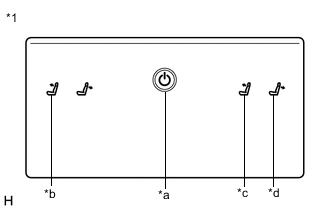
*1 Cooler Control Switch Assembly *a Home Switch *b Left Seat Reclining Forward Switch *c Right Seat Reclining Forward Switch *d Right Seat Reclining Back Switch
-
Turn the ignition switch to ACC.
-
While pressing and holding the home switch, touch the left seat reclining forward switch and right seat reclining back switch for 20 seconds or more.
Tech Tips
Make sure not to touch any switch except the left seat reclining forward switch and right seat reclining back switch.
-
When a beep emitted, release the home switch, left seat reclining forward switch and right seat reclining back switch.
-
Touch the right seat reclining forward switch or right seat reclining back switch to adjust the sensitivity level.
Setting Switch Sensitivity Level Adjustment Right seat reclining forward switch Up Right seat reclining back switch Down -
Check the selected sensitivity level according to the number of times the seat reclining switches blink.
Answer-back Function Sensitivity Level Number of Blinks High
(Default)
10 Medium 9 Low 8 -
Perform any of the following to end customization.
-
Wait 10 seconds or more without touching a seat reclining switch.
-
Press the home switch.
-
Turn the ignition switch off.
-
Turn the ignition switch to ON.
-
-