FRONT AIRBAG SENSOR INSTALLATION
CAUTION / NOTICE / HINT
Tech Tips
-
Use the same procedure for the RH side and LH side.
-
The following procedure is for the LH side.
PROCEDURE
-
INSTALL FRONT AIRBAG SENSOR
-
Check that the ignition switch is off.
-
Check that the cable is disconnected from the negative (-) battery terminal.
CAUTION:
Wait at least 90 seconds after disconnecting the cable from the negative (-) battery terminal to disable the SRS system.
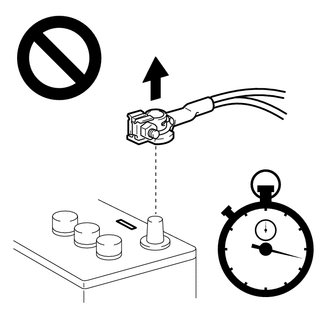
-
Before connecting the connector, check that the position of the white housing lock is as shown in the illustration.
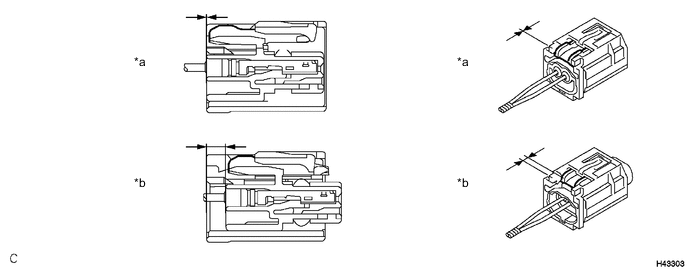
*a Incorrect *b Correct -
Engage the claw and install the front airbag sensor with the bolt.
- Torque:
- 9.0 N*m { 92 kgf*cm, 80 in.*lbf }
Note
-
If the front airbag sensor has been dropped, or there are any cracks, dents or other defects in the case or connector, replace it with a new one.
-
When installing the front airbag sensor, make sure that the SRS wiring does not interfere with or is not pinched between other parts.
-
Make sure that the front airbag sensor claw is securely inserted into the body hole.
-
Connect the connector to the front airbag sensor.
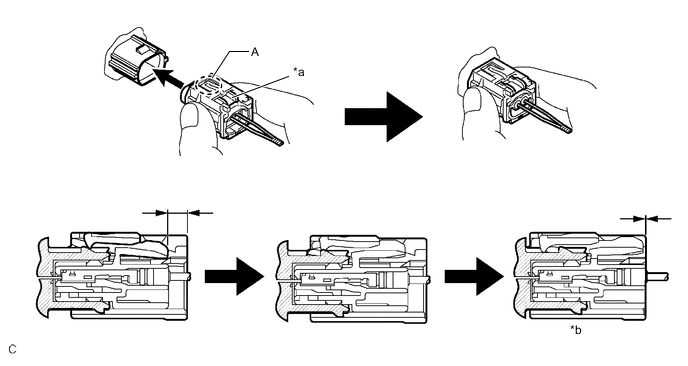
*a White Housing Lock *b Connection is completed Note
When connecting any airbag connector, take care not to damage the airbag wire harness.
Tech Tips
-
Be sure to connect the connector until it is locked (when locking, make sure that a click sound can be heard).
-
When the connector is locked, the white housing lock will slide. Do not hold the white housing lock or the part (A) as it may result in an insecure connection.
-
-
Check that there is no looseness in the installed parts of the front airbag sensor.
-
-
CONNECT CABLE TO NEGATIVE BATTERY TERMINAL
for 2AR-FE: Click here
for A25A-FKS: Click here
for 2GR-FKS: Click here
Note
When disconnecting the cable, some systems need to be initialized after the cable is reconnected.
-
PERFORM DIAGNOSTIC SYSTEM CHECK
-
INSPECT SRS WARNING LIGHT