NAVIGATION ECU REMOVAL
PROCEDURE
-
PRECAUTION
Note
-
When replacing the radio and display receiver assembly or navigation ECU, always replace it with a new one. If a radio and display receiver assembly or navigation ECU which was installed to another vehicle is used, the following may occur:
-
A communication malfunction DTC may be stored.
-
The radio and display receiver assembly or navigation ECU may not operate normally.
-
After replacing the navigation ECU, if "New software is not compatible with the system. Contact your dealer." is displayed on the multi-display, update the software of the radio and display receiver assembly.
-
-
CHANGE POWER TILT AND POWER TELESCOPIC STEERING COLUMN SYSTEM SETTINGS (for Power Tilt and Power Telescopic Steering Column)
-
REMOVE NO. 1 METER HOOD CLUSTER
-
REMOVE NO. 2 INSTRUMENT PANEL GARNISH SUB-ASSEMBLY
-
REMOVE LOWER INSTRUMENT PANEL FINISH PANEL ASSEMBLY
-
REMOVE NO. 3 INSTRUMENT PANEL REGISTER ASSEMBLY
-
REMOVE RADIO AND DISPLAY RECEIVER ASSEMBLY WITH BRACKET
-
REMOVE MULTI-MEDIA MODULE WIRE
-
REMOVE NO. 1 NAVIGATION WIRE
-
for LHD:
-
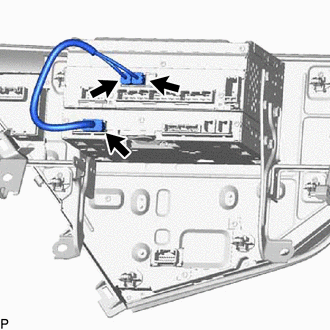
Disconnect the 3 connectors to remove the No. 1 navigation wire.
-
-
for RHD:
-
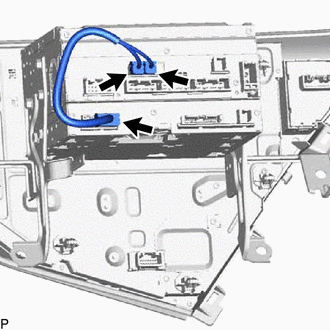
Disconnect the 3 connectors to remove the No. 1 navigation wire.
-
-
-
REMOVE NO. 1 RADIO RECEIVER BRACKET
-
REMOVE NO. 2 RADIO RECEIVER BRACKET
-
REMOVE RADIO AND DISPLAY RECEIVER ASSEMBLY
-
REMOVE NAVIGATION ECU