NOISE FILTER REMOVAL
CAUTION / NOTICE / HINT
The necessary procedures (adjustment, calibration, initialization, or registration) that must be performed after parts are removed and installed, or replaced during radio setting condenser removal/installation are shown below.
| Replaced Part or Performed Procedure | Necessary Procedure | Effect/Inoperative Function When Necessary Procedures are not Performed | Link |
|---|---|---|---|
| Disconnect cable from negative battery terminal | Perform steering sensor zero point calibration | Lane departure alert system (w/ Steering Control) | |
| Pre-collision system | |||
| Memorize steering angle neutral point | Parking assist monitor system |
CAUTION:
Some of these service operations affect the SRS airbag system. Read the precautionary notices concerning the SRS airbag system before servicing.
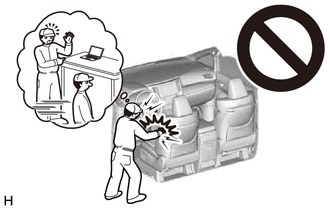
PROCEDURE
-
PRECAUTION (w/ Rear Seat Side Airbag)
Note
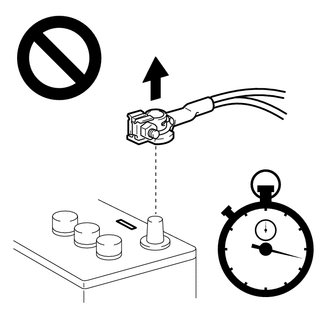
After turning the ignition switch off, waiting time may be required before disconnecting the cable from the negative (-) battery terminal. Therefore, make sure to read the disconnecting the cable from the negative (-) battery terminal notices before proceeding with work.
-
DISCONNECT CABLE FROM NEGATIVE BATTERY TERMINAL (w/ Rear Seat Side Airbag)
for 2AR-FE:
for A25A-FKS:
for 2GR-FKS:
CAUTION:
-
Wait at least 90 seconds after disconnecting the cable from the negative (-) battery terminal to disable the SRS system.
-
If an airbag deploys for any reason, it may cause a serious injury.
-
-
REMOVE REAR SEAT ASSEMBLY (for Fixed Seat Type)
-
DISCONNECT REAR DOOR OPENING TRIM WEATHERSTRIP LH (for Fixed Seat Type)
-
DISCONNECT REAR CENTER SEAT OUTER BELT ASSEMBLY (for Fold Down Seat Type)
-
REMOVE REAR SEAT CUSHION ASSEMBLY (for Fold Down Seat Type)
-
REMOVE REAR SEAT CUSHION LOCK HOOK (for Fold Down Seat Type)
-
DISCONNECT REAR DOOR OPENING TRIM WEATHERSTRIP LH (for Fold Down Seat Type)
-
REMOVE REAR SIDE SEATBACK ASSEMBLY LH (for Fold Down Seat Type)
-
REMOVE REAR SEAT HEADREST ASSEMBLY (for Reclining Seat Type)
-
DISCONNECT REAR CENTER SEAT OUTER BELT ASSEMBLY (for Reclining Seat Type)
-
REMOVE REAR SEAT CUSHION ASSEMBLY (for Reclining Seat Type)
-
REMOVE REAR SEAT CUSHION LOCK HOOK (for Reclining Seat Type)
-
REMOVE REAR SEATBACK COVER (for Reclining Seat Type)
-
REMOVE REAR SEATBACK ASSEMBLY LH (for Reclining Seat Type)
-
DISCONNECT REAR DOOR OPENING TRIM WEATHERSTRIP LH (for Reclining Seat Type)
-
REMOVE REAR SIDE SEATBACK ASSEMBLY LH (for Reclining Seat Type)
-
REMOVE INNER ROOF SIDE GARNISH LH
-
REMOVE RADIO SETTING CONDENSER (for High Mounted Stop Light)
Note
When a terminal cover is removed, the radio setting condenser must be replaced because the terminal covers and condenser are supplied as a set.
-
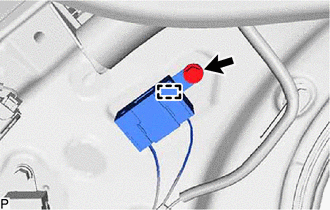
Remove the bolt.
-
Disengage the clamp and disconnect the radio setting condenser with wire harness from the vehicle body.
-
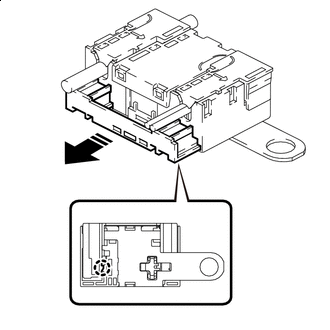

Remove in this Direction Disengage the claw and pull out the cover as shown in the illustration.
-
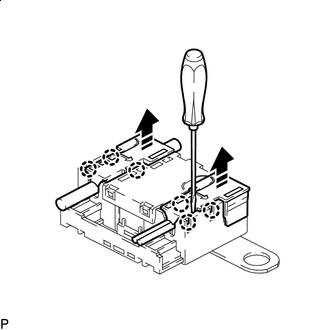
Remove in this Direction Using a screwdriver, disengage the 6 claws and remove the 2 terminal covers with wire harness from the condenser as shown in the illustration.
-
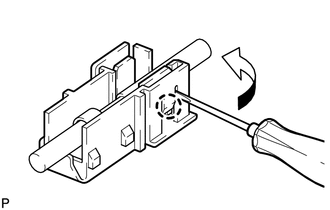
Using a screwdriver, bend back and break off the claw as shown in the illustration.
Tech Tips
Use the same procedure for the other terminal cover.
-
Remove the 2 terminal covers from the wire harness.
Note
-
Make sure to hold the crimping side of the terminal when disconnecting the wire harness from the terminal cover.
-
Make sure not to bend the exposed wire when disconnecting the wire harness from the terminal cover.
-
Check for deformation of the terminal after the wire harness has been removed from the terminal cover.
-
-
-
REMOVE RADIO SETTING CONDENSER (for Window Defogger)
Note
When the terminal cover is removed, the radio setting condenser must be replaced because the terminal cover and condenser are supplied as a set.
-
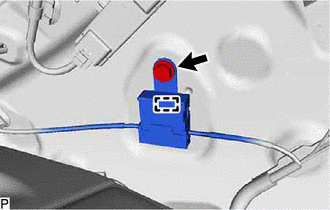
Remove the bolt.
-
Disengage the clamp and disconnect the radio setting condenser with wire harness from the vehicle body.
-
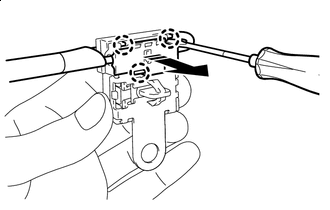
Remove in this Direction Using a screwdriver, disengage the 3 claws and remove the terminal cover with wire harness from the condenser as shown in the illustration.
-
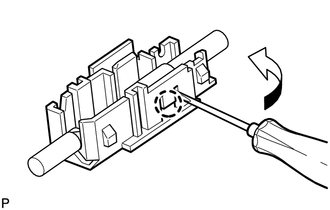
Using a screwdriver, bend back and break off the claw as shown in the illustration.
-
Remove the terminal cover from the wire harness.
Note
-
Make sure to hold the crimping side of the terminal when disconnecting the wire harness from the terminal cover.
-
Make sure not to bend the exposed wire when disconnecting the wire harness from the terminal cover.
-
Check for deformation of the terminal after the wire harness has been removed from the terminal cover.
-
-