PROCEDURE
- Click here
INSTALL IGNITION OR STARTER SWITCH ASSEMBLY (w/o Smart Key System)
-
Engage the 2 claws to install the ignition or starter switch assembly onto the upper steering column bracket assembly.
-
- Click here
INSTALL UN-LOCK WARNING SWITCH ASSEMBLY (w/o Smart Key System)
-
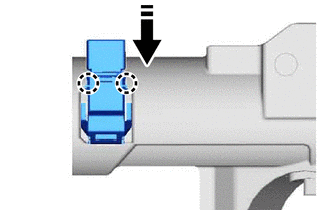
Engage the 2 claws to install the un-lock warning switch assembly to the upper steering column bracket assembly.
Tip:Slide the un-lock warning switch assembly, in the direction shown by the arrow in the illustration, to install it.
-
- Click here
INSTALL IGNITION SWITCH LOCK CYLINDER ASSEMBLY (w/o Smart Key System)
-
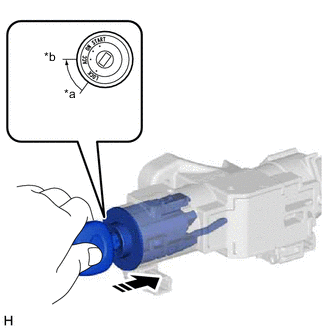
*a LOCK *b ACC Turn the ignition switch to ACC.
-
Install the ignition switch lock cylinder assembly to the upper steering column bracket assembly.
-
Make sure that the ignition switch lock cylinder assembly is securely installed into the upper steering column bracket assembly.
-
- Click here
INSTALL UPPER STEERING COLUMN BRACKET WITH SWITCH ASSEMBLY (w/o Smart Key System)
-
Secure the steering column assembly in a vise between aluminum plates.
Note:Do not overtighten the vise.
-
Temporarily install the upper steering column bracket with switch assembly and upper steering column clamp with 2 new steering lock set bolts.
-
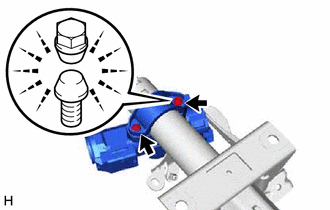
Tighten the 2 steering lock set bolts until the bolt head breaks off.
-
- Click here
INSTALL STEERING LOCK ACTUATOR ASSEMBLY (w/ Smart Key System)
Note:When replacing the steering lock actuator assembly, perform registration.
Tip:Perform the same procedure as for the upper steering column bracket with switch assembly (w/o Smart Key System).