SFI SYSTEM(w/o Canister Pump Module) VEHICLE CONTROL HISTORY
-
DESCRIPTION (SFI SYSTEM)
-
Vehicle Control History is a function that captures and stores ECU data when triggered by specific vehicle behavior.
-
If the customer states that the engine stalled or will not start, it may be possible to diagnose the cause of the malfunction by checking the vehicle history information and freeze frame data.
-
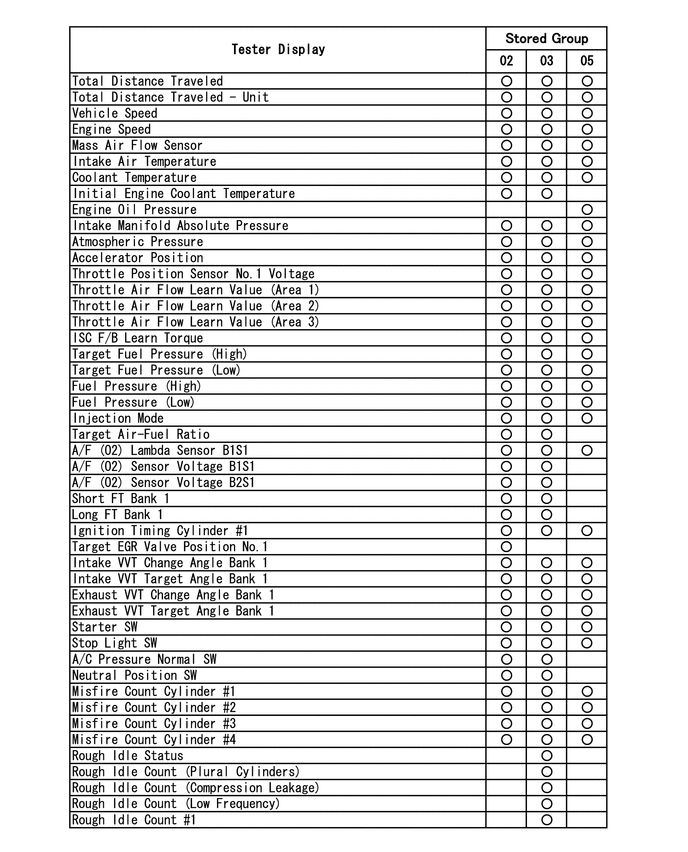
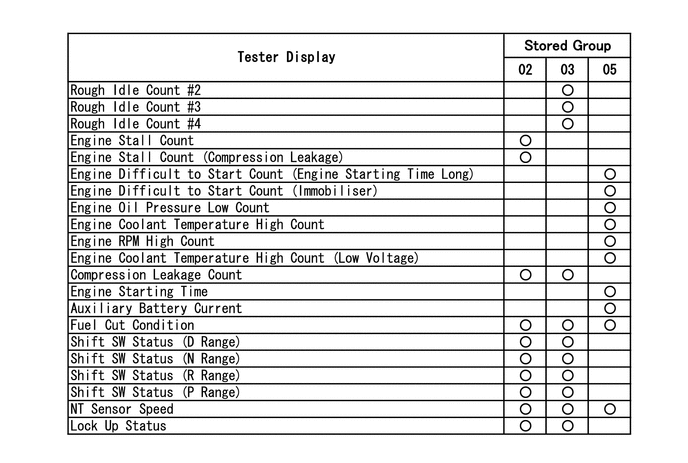
The number of possible stored Freeze Frame Data sets, whether multi Freeze Frame Data is available, the number of freeze frame points, Freeze Frame Data items, the ECU internal range, etc., is different depending on the stored group.
-
The stored data items for Vehicle Control History Freeze Frame Data are different depending on the stored group. When the value of a data item does not change across all points, only the value of the detection point will be displayed. The contents of the Freeze Frame Data is almost the same as that of the Data List.
-
-
PRECAUTIONS (SFI SYSTEM)
-
As Vehicle Control History may be overwritten whenever the trigger conditions are met, make sure to save Vehicle Control History before performing any inspections.
-
As Vehicle Control History may be stored when performing an Active Test, learning, etc., make sure to clear the Vehicle Control History before returning the vehicle to the customer.
-
-
CHECK VEHICLE CONTROL HISTORY (SFI SYSTEM)
-
Connect the GTS to the DLC3.
-
Turn the ignition switch to ON.
-
Turn the GTS on.
-
Enter the following menus: Powertrain / Engine / Utility / Vehicle Control History.
Powertrain > Engine > UtilityTester Display Vehicle Control History Tech Tips
It is also possible to display Vehicle Control History during the Health Check, if "Store All Data" is selected.
Vehicle Control History Item Code Item Trigger Description Stored Group Reference Inspection Procedure Link X0800 Engine Stall
-
Prerequisite Conditions: The engine is running (after engine is judged to be difficult to start)
-
Detection Conditions: The engine speed is decreases to 200 rpm or less, or stops
-
Duration: 0.5 seconds or more
Detection Condition (Engine Stall)
02 Flow chart [Engine Stalls] step 3 The engine stalled due to factors other than the operation of the ignition or starter switch assembly*1 or engine switch*2 X0803 Engine Stall (Compression Leakage) It is judged that the engine stalled due to compression leakage 02 Flow chart [Engine Stalls] step 3 X0810 Engine Difficult to Start (Engine Starting Time Long)
-
Prerequisite Conditions: STA signal is ON
-
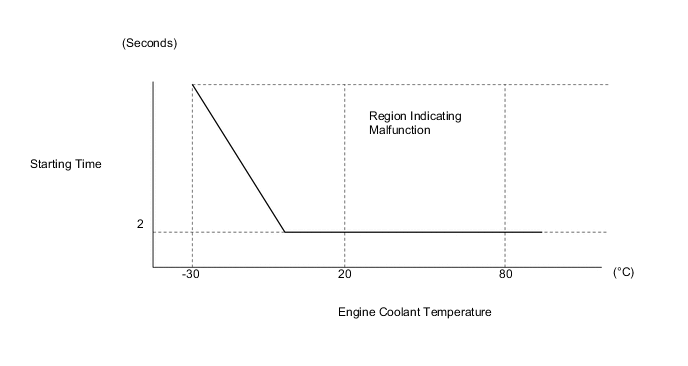
Detection Conditions: The engine speed is less than 500 rpm for a long period of time (the starting time is long or the engine does not start)
-
Duration: Refer to Engine Difficult to Start Duration Judgment Region illustration
Detection Condition (Engine Starting Time Long)
05 Flow chart [Engine Difficult to Start] step 3 The engine speed decreases or the engine stalls immediately after starting X0811 Engine Difficult to Start (Engine Stall Immediately After Starting)
-
Prerequisite Conditions: Within 2 seconds after the engine has started (engine speed is 500 rpm or more) and the engine coolant temperature is -15°C (5°F) or more
-
Detection Conditions: The engine speed decreases to 200 rpm or less (immediately after starting, the engine speed decreases or the engine stalls)
-
Duration: -
Detection Condition (Engine Stall Immediately After Starting)
05 Flow chart [Engine Difficult to Start] step 3 The engine speed decreases or the engine stalls immediately after starting X0812 Engine Difficult to Start (Immobiliser) Engine difficult to start due to immobiliser 05 Flow chart [Engine Difficult to Start] step 3 X0821 Rough Idle #1
-
Prerequisite Conditions: The engine is idling with the vehicle is stopped and the accelerator pedal is fully released
-
Detection Conditions: It is judged that combustion is unstable due to the instantaneous change in engine speed for each cylinder
-
Duration: Depending on the combustion status, between 2 and 10 seconds
Detection Condition (Rough Idle)
03 Flow chart [Rough Idling] step 3 Idling is rough due to unstable combustion in the No. 1 cylinder X0822 Rough Idle #2 Idling is rough due to unstable combustion in the No. 2 cylinder 03 Flow chart [Rough Idling] step 3 X0823 Rough Idle #3 Idling is rough due to unstable combustion in the No. 3 cylinder 03 Flow chart [Rough Idling] step 3 X0824 Rough Idle #4 Idling is rough due to unstable combustion in the No. 4 cylinder 03 Flow chart [Rough Idling] step 3 X082A Rough Idle (Plural Cylinders) Idling is rough due to multiple cylinders
As more than one cylinder is affected, the EGR system, fuel system, etc. is suspected
03 Flow chart [Rough Idling] step 3 X082D Rough Idle (Compression Leakage) Idling is judged to be rough due to compression leakage 03 Flow chart [Rough Idling] step 3 X082E Rough Idle (Low Frequency) Slight rough idle symptoms are detected 3 times in 10 trips
Tech Tips
As the rough idle symptoms are slight, if rough idle codes other than rough idle (low frequency) code X082E are stored, this code will not be stored.
03 Flow chart [Rough Idling] step 3 X0850 Engine Oil Pressure Low The engine oil pressure is low 05 - - X0851 Engine Coolant Temperature High The engine coolant temperature is high (overheating) 05 - - X0852 Engine RPM High The engine speed is high (over revving) 05 - - X0854 Engine Coolant Temperature High (Low Voltage) The engine coolant temperature is high (overheating) due to a low engine water pump assembly voltage causing the engine water pump assembly to stop 05 - - Figure 1. Engine Difficult to Start Duration Judgment Region (Engine Starting Time Long) (X0810)
Stored Data Stored Group Number of Records Number of Freeze Frame Points Multi Freeze Frame Data Sampling Period Note 02 2 codes
Tech Tips
-
If the detection conditions for a code that is not currently stored are met, the code will be stored.
-
If the detection conditions for a code that is currently stored are met again in the same trip, the code will not be overwritten.
-
If the detection conditions for a code that is currently stored are met again in a different trip, the code will be overwritten.
12 points (1 point at detection + 8 points before detection + 3 points after detection)
Tech Tips
When the value of a data item does not change across all points, only the value at the detection point will be displayed.
0.5 seconds The data can be cleared by using the GTS or by disconnecting the cable from the negative (-) battery terminal. 03 1 code
Tech Tips
-
If the detection conditions for a code that is not currently stored are met, the code will be stored.
-
If the detection conditions for a code that is currently stored are met again in the same trip, the code will not be overwritten.
-
If the detection conditions for a code that is currently stored are met again in a different trip, the code will be overwritten.
-
If rough idle codes other than Rough Idle (Low Frequency) code X082E are stored, data for code X082E will not be overwritten.
7 points (1 point at detection + 6 points before detection)
Tech Tips
When the value of a data item does not change across all points, only the value at the detection point will be displayed.
0.5 seconds The data can be cleared by using the GTS or by disconnecting the cable from the negative (-) battery terminal. 05 4 codes
Tech Tips
-
If the detection conditions for a code that is not currently stored are met, the code will be stored.
-
If the detection conditions for a code that is currently stored are met again in the same trip, the code will not be overwritten.
-
If the detection conditions for a code that is currently stored are met again in a different trip, the code will be overwritten.
-
If 4 codes are stored and the detection conditions for a code that is not currently stored are met, the oldest code will be overwritten.
-
Example 1: If X0810, X0811, X0812 and X0850 are stored and X0811 is to be stored in a different trip, X0811 will be overwritten as it is the same code.
-
Example 2: If X0810, X0811, X0812 and X0850 are stored and X0852 is to be stored in a different trip, X0810 will be overwritten as it is the oldest code.
1 point (multi freeze frame data not available) -
-
The data can be cleared by using the GTS.
-
The data cannot be cleared by disconnecting the cable from the negative (-) battery terminal.
-
*1: w/o Smart Entry and Start System
-
*2: w/ Smart Entry and Start System
Tech Tips
-
Multi Freeze Frame Data makes it possible to display the engine condition (ECU data) both before and after the trigger detection point.
-
The number of available points differs depending on the stored group.
-
When the value of a data item does not change across all points, only the value at the detection point will be displayed.
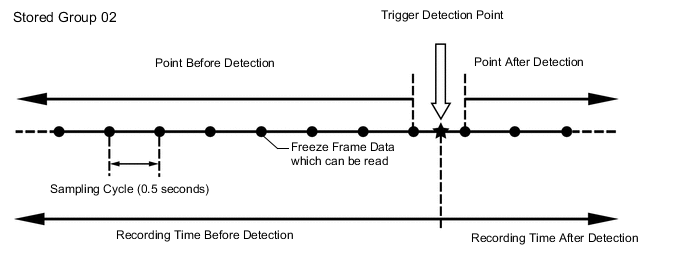
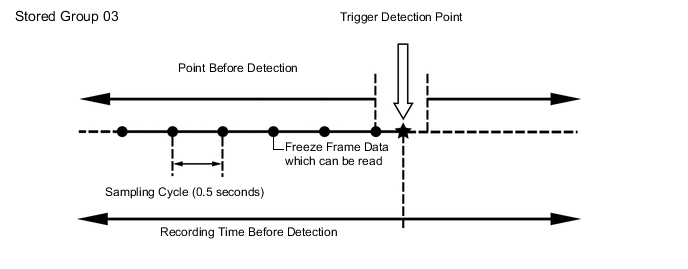
Only 1 measurement point can be displayed for stored group 05 Freeze Frame Data.
Vehicle Control History Freeze Frame Data
-
-
-
CLEAR VEHICLE CONTROL HISTORY (SFI SYSTEM)
-
Connect the GTS to the DLC3.
-
Turn the ignition switch to ON.
-
Turn the GTS on.
-
Enter the following menus: Powertrain / Engine / Utility / Vehicle Control History (Clear).
Note
By performing this procedure, all stored Vehicle Control History items will be cleared.
-
-
VEHICLE CONTROL HISTORY (AIRBAG SYSTEM)
Tech Tips
A part of the control history can be confirmed using the vehicle control history.