CAUTION / NOTICE / HINT
-
Immediately after installing the brake pads, the braking performance may be reduced. Always perform a road test in a safe place while paying attention to the surroundings.
-
After replacing the rear disc brake pads, the brake pedal may feel soft due to clearance between the rear disc brake pads and rear disc. Depress the brake pedal several times until the brake pedal feels firm.
-
After replacing the rear disc brake pads, always perform a road test to check the braking performance and check for vibrations.
-
Use the same procedure for the RH side and LH side.
-
The following procedure is for the LH side.
PROCEDURE
- Click here
INSTALL REAR DISC BRAKE ANTI-SQUEAL SHIM KIT
Note:
-
When replacing worn rear disc brake pads, the rear disc brake anti-squeal shims and rear disc brake pad wear indicator plates must be replaced together with the rear disc brake pads.
-
Install each rear disc brake pad wear indicator plate in the correct position and direction.
-
Install the rear disc brake anti-squeal shims in the correct positions and directions.
-
Do not apply disc brake grease to the lining surface of the rear disc brake pad.
-
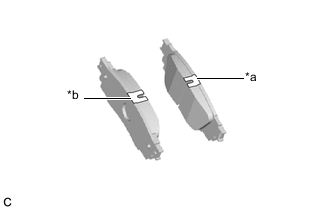
*a Inner Side (Blue) *b Outer Side (Green) Check the rear disc brake pad.
Tip:If the rear disc brake pad has an identification mark, be sure to confirm the installation location.
-
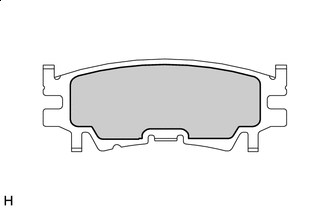

Disc Brake Grease Apply disc brake grease to the inner side of the rear disc brake anti-squeal shim as shown in the illustration.
-
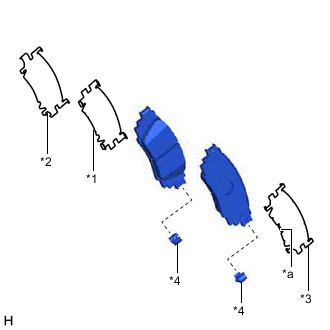
*1 Rear No. 1 Disc Brake Anti-squeal Shim *2 Rear No. 2 Disc Brake Anti-squeal Shim *3 Rear Disc Brake Anti-squeal Shim *4 Rear Disc Brake Pad Wear Indicator Plate *a Claw Install the rear No. 1 disc brake anti-squeal shim to the rear disc brake pad (inside).
-
Install the rear No. 2 disc brake anti-squeal shim to the rear disc brake pad (inside).
-
Install the rear disc brake anti-squeal shim to the rear disc brake pad (outside).
Note:Install the rear disc brake anti-squeal shim so that its claws are toward the outside of the vehicle.
-
Install a new rear disc brake pad wear indicator plate to each rear disc brake pad.
-
- Click here
INSTALL REAR DISC BRAKE PAD
CAUTION: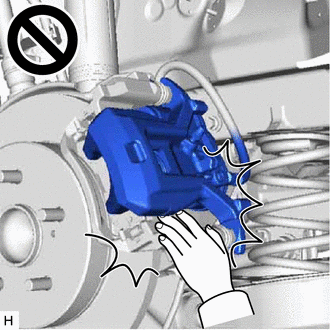
-
Be careful not to get pinched by the rear disc brake cylinder assembly or other parts when installing the rear disc brake pads.
-
After lifting up the rear disc brake cylinder assembly, secure it in place before performing any work on it.
-
The rear disc brake cylinder assembly could fall, pinching hands or fingers and causing injury.
-
Push in the rear disc brake piston.
Note:
-
Make sure the brake fluid does not overflow from the reservoir.
-
Do not forcibly push in the rear disc brake piston.
-
-
Install the 2 rear disc brake pads to the rear disc brake cylinder mounting.
Note:
-
Keep the friction surfaces of the rear disc brake pads and rear disc free from oil and grease.
-
Install the rear disc brake pad so that the rear disc brake pad wear indicator plate is mounted on the lower side of the vehicle.
Tip: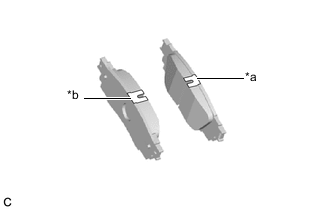
*a Inner Side (Blue) *b Outer Side (Green) If the rear disc brake pad has an identification mark, be sure to confirm the installation location.
-
-
Hold the rear No. 1 disc brake cylinder slide pin and install the rear disc brake cylinder assembly to the rear disc brake cylinder mounting with a new bolt.
34.3 N*m 350 kgf*cm 25 ft.*lbf -
Depress the brake pedal several times.
-
- Click here
CONNECT NO. 2 PARKING BRAKE WIRE ASSEMBLY
- Click here
INSPECT BRAKE FLUID LEVEL IN RESERVOIR
- Click here
INSTALL REAR WHEEL
- Click here
NORMAL CONDITION RECOVERY