CAMERA HEATER INSTALLATION
PROCEDURE
-
INSTALL FORWARD RECOGNITION HOOD
Note
-
Do not apply force to the heater area as the heater may become damaged.
-
Do not forcibly pull the wire harness as it may become damaged.
-
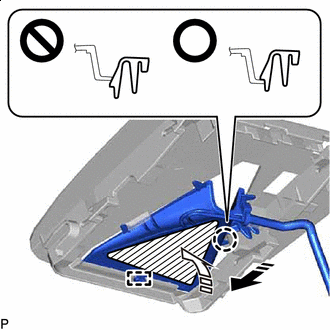

Heater Area 
Install in this Direction (1) 
Install in this Direction (2) Engage the guide and claw as indicated by the arrows, in the order shown in the illustration.
Note
Make sure that the claw is engaged as shown in the illustration. Failure to do so may result in the malfunction of systems that use the forward recognition camera.
-
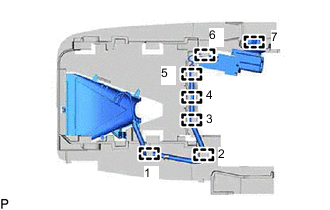
Engage the 7 clamps to install the forward recognition hood.
Note
As the No. 1 forward recognition cover cannot be installed correctly if the clamps are not engaged securely, make sure to engage each clamp securely.
Tech Tips
Engage the clamps in the order shown in the illustration.
-
Connect the connector.
-
-
INSTALL FORWARD RECOGNITION CAMERA