CAMERA HEATER REMOVAL
PROCEDURE
-
REMOVE FORWARD RECOGNITION CAMERA
-
REMOVE FORWARD RECOGNITION HOOD
-
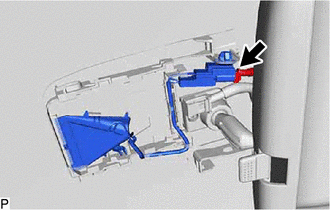
Disconnect the connector.
-
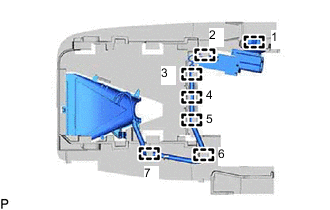
Disengage the 7 clamps.
Tech Tips
Disengage the clamps in the order shown in the illustration.
-
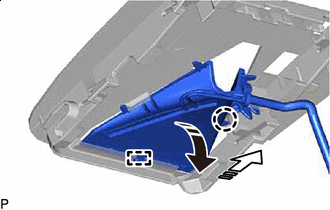

Remove in this Direction (1) 
Remove in this Direction (2) Pull the forward recognition hood in the direction indicated by the arrow (1) shown in the illustration to disengage the claw.
-
Pull the forward recognition hood in the direction indicated by the arrow (2) shown in the illustration to disengage the guide and remove the forward recognition hood.
-